Asynchronous Speech to Text
Overview
Section titled “Overview”Webhooks allow you to receive automatic notifications when your Speech to Text transcription tasks are completed, eliminating the need to continuously poll the API for status updates. This is particularly useful for long-running transcription jobs or when processing large volumes of audio files.
When a transcription is completed, ElevenLabs will send a POST request to your specified webhook URL with the transcription results, including the transcript text, language detection, and any metadata.
Using webhooks
Section titled “Using webhooks”Create or edit a webhook
Section titled “Create or edit a webhook”In the ElevenLabs dashboard, go to Developers > Webhooks. Click Create webhook, or edit an existing webhook.
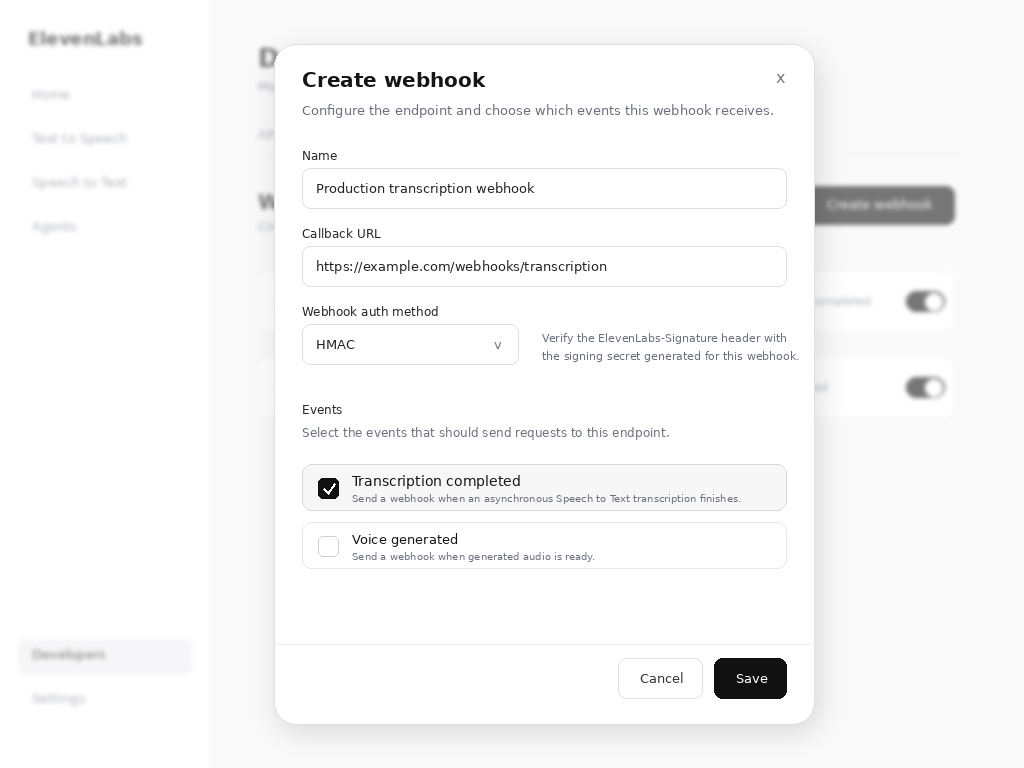
Configure the webhook with:
- Name: A descriptive name for your webhook
- Callback URL: Your publicly accessible HTTPS endpoint
- Webhook Auth Method: Either
HMACorOAuth. It is up to the client to implement the verification mechanism. ElevenLabs sends headers that allow for verification but we do not enforce it. - Events: Select Transcription completed.
Make API calls with webhook parameter enabled
Section titled “Make API calls with webhook parameter enabled”When making speech-to-text API calls, include the webhook parameter set to true to enable webhook notifications for that specific request.
from dotenv import load_dotenv
from elevenlabs.client import ElevenLabs

load_dotenv()

elevenlabs = ElevenLabs(
  api_key=os.getenv("ELEVENLABS_API_KEY"),
)

def transcribe_with_webhook(audio_file):
  try:
    result = elevenlabs.speech_to_text.convert(
      file=audio_file,
      model_id="scribe_v2",
      webhook=True,
    )
    print(f"Transcription started: {result.request_id}")
    return result
  except Exception as e:
    print(f"Error starting transcription: {e}")
raise eimport { ElevenLabsClient } from '@elevenlabs/elevenlabs-js';
const elevenlabs = new ElevenLabsClient({
apiKey: process.env.ELEVENLABS_API_KEY,
});
async function transcribeWithWebhook(audioFile) {
try {
const result = await elevenlabs.speechToText.convert({
file: audioFile,
modelId: 'scribe_v2',
webhook: true,
});
console.log('Transcription started:', result.requestId);
return result;
} catch (error) {
console.error('Error starting transcription:', error);
throw error;
}
}Webhook payload
Section titled “Webhook payload”When a transcription is completed, your webhook endpoint will receive a POST request with the transcription and webhook data:
{
  type: 'speech_to_text_transcription',
  data: {
    request_id: 'some-request-id-123',
    webhook_metadata: { ... }, // if provided in the convert request
    transcription: {
      "language_code": "en",
      "language_probability": 0.98,
      "text": "Hello world!",
      "words": [
        {
          "text": "Hello",
          "start": 0.0,
          "end": 0.5,
          "type": "word",
          "speaker_id": "speaker_1"
        },
        {
          "text": " ",
          "start": 0.5,
          "end": 0.5,
          "type": "spacing",
          "speaker_id": "speaker_1"
        },
        {
          "text": "world!",
          "start": 0.5,
          "end": 1.2,
          "type": "word",
          "speaker_id": "speaker_1"
        }
      ]
    }
  }
}
Please refer to the Speech-to-text API reference to learn about the details of the response structure.
If the request included a transcript_edit instruction, the transcription object also contains an edited_transcript field with the edited text.
Implementing your webhook endpoint
Section titled “Implementing your webhook endpoint”Here's an example of how to implement a webhook endpoint to handle incoming notifications:
import { ElevenLabsClient } from '@elevenlabs/elevenlabs-js';
import 'dotenv/config';
import express from 'express';

const elevenlabs = new ElevenLabsClient();

const app = express();
app.use(express.json());

const WEBHOOK_SECRET = process.env.WEBHOOK_SECRET;

app.post('/webhook/speech-to-text', (req, res) => {
  try {
    const signature = req.headers['elevenlabs-signature'];
    const payload = JSON.stringify(req.body);
    let event;

    try {
      // Verify the webhook signature.
      event = await elevenlabs.webhooks.constructEvent(payload, signature, WEBHOOK_SECRET);
    } catch (error) {
      return res.status(401).json({ error: 'Invalid signature' });
    }

    if (event.type === 'speech_to_text.completed') {
      const { requestId, status, text, language_code } = event.data;

      console.log(`Transcription ${requestId} completed`);
      console.log(`Language: ${language_code}`);
      console.log(`Text: ${text}`);

      processTranscription(requestId, text, language_code);
    } else if (status === 'failed') {
      console.error(`Transcription ${requestId} failed`);
      handleTranscriptionError(requestId);
    }

    res.status(200).json({ received: true });
  } catch (error) {
    console.error('Webhook error:', error);
    res.status(500).json({ error: 'Internal server error' });
  }
});

async function processTranscription(requestId, text, language) {
  console.log('Processing completed transcription...');
}

async function handleTranscriptionError(requestId) {
  console.log('Handling transcription error...');
}

app.listen(3000, () => {
  console.log('Webhook server listening on port 3000');
});
Security considerations
Section titled “Security considerations”Signature verification
Section titled “Signature verification”Always verify webhook signatures to ensure requests came from ElevenLabs.
HTTPS requirement
Section titled “HTTPS requirement”Webhook URLs must use HTTPS to ensure secure transmission of transcription data.
Rate limiting
Section titled “Rate limiting”Implement rate limiting on your webhook endpoint to prevent abuse:
import rateLimit from "express-rate-limit";

const webhookLimiter = rateLimit({
  windowMs: 15 * 60 * 1000, // 15 minutes
  max: 100, // limit each IP to 100 requests per windowMs
  message: "Too many webhook requests from this IP",
});

app.use("/webhook", webhookLimiter);
Failure responses
Section titled “Failure responses”Return appropriate HTTP status codes:
200-299: Success - webhook processed successfully400-499: Client error - webhook will not be retried500-599: Server error - webhook will be retried
Testing webhooks
Section titled “Testing webhooks”Local development
Section titled “Local development”For local testing, use tools like ngrok to expose your local server:
ngrok http 3000Use the provided HTTPS URL as your webhook endpoint during development.
Webhook testing
Section titled “Webhook testing”You can test your webhook implementation by making a transcription request and monitoring your endpoint:
async function testWebhook() {
  const audioFile = new File([audioBuffer], "test.mp3", { type: "audio/mp3" });

  const result = await elevenlabs.speechToText.convert({
    file: audioFile,
    modelId: "scribe_v2",
    webhook: true,
  });

  console.log("Test transcription started:", result.requestId);
}
Next steps
Section titled “Next steps”Transcribe audio in real time using the WebSocket-based streaming API.
Full Speech to Text API reference and parameters.