Models
Learn about the models that power the ElevenLabs API.
Flagship models
Section titled “Flagship models”Text to Speech
Section titled “Text to Speech”Eleven v4
Our most emotive, high quality speech synthesis model
Exceptional voice cloning capabilities
90+ languages supported
10,000 character limit
Support for natural multi-speaker dialogue
Eleven v4 Turbo
Our most emotive, real-time speech synthesis model
Ultra-low latency (median inference latency of ~100ms†)
Exceptional voice cloning capabilities
90+ languages supported
Audio tags for fine-grained control
Eleven v3
Our emotionally rich, expressive speech synthesis model
Dramatic delivery and performance
70+ languages supported
5,000 character limit
Support for natural multi-speaker dialogue
Eleven v3 Conversational
Our expressive, realtime speech synthesis model
Low latency (~280ms)
Dramatic delivery and performance
70+ languages supported
Audio tags for fine-grained control
Eleven Multilingual v2
Lifelike, consistent quality speech synthesis model
Natural-sounding output
29 languages supported
10,000 character limit
Most stable on long-form generations
Eleven Flash v2.5
Our fast, affordable speech synthesis model
Ultra-low latency (~75ms†)
32 languages supported
40,000 character limit
Faster model, 50% lower price per character for API generations
Speech to Text
Section titled “Speech to Text”Scribe v2
State-of-the-art speech recognition model
Accurate transcription in 90+ languages
Keyterm prompting, up to 1000 terms
Entity detection, 65 entity types
Transcript editing with natural-language instructions
Precise word-level timestamps
Speaker diarization, up to 32 speakers
Dynamic audio tagging
Smart language detection
Scribe v2 Realtime
Real-time speech recognition model
Accurate transcription in 90+ languages
Real-time transcription
Low latency (~150ms†)
Precise word-level timestamps
Entity detection, 65 entity types
Transcript editing with natural-language instructions
Scribe v2 Medical
Speech recognition fine-tuned for clinical audio
35% fewer transcription errors on clinical audio than Scribe v2
Same accuracy on everyday speech as Scribe v2
Same features, languages, pricing, and API as Scribe v2
Eleven Music v2.5
Our most advanced music model
Improved quality and prompt adherence
Richer melodies, deeper arrangements, and more layered instruments.
Same workflows and support: composition plans, audio reference, and inpainting
Eleven Music v2
Studio-grade music with natural language prompts in any style
Complete control over genre, style, and structure
Vocals or just instrumental
Multilingual, including English, Spanish, German, Japanese and more
Edit the sound and lyrics of individual sections or the whole song
Models overview
Section titled “Models overview”The ElevenLabs API offers a range of audio models optimized for different use cases, quality levels, and performance requirements.
| Model ID | Description | Languages |
|---|---|---|
eleven_v4 |
Our most emotionally rich, expressive speech synthesis model | 90+ languages |
eleven_v4_turbo |
Our most expressive, real-time speech synthesis model (~100ms†) | 90+ languages |
eleven_v3 |
Human-like and expressive speech generation | 70+ languages |
eleven_v3_conversational |
Our most expressive, realtime speech synthesis model (~280ms†) | 70+ languages |
eleven_ttv_v3 |
Human-like and expressive voice design model (Text to Voice) | 70+ languages |
eleven_multilingual_v2 |
Our lifelike model with rich emotional expression | en, ja, zh, de, hi, fr, ko, pt, it, es, id, nl, tr, fil, pl, sv, bg, ro, ar, cs, el, fi, hr, ms, sk, da, ta, uk, ru |
eleven_flash_v2_5 |
Ultra-fast model optimized for real-time use (~75ms†) | All eleven_multilingual_v2 languages plus: hu, no, vi |
eleven_flash_v2 |
Ultra-fast model optimized for real-time use (~75ms†) | en |
eleven_multilingual_sts_v2 |
State-of-the-art multilingual voice changer model (Speech to Speech) | en, ja, zh, de, hi, fr, ko, pt, it, es, id, nl, tr, fil, pl, sv, bg, ro, ar, cs, el, fi, hr, ms, sk, da, ta, uk, ru |
eleven_multilingual_ttv_v2 |
State-of-the-art multilingual voice designer model (Text to Voice) | en, ja, zh, de, hi, fr, ko, pt, it, es, id, nl, tr, fil, pl, sv, bg, ro, ar, cs, el, fi, hr, ms, sk, da, ta, uk, ru |
eleven_english_sts_v2 |
English-only voice changer model (Speech to Speech) | en |
scribe_v2_realtime |
Real-time speech recognition model | 90+ languages |
scribe_v2_medical |
Speech recognition fine-tuned for clinical audio | 90+ languages |
scribe_v2 |
State-of-the-art speech recognition model | 90+ languages |
scribe_v2_medical |
Speech recognition model specialized for medical and clinical audio | 90+ languages |
eleven_text_to_sound_v2 |
Sound effects generation from text prompts | N/A |
music_v2_5 |
Our most advanced music model. Studio-grade generation from text prompts, composition plans and previously generated songs, with improved quality and prompt adherence over music_v2 |
en, es, de, ja, and more |
music_v2 |
Studio-grade music generation from text prompts, composition plans and previously generated songs | en, es, de, ja, and more |
music_v1 |
Studio-grade music generation from text prompts. Outclassed by music_v2 and music_v2_5 |
en, es, de, ja, and more |
† Excluding application & network latency
Deprecated models
Section titled “Deprecated models”| Model ID | Description | Languages | Replacement model suggestion |
|---|---|---|---|
eleven_turbo_v2_5 |
First generation low-latency model (outclassed by Flash models) | en, ja, zh, de, hi, fr, ko, pt, it, es, id, nl, tr, fil, pl, sv, bg, ro, ar, cs, el, fi, hr, ms, sk, da, ta, uk, ru, hu, no, vi |
eleven_flash_v2_5 |
eleven_turbo_v2 |
First generation low-latency model (outclassed by Flash models) | en |
eleven_flash_v2 |
scribe_v1 |
First generation speech recognition (outclassed by v2 models) | 90+ languages | scribe_v2 |
Eleven v4
Section titled “Eleven v4”Eleven v4 is our state of the art speech synthesis model, delivering our highest quality audio, expressiveness, and control over how voices are performed. Eleven v4 supports high-fidelity voice cloning with reliable speaker preservation across long text generations.
This model works well in the following scenarios:
- Character Voiceovers: Ideal for gaming and animation due to its emotional range.
- Emotional Dialogue: Generate natural, lifelike dialogue with high emotional range and contextual understanding.
- Audiobook Production: Perfect for long-form narration with complex emotional delivery.
- Multilingual Projects: Maintains consistent voice quality across language switches.
Eleven v4 is available via the Text to Dialogue API.
Supported languages
Section titled “Supported languages”The Eleven v4 model family supports 90+ languages, including:
Afrikaans (afr), Amharic (amh), Arabic (ara), Armenian (hye), Assamese (asm), Asturian (ast), Azerbaijani (aze), Belarusian (bel), Bengali (ben), Bosnian (bos), Bulgarian (bul), Burmese (mya), Cantonese (yue), Catalan (cat), Cebuano (ceb), Croatian (hrv), Czech (ces), Danish (dan), Dutch (nld), English (eng), Estonian (est), Filipino (fil), Finnish (fin), French (fra), Fula/Pulaar (ful), Galician (glg), Georgian (kat), German (deu), Greek (ell), Gujarati (guj), Hausa (hau), Hebrew (heb), Hindi (hin), Hungarian (hun), Icelandic (isl), Indonesian (ind), Italian (ita), Japanese (jpn), Javanese (jav), Kamba (kam), Kannada (kan), Kazakh (kaz), Korean (kor), Kyrgyz (kir), Lao (lao), Latvian (lav), Lingala (lin), Lithuanian (lit), Luganda (lug), Luxembourgish (ltz), Macedonian (mkd), Malay (msa), Malayalam (mal), Maltese (mlt), Mandarin Chinese (cmn), Māori (mri), Marathi (mar), Mongolian (mon), Nepali (nep), Norwegian Bokmål (nob), Occitan (oci), Odia (ori), Pashto (pus), Persian (fas), Polish (pol), Portuguese, Brazil (por), Punjabi (pan), Romanian (ron), Russian (rus), Serbian (srp), Shona (sna), Sindhi (snd), Slovak (slk), Slovenian (slv), Somali (som), Sorani Kurdish (ckb), Spanish, LatAm (spa), Swahili (swa), Swedish (swe), Tajik (tgk), Tamil (tam), Telugu (tel), Thai (tha), Turkish (tur), Ukrainian (ukr), Urdu (urd), Uzbek (uzb), Vietnamese (vie), Welsh (cym), Wolof (wol), Zulu (zul).
Eleven v4 Turbo
Section titled “Eleven v4 Turbo”Eleven v4 Turbo is our state of the art model for real-time speech synthesis, delivering high quality audio, expressiveness, and control over how voices are performed. Eleven v4 Turbo supports high-fidelity voice cloning and delivers results in median inference latency of ~100ms latency.
This model works well in the following scenarios:
- Support agents: Power voice agents that resolve customer queries in realtime.
- AI assistants: Generate natural, lifelike dialogue with high emotional range and contextual understanding.
- Interactive characters: Excellent for audio experiences with expressive characters.
Eleven v4 Turbo is available via the Text to Dialogue websocket.
Supported languages
Section titled “Supported languages”The Eleven v4 model family supports 90+ languages, including:
Afrikaans (afr), Amharic (amh), Arabic (ara), Armenian (hye), Assamese (asm), Asturian (ast), Azerbaijani (aze), Belarusian (bel), Bengali (ben), Bosnian (bos), Bulgarian (bul), Burmese (mya), Cantonese (yue), Catalan (cat), Cebuano (ceb), Croatian (hrv), Czech (ces), Danish (dan), Dutch (nld), English (eng), Estonian (est), Filipino (fil), Finnish (fin), French (fra), Fula/Pulaar (ful), Galician (glg), Georgian (kat), German (deu), Greek (ell), Gujarati (guj), Hausa (hau), Hebrew (heb), Hindi (hin), Hungarian (hun), Icelandic (isl), Indonesian (ind), Italian (ita), Japanese (jpn), Javanese (jav), Kamba (kam), Kannada (kan), Kazakh (kaz), Korean (kor), Kyrgyz (kir), Lao (lao), Latvian (lav), Lingala (lin), Lithuanian (lit), Luganda (lug), Luxembourgish (ltz), Macedonian (mkd), Malay (msa), Malayalam (mal), Maltese (mlt), Mandarin Chinese (cmn), Māori (mri), Marathi (mar), Mongolian (mon), Nepali (nep), Norwegian Bokmål (nob), Occitan (oci), Odia (ori), Pashto (pus), Persian (fas), Polish (pol), Portuguese, Brazil (por), Punjabi (pan), Romanian (ron), Russian (rus), Serbian (srp), Shona (sna), Sindhi (snd), Slovak (slk), Slovenian (slv), Somali (som), Sorani Kurdish (ckb), Spanish, LatAm (spa), Swahili (swa), Swedish (swe), Tajik (tgk), Tamil (tam), Telugu (tel), Thai (tha), Turkish (tur), Ukrainian (ukr), Urdu (urd), Uzbek (uzb), Vietnamese (vie), Welsh (cym), Wolof (wol), Zulu (zul).
Eleven v3
Section titled “Eleven v3”Eleven v3 is our previous generation speech synthesis model which produces natural, life-like speech with high emotional range and contextual understanding across multiple languages.
With Eleven v3 comes a new Text to Dialogue API, which allows you to generate natural, lifelike dialogue with high emotional range and contextual understanding across multiple languages. Eleven v3 can also be used with the Text to Speech API to generate natural, lifelike speech with high emotional range and contextual understanding across multiple languages.
Read more about the Text to Dialogue API here.
Supported languages
Section titled “Supported languages”The Eleven v3 model supports 70+ languages, including:
Afrikaans (afr), Arabic (ara), Armenian (hye), Assamese (asm), Azerbaijani (aze), Belarusian (bel), Bengali (ben), Bosnian (bos), Bulgarian (bul), Catalan (cat), Cebuano (ceb), Chichewa (nya), Croatian (hrv), Czech (ces), Danish (dan), Dutch (nld), English (eng), Estonian (est), Filipino (fil), Finnish (fin), French (fra), Galician (glg), Georgian (kat), German (deu), Greek (ell), Gujarati (guj), Hausa (hau), Hebrew (heb), Hindi (hin), Hungarian (hun), Icelandic (isl), Indonesian (ind), Irish (gle), Italian (ita), Japanese (jpn), Javanese (jav), Kannada (kan), Kazakh (kaz), Kirghiz (kir), Korean (kor), Latvian (lav), Lingala (lin), Lithuanian (lit), Luxembourgish (ltz), Macedonian (mkd), Malay (msa), Malayalam (mal), Mandarin Chinese (cmn), Marathi (mar), Nepali (nep), Norwegian (nor), Pashto (pus), Persian (fas), Polish (pol), Portuguese (por), Punjabi (pan), Romanian (ron), Russian (rus), Serbian (srp), Sindhi (snd), Slovak (slk), Slovenian (slv), Somali (som), Spanish (spa), Swahili (swa), Swedish (swe), Tamil (tam), Telugu (tel), Thai (tha), Turkish (tur), Ukrainian (ukr), Urdu (urd), Vietnamese (vie), Welsh (cym).
Eleven v3 Conversational
Section titled “Eleven v3 Conversational”Eleven v3 Conversational is our previous generation model for realtime speech synthesis. It produces natural, life-like speech with high emotional range and contextual understanding across multiple languages.
With Eleven v3 Conversational comes a new Text to Dialogue WebSocket, which allows you to generate natural, lifelike dialogue with high emotional range and contextual understanding across multiple languages.
With Eleven v3 Conversational comes a new Text to Dialogue WebSocket, which allows you to generate natural, lifelike dialogue with high emotional range and contextual understanding across multiple languages.
Read more about the Text to Dialogue WebSocket here.
Supported languages
Section titled “Supported languages”The Eleven v3 model supports 70+ languages, including:
Afrikaans (afr), Arabic (ara), Armenian (hye), Assamese (asm), Azerbaijani (aze), Belarusian (bel), Bengali (ben), Bosnian (bos), Bulgarian (bul), Catalan (cat), Cebuano (ceb), Chichewa (nya), Croatian (hrv), Czech (ces), Danish (dan), Dutch (nld), English (eng), Estonian (est), Filipino (fil), Finnish (fin), French (fra), Galician (glg), Georgian (kat), German (deu), Greek (ell), Gujarati (guj), Hausa (hau), Hebrew (heb), Hindi (hin), Hungarian (hun), Icelandic (isl), Indonesian (ind), Irish (gle), Italian (ita), Japanese (jpn), Javanese (jav), Kannada (kan), Kazakh (kaz), Kirghiz (kir), Korean (kor), Latvian (lav), Lingala (lin), Lithuanian (lit), Luxembourgish (ltz), Macedonian (mkd), Malay (msa), Malayalam (mal), Mandarin Chinese (cmn), Marathi (mar), Nepali (nep), Norwegian (nor), Pashto (pus), Persian (fas), Polish (pol), Portuguese (por), Punjabi (pan), Romanian (ron), Russian (rus), Serbian (srp), Sindhi (snd), Slovak (slk), Slovenian (slv), Somali (som), Spanish (spa), Swahili (swa), Swedish (swe), Tamil (tam), Telugu (tel), Thai (tha), Turkish (tur), Ukrainian (ukr), Urdu (urd), Vietnamese (vie), Welsh (cym).
Multilingual v2
Section titled “Multilingual v2”Eleven Multilingual v2 is a previous generation emotionally-aware speech synthesis model. It produces natural, lifelike speech with high emotional range and contextual understanding across multiple languages.
The model delivers consistent voice quality and personality across all supported languages while maintaining the speaker’s unique characteristics and accent.
This model excels in scenarios requiring high-quality, emotionally nuanced speech:
- Character Voiceovers: Ideal for gaming and animation due to its emotional range.
- Professional Content: Well-suited for corporate videos and e-learning materials.
- Multilingual Projects: Maintains consistent voice quality across language switches.
- Stable Quality: Produces consistent, high-quality audio output.
While it has a higher latency & cost per character than Flash models, it delivers superior quality for projects where lifelike speech is important.
Our multilingual v2 models support 29 languages:
English (USA, UK, Australia, Canada), Japanese, Chinese, German, Hindi, French (France, Canada), Korean, Portuguese (Brazil, Portugal), Italian, Spanish (Spain, Mexico), Indonesian, Dutch, Turkish, Filipino, Polish, Swedish, Bulgarian, Romanian, Arabic (Saudi Arabia, UAE), Czech, Greek, Finnish, Croatian, Malay, Slovak, Danish, Tamil, Ukrainian & Russian.
Flash v2.5
Section titled “Flash v2.5”Eleven Flash v2.5 is our fastest speech synthesis model, designed for real-time applications and Agents Platform. It delivers high-quality speech with ultra-low latency (~75ms†) across 32 languages.
The model balances speed and quality, making it ideal for interactive applications while maintaining natural-sounding output and consistent voice characteristics across languages.
This model is particularly well-suited for:
- Agents Platform: Perfect for real-time voice agents and chatbots.
- Interactive Applications: Ideal for games and applications requiring immediate response.
- Large-Scale Processing: Efficient for bulk text-to-speech conversion.
With its lower price point for API generations and 75ms latency, Flash v2.5 is the cost-effective option for anyone needing fast, reliable speech synthesis across multiple languages.
Flash v2.5 supports 32 languages - all languages from v2 models plus:
Hungarian, Norwegian & Vietnamese
† Excluding application & network latency
Considerations
Section titled “Considerations”Text normalization with numbers
When using Flash v2.5, numbers aren’t normalized by default in a way you might expect. For example, phone numbers might be read out in way that isn’t clear for the user. Dates and currencies are affected in a similar manner.
By default, normalization is disabled for Flash v2.5 to maintain the low latency. However, Enterprise customers can now enable text normalization for v2.5 models by setting the apply_text_normalization parameter to “on” in your request.
The Multilingual v2 model does a better job of normalizing numbers, so we recommend using it for phone numbers and other cases where number normalization is important.
For low-latency or Agents Platform applications, best practice is to have your LLM normalize the text before passing it to the TTS model, or use the apply_text_normalization parameter (Enterprise plans only for v2.5 models).
Model selection guide
Section titled “Model selection guide”For guidance on which model best fits your requirements and use case, see the model selection guide.
Requirements
Quality
Use eleven_v4 or eleven_multilingual_v2
Best for high-fidelity audio output with rich emotional expression
Low-latency
Use eleven_v4_turbo
Optimized for real-time applications (~100ms latency)
Use case
Content creation
Use eleven_v4 or eleven_multilingual_v2
Ideal for professional content, audiobooks & video narration.
Agents Platform
Use eleven_v4_turbo, eleven_flash_v2_5, eleven_flash_v2 or eleven_multilingual_v2
Perfect for real-time conversational applications. Use eleven_v4_turbo for the most expressive delivery.
Voice changer
Use eleven_multilingual_sts_v2
Specialized for Speech-to-Speech conversion
Character limits
Section titled “Character limits”The maximum number of characters supported in a single text-to-speech request varies by model.
| Model ID | Character limit | Approximate audio duration |
|---|---|---|
eleven_v4 |
10,000 | ~10 minutes |
eleven_v3 |
5,000 | ~5 minutes |
eleven_flash_v2_5 |
40,000 | ~40 minutes |
eleven_flash_v2 |
30,000 | ~30 minutes |
eleven_multilingual_v2 |
10,000 | ~10 minutes |
eleven_multilingual_v1 |
10,000 | ~10 minutes |
eleven_english_sts_v2 |
10,000 | ~10 minutes |
eleven_english_sts_v1 |
10,000 | ~10 minutes |
Scribe v2
Section titled “Scribe v2”Scribe v2 is our state-of-the-art speech recognition model designed for accurate transcription across 90+ languages. It provides precise word-level timestamps and advanced features like speaker diarization and dynamic audio tagging.
This model excels in scenarios requiring accurate speech-to-text conversion:
- Transcription Services: Perfect for converting audio/video content to text
- Meeting Documentation: Ideal for capturing and documenting conversations
- Content Analysis: Well-suited for audio content processing and analysis
- Multilingual Recognition: Supports accurate transcription across 90+ languages
Key features:
- Accurate transcription with word-level timestamps
- Speaker diarization for multi-speaker audio
- Dynamic audio tagging for enhanced context
- Support for 90+ languages
- Entity detection
- Keyterm prompting
- Transcript editing
Read more about Scribe v2 here.
Scribe v2 Realtime
Section titled “Scribe v2 Realtime”Scribe v2 Realtime, our fastest and most accurate live speech recognition model, delivers state-of-the-art accuracy in over 90 languages with an ultra-low 150ms of latency.
This model excels in conversational use cases:
- Live meeting transcription: Perfect for realtime transcription
- AI Agents: Ideal for live conversations
- Multilingual Recognition: Supports accurate transcription across 90+ languages with automatic language recognition
Key features:
- Ultra-low latency: Get partial transcriptions in ~150 milliseconds
- Streaming support: Send audio in chunks while receiving transcripts in real-time
- Multiple audio formats: Support for PCM (8kHz to 48kHz) and μ-law encoding
- Voice Activity Detection (VAD): Automatic speech segmentation based on silence detection
- Manual commit control: Full control over when to finalize transcript segments
- Entity detection
- Transcript editing
Read more about Scribe v2 Realtime here.
Scribe v2 Medical
Section titled “Scribe v2 Medical”Scribe v2 Medical is a batch speech recognition model specialized for medical and clinical audio. It is a fine-tune of Scribe v2 that improves recognition of drug names, anatomy, pathology, and clinical dictation while matching Scribe v2’s accuracy on everyday speech. It uses the same Speech to Text API as Scribe v2 and is billed at the same rate. Pass scribe_v2_medical as model_id.
This model is well-suited for:
- Clinical documentation: Ambient encounters and notes where medical terms surface mid-conversation
- Dictation: Dense sequences of medications, dosages, and findings
- Intake and coordination calls: Patients describing their own conditions, often over the phone
- Compliance workflows: Combine with entity detection for PHI categories
Key features:
- Same request shape as Scribe v2 (
keyterms,entity_detection,no_verbatim, diarization, timestamps) - Improved recognition of medication names, anatomy, and pathology terms
- No regression on everyday speech versus Scribe v2
- Support for 90+ languages
- Speaker diarization for multi-speaker audio
- Dynamic audio tagging
- Entity detection, including PHI categories
Scribe v2 Medical is a batch model. For live transcription, use Scribe v2 Realtime.
Scribe v2 Medical is eligible for HIPAA, with Business Associate Agreements available to Enterprise customers as well as Zero Retention Mode (ZRM). With ZRM enabled, audio input and text output are deleted immediately after each request completes. ElevenLabs retains nothing, and your application receives the full API response and retains transcripts under your own controls.
Read more about Speech to Text here.
Eleven Music
Section titled “Eleven Music”Eleven Music is our studio-grade music generation model. It allows you to generate music with natural language prompts in any style.
This model is excellent for the following scenarios:
- Game Soundtracks: Create immersive soundtracks for games
- Podcast Backgrounds: Enhance podcasts with professional music
- Marketing: Add background music to ad reels
Key features:
- Complete control over genre, style, and structure
- Vocals or just instrumental
- Multilingual, including English, Spanish, German, Japanese and more
- Edit the sound and lyrics of individual sections or the whole song
Read more about Eleven Music here.
Concurrency and priority
Section titled “Concurrency and priority”Your subscription plan determines how many requests can be processed simultaneously and the priority level of your requests in the queue. Speech to Text has an elevated concurrency limit. Once the concurrency limit is met, subsequent requests are processed in a queue alongside lower-priority requests. In practice this typically only adds ~50ms of latency.
| Plan | Concurrency Limit (Multilingual v2) |
Concurrency Limit (Flash) |
STT Concurrency Limit | Realtime STT Concurrency limit | Music Concurrency limit | Priority level |
|---|---|---|---|---|---|---|
| Free | 2 | 4 | 8 | 6 | 0 | 3 |
| Starter | 3 | 6 | 12 | 9 | 2 | 4 |
| Creator | 5 | 10 | 20 | 15 | 2 | 5 |
| Pro | 10 | 20 | 40 | 30 | 2 | 5 |
| Scale | 15 | 30 | 60 | 45 | 5 | 5 |
| Business | 15 | 30 | 60 | 45 | 5 | 5 |
| Enterprise | Elevated | Elevated | Elevated | Elevated | Highest | 6 |
The response headers include current-concurrent-requests and maximum-concurrent-requests which you can use to monitor your concurrency.
API requests per minute vs concurrent requests
Section titled “API requests per minute vs concurrent requests”It’s important to understand that API requests per minute and concurrent requests are different metrics that depend on your usage patterns.
API requests per minute can be different from concurrent requests since it depends on the length of time for each request and how the requests are batched.
Example 1: Spaced requests If you had 180 requests per minute that each took 1 second to complete and you sent them each 0.33 seconds apart, the max concurrent requests would be 3 and the average would be 3 since there would always be 3 in flight.
Example 2: Batched requests However, if you had a different usage pattern such as 180 requests per minute that each took 3 seconds to complete but all fired at once, the max concurrent requests would be 180 and the average would be 9 (first 3 seconds of the minute saw 180 requests at once, final 57 seconds saw 0 requests).
Since our system cares about concurrency, requests per minute matter less than how long each of the requests take and the pattern of when they are sent.
How endpoint requests are made impacts concurrency limits:
- With HTTP, each request counts individually toward your concurrency limit.
- With the Text to Speech WebSocket, only the time where our model is generating audio counts towards your concurrency limit. This means that for most of the time, an open websocket doesn’t count towards your concurrency limit at all.
- The Text to Dialogue WebSockets work differently: each open connection reserves one dialogue session from a separate pool for as long as it stays open, and audio generated over the connection does not count towards your standard concurrency limit. This is designed to be simpler to reason about as one connection is one session, and your dialogue session limits are sized to adjust to this new concurrency methodology. See Text to Dialogue concurrency.
Understanding concurrency limits
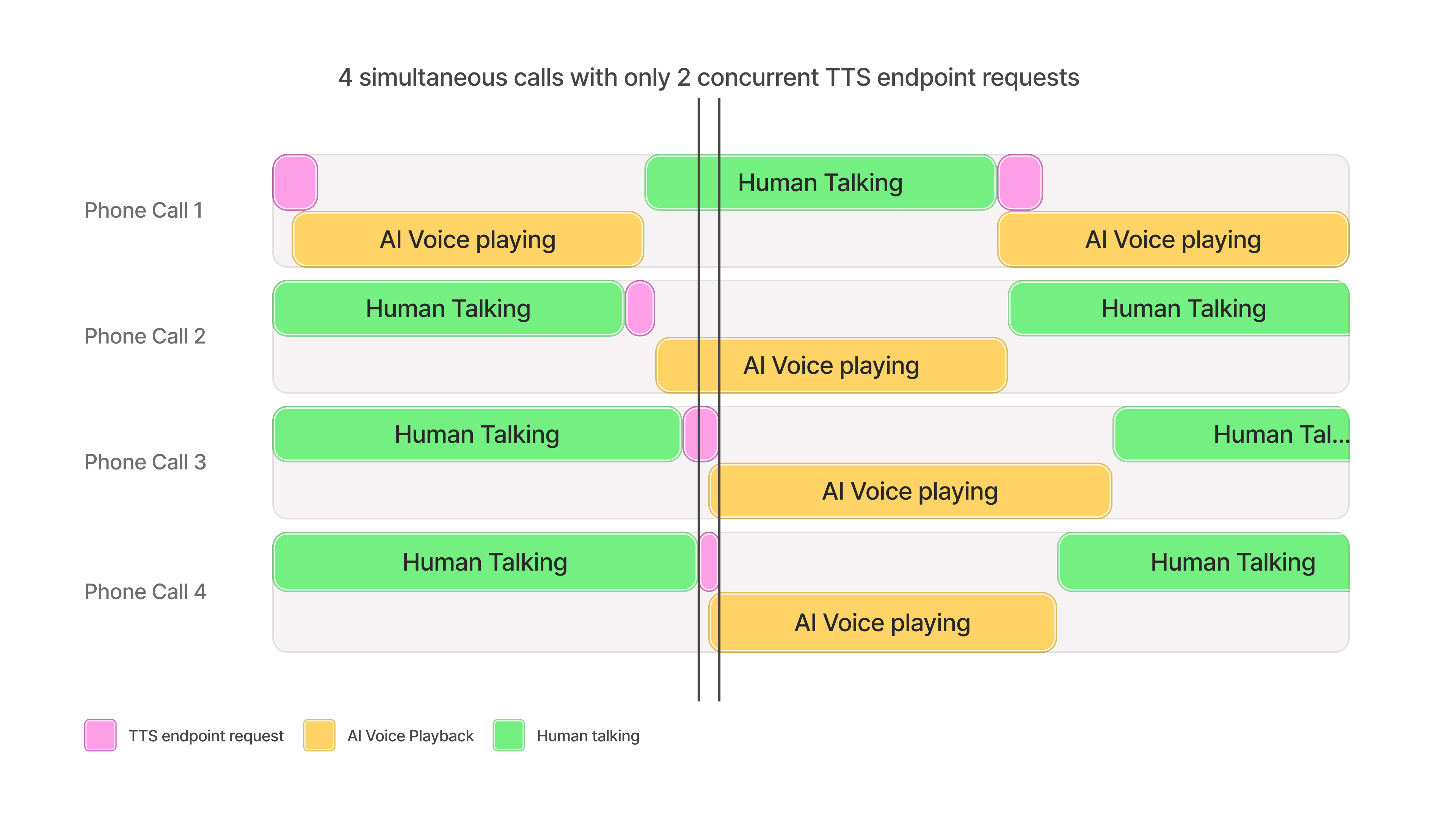
Section titled “Understanding concurrency limits”The concurrency limit associated with your plan should not be interpreted as the maximum number of simultaneous conversations, phone calls character voiceovers, etc that can be handled at once. The actual number depends on several factors, including the specific AI voices used and the characteristics of the use case.
As a general rule of thumb, a concurrency limit of 5 can typically support up to approximately 100 simultaneous audio broadcasts.
This is because of the speed it takes for audio to be generated relative to the time it takes for the TTS request to be processed. The diagram below is an example of how 4 concurrent calls with different users can be facilitated while only hitting 2 concurrent requests.
Building AI Voice Agents
Where TTS is used to facilitate dialogue, a concurrency limit of 5 can support about 100 broadcasts for balanced conversations between AI agents and human participants.
For use cases in which the AI agent speaks less frequently than the human, such as customer support interactions, more than 100 simultaneous conversations could be supported.
Character voiceovers
Generally, more than 100 simultaneous character voiceovers can be supported for a concurrency limit of 5.
The number can vary depending on the character’s dialogue frequency, the length of pauses, and in-game actions between lines.
Live Dubbing
Concurrent dubbing streams generally follow the provided heuristic.
If the broadcast involves periods of conversational pauses (e.g. because of a soundtrack, visual scenes, etc), more simultaneous dubbing streams than the suggestion may be possible.
If you exceed your plan’s concurrency limits at any point and you are on the Enterprise plan, model requests may still succeed, albeit slower, on a best efforts basis depending on available capacity.
Text to Dialogue concurrency
Section titled “Text to Dialogue concurrency”Text to Dialogue requests are metered in two different ways depending on how you call the API:
- HTTP endpoints (Create dialogue and Stream dialogue) count toward your plan’s standard concurrency limit while audio is being generated, like any other Text to Speech request.
- WebSocket endpoints such as the Text to Dialogue WebSocket are metered as dialogue sessions. An open connection holds a dialogue session for as long as it stays open, whether or not audio is currently being generated.
Session-based metering keeps capacity planning simple: one connection is one session, so your usage doesn’t fluctuate with generation activity. Because a session is held for the whole connection rather than only while audio is generating, your dialogue session limits are sized to adjust to this new concurrency methodology.
| Plan | WebSocket Sessions |
|---|---|
| Free | 14 |
| Starter | 21 |
| Creator | 35 |
| Pro | 70 |
| Scale | 105 |
| Business | 105 |
| Enterprise | Elevated |
If you open a connection while all of your workspace’s dialogue sessions are in use, the new connection is rejected with a too_many_concurrent_requests error. To free sessions, close connections you no longer need — a connection also closes automatically after 20 seconds of inactivity unless you send keep_alive messages.
To monitor dialogue sessions, open Developers at the bottom of the dashboard sidebar, select the Analytics tab, and view the Concurrent requests metric in the Usage view. Dialogue sessions are reported as their own series, TTD Websocket Sessions, separate from your other concurrent requests.
Scale testing concurrency limits
Section titled “Scale testing concurrency limits”Scale testing can be useful to identify client side scaling issues and to verify concurrency limits are set correctly for your usecase.
It is heavily recommended to test end-to-end workflows as close to real world usage as possible, simulating and measuring how many users can be supported is the recommended methodology for achieving this. It is important to:
- Simulate users, not raw requests
- Simulate typical user behavior such as waiting for audio playback, user speaking or transcription to finish before making requests
- Ramp up the number of users slowly over a period of minutes
- Introduce randomness to request timings and to the size of requests
- Capture latency metrics and any returned error codes from the API
For example, to test an agent system designed to support 100 simultaneous conversations you would create up to 100 individual “users” each simulating a conversation. Conversations typically consist of a repeating cycle of ~10 seconds of user talking, followed by the TTS API call for ~150 characters, followed by ~10 seconds of audio playback to the user. Therefore, each user should follow the pattern of making a websocket Text-to-Speech API call for 150 characters of text every 20 seconds, with a small amount of randomness introduced to the wait period and the number of characters requested. The test would consist of spawning one user per second until 100 exist and then testing for 10 minutes in total to test overall stability.
Scale testing script example
This example uses locust as the testing framework with direct API calls to the ElevenLabs API.
It follows the example listed above, testing a conversational agent system with each user sending 1 request every 20 seconds.
import json
import random
import time
import gevent
import locust
from locust import User, task, events, constant_throughput
import websocket

# Averages up to 10 seconds of audio when played, depends on the voice speed
DEFAULT_TEXT = (
    "Hello, this is a test message. I am testing if a long input will cause issues for the model "
    "like this sentence. "
)

TEXT_ARRAY = [
    "Hello.",
    "Hello, this is a test message.",
    DEFAULT_TEXT,
    DEFAULT_TEXT * 2,
    DEFAULT_TEXT * 3
]

# Custom command line arguments
@events.init_command_line_parser.add_listener
def on_parser_init(parser):
    parser.add_argument("--api-key", default="YOUR_API_KEY", help="API key for authentication")
    parser.add_argument("--encoding", default="mp3_22050_32", help="Encoding")
    parser.add_argument("--text", default=DEFAULT_TEXT, help="Text to use")
    parser.add_argument("--use-text-array", default="false", help="Text to use")
    parser.add_argument("--voice-id", default="aria", help="Text to use")

class WebSocketTTSUser(User):
    # Each user will send a request every 20 seconds, regardless of how long each request takes
    wait_time = constant_throughput(0.05)

    def __init__(self, *args, **kwargs):
        super().__init__(*args, **kwargs)
        self.api_key = self.environment.parsed_options.api_key
        self.voice_id = self.environment.parsed_options.voice_id
        self.text = self.environment.parsed_options.text
        self.encoding = self.environment.parsed_options.encoding
        self.use_text_array = self.environment.parsed_options.use_text_array
        if self.use_text_array:
            self.text = random.choice(TEXT_ARRAY)
        self.all_recieved = False

    @task
    def tts_task(self):
        # Do jitter waiting of up to 1 second
        # Users appear to be spawned every second so this ensures requests are not aligned
        gevent.sleep(random.random())

        max_wait_time = 10

        # Connection details
        uri = f"{self.environment.host}/v1/text-to-speech/{self.voice_id}/stream-input?auto_mode=true&output_format={self.encoding}"
        headers = {"xi-api-key": self.api_key}

        ws = None
        self.all_recieved = False
        try:
            init_msg = {"text": " "}
            # Use proper header format for websocket - this is case sensitive!
            ws = websocket.create_connection(uri, header=headers)
            ws.send(json.dumps(init_msg))

            # Start measuring after websocket initiated but before any messages are sent
            send_request_time = time.perf_counter()
            ws.send(json.dumps({"text": self.text}))

            # Send to flush and receive the audio
            ws.send(json.dumps({"text": ""}))

            def _receive():
                t_first_response = None
                audio_size = 0
                try:
                    while True:
                        # Wait up to 10 seconds for a response
                        ws.settimeout(max_wait_time)
                        response = ws.recv()
                        response_data = json.loads(response)

                        if "audio" in response_data and response_data["audio"]:
                            audio_size = audio_size + len(response_data["audio"])

                        if t_first_response is None:
                            t_first_response = time.perf_counter()
                            first_byte_ms = (
                                t_first_response - send_request_time
                            ) * 1000
                            if audio_size is None:
                                # The first response should always have audio
                                locust.events.request.fire(
                                    request_type="websocket",
                                    name="Bad Response (no audio)",
                                    response_time=first_byte_ms,
                                    response_length=audio_size,
                                    exception=Exception("Response has no audio"),
                                )
                                break

                        if "isFinal" in response_data and response_data["isFinal"]:
                            # Fire this event once finished streaming, but report the important TTFB metric
                            locust.events.request.fire(
                                request_type="websocket",
                                name="TTS Stream Success (First Byte)",
                                response_time=first_byte_ms,
                                response_length=audio_size,
                                exception=None,
                            )
                            break

                except websocket.WebSocketTimeoutException:
                    locust.events.request.fire(
                        request_type="websocket",
                        name="TTS Stream Timeout",
                        response_time=max_wait_time * 1000,
                        response_length=audio_size,
                        exception=Exception("Timeout waiting for response"),
                    )
                except Exception as e:
                    # Typically JSON decode error if the server returns HTTP backoff error
                    locust.events.request.fire(
                        request_type="websocket",
                        name="TTS Stream Failure",
                        response_time=0,
                        response_length=0,
                        exception=e,
                    )
                finally:
                    self.all_recieved = True

            gevent.spawn(_receive)

            # Sleep until recieved so new tasks aren't spawned
            while not self.all_recieved:
                gevent.sleep(1)

        except websocket.WebSocketTimeoutException:
            locust.events.request.fire(
                request_type="websocket",
                name="TTS Stream Timeout",
                response_time=max_wait_time * 1000,
                response_length=0,
                exception=Exception("Timeout waiting for response"),
            )
        except Exception as e:
            locust.events.request.fire(
                request_type="websocket",
                name="TTS Stream Failure",
                response_time=0,
                response_length=0,
                exception=e,
            )
        finally:
            # Try and close the websocket gracefully
            try:
                if ws:
                    ws.close()
            except Exception:
                pass