Real-time monitoring
Observe live conversations and send control commands during active calls
Real-time monitoring enables live observation of agent conversations via WebSocket and remote control of active calls. This feature provides real-time visibility into conversation events and allows intervention through control commands.
Overview
Section titled “Overview”Monitoring sessions stream conversation events in real-time, including transcripts, agent responses, and corrections. You can also send control commands to end calls, transfer to phone numbers, or enable human takeover during active chat conversations.
WebSocket endpoint
Section titled “WebSocket endpoint”Connect to a live conversation using the monitoring endpoint:
wss://api.elevenlabs.io/v1/convai/conversations/{conversation_id}/monitorReplace {conversation_id} with the ID of the conversation you want to monitor.
Authentication
Section titled “Authentication”Authentication requires:
- API key permissions: Your API key must have
ElevenLabs Agents Writescope - Workspace access: You must have
EDITORaccess to the agent’s workspace - Header format: Include your API key via the
xi-api-keyheader
Example connection
Section titled “Example connection”const ws = new WebSocket('wss://api.elevenlabs.io/v1/convai/conversations/conv_123/monitor', {
headers: {
'xi-api-key': 'your_api_key_here',
},
});Configuration
Section titled “Configuration”Before monitoring conversations, enable the feature in your agent’s settings:
Enable monitoring
In the Advanced settings panel, toggle the “Monitoring” option.
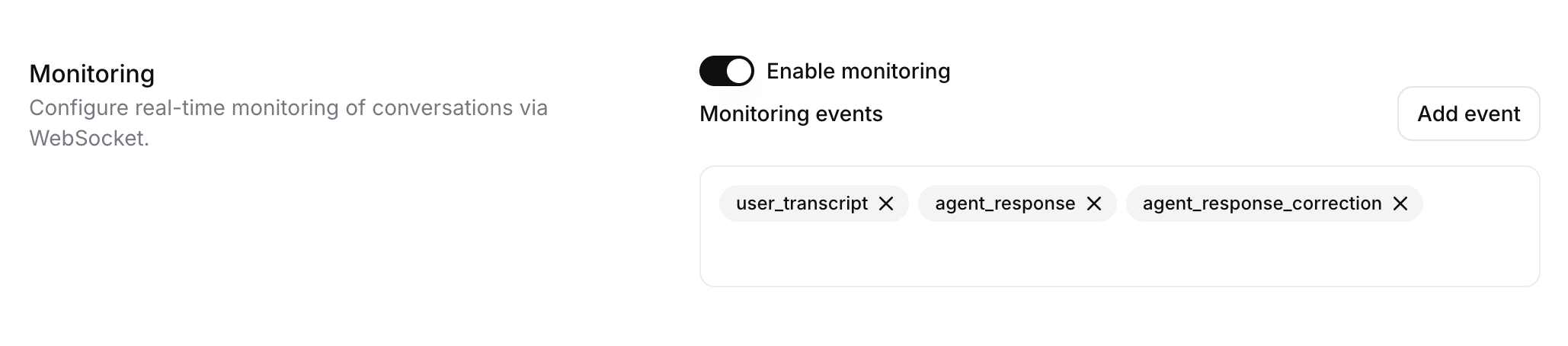
Select events
Choose which events you want to monitor. See Client Events for a full list of available events.
Control commands
Section titled “Control commands”Send JSON commands through the WebSocket to control the conversation:
End call
Terminate the active conversation immediately.
// End the active conversation
ws.send(JSON.stringify({
  command_type: "end_call"
}));
Transfer to phone number
Transfer the call to a specified phone number.
// Transfer to a phone number
ws.send(JSON.stringify({
  command_type: "transfer_to_number",
  parameters: {
    phone_number: "+1234567890"
  }
}));Realtime contextual update
Inject context or instructions into the active conversation so the agent can use the new information in its responses.
// Send a contextual update to the agent
ws.send(JSON.stringify({
  command_type: "contextual_update",
  parameters: {
    contextual_update: "<your update text>"
  }
}));
Enable human takeover
Switch from AI agent to human operator mode for chat conversations.
// Enable human takeover
ws.send(JSON.stringify({
  command_type: "enable_human_takeover"
}));
Send message as human
Send a message to the user as a human operator in chat conversations.
// Send a message as a human operator
ws.send(JSON.stringify({
  command_type: "send_human_message",
  parameters: {
    text: "How can I help you?"
  }
}));
Disable human takeover
Return control from human operator back to the AI agent.
// Disable human takeover and return to AI
ws.send(JSON.stringify({
  command_type: "disable_human_takeover"
}));
Use cases
Section titled “Use cases”Real-time monitoring enables several operational scenarios:
Quality assurance
Monitor agent conversations in real-time to ensure quality standards and identify training opportunities.
Human escalation
Detect conversations requiring human intervention and seamlessly take over from the AI agent.
Analytics dashboards
Build real-time monitoring dashboards that aggregate conversation metrics and performance indicators.
Call center oversight
Supervise multiple agent conversations simultaneously and intervene when necessary.
Automated intervention
Implement automated systems that analyze conversation content and trigger actions based on specific conditions.
Training and coaching
Use live conversations as training material and provide real-time feedback to improve agent performance.
Limitations
Section titled “Limitations”Asynchronous event delivery
Monitoring events are sent asynchronously to the conversation and may not arrive in the same order as the core conversation events. When processing events, do not rely on event order to reconstruct exact conversation timing.
Audio data not available
The monitoring endpoint streams only text events and metadata. Raw audio data is not included in monitoring events.
Historical event limit
Only approximately the last 100 events are cached and available when connecting to an active conversation. Earlier events cannot be retrieved.
Event filtering restrictions
VAD scores, turn probability metrics, and ping events cannot be monitored when custom event selection is enabled.
Connection timing
You must connect after the conversation has started. The monitoring endpoint cannot be used before conversation initiation.
Permissions required
API keys must have ElevenLabs Agents Write scope, and you must have EDITOR workspace access to monitor conversations.
Related resources
Section titled “Related resources”Post-call Webhooks
Receive conversation data and analysis after calls complete.
Agent Analysis
Configure success evaluation and data collection for conversations.
Client Events
Understand events received during conversational applications.
WebSocket API
Learn about the WebSocket API for real-time conversations.