Conversation flow
Overview
Section titled “Overview”Conversation flow settings determine how your assistant handles periods of user silence, interruptions during speech, and turn-taking behavior. These settings help create more natural conversations and can be customized based on your use case.
Limit the total duration of each conversation
Configure how long your assistant waits during periods of silence
Provide natural audio feedback when your agent needs time to think
Control whether users can interrupt your assistant while speaking
Adjust how quickly your assistant responds to user input
Maximum conversation duration
Section titled “Maximum conversation duration”The Max conversation duration setting limits the total time a conversation can remain active. This global limit starts when the conversation begins and applies independently of turn-level timeouts. The default is 600 seconds (10 minutes). You can set a value from 60 to 7,200 seconds.
Configuration
Section titled “Configuration”In the CLI and API, configure this setting with the
conversation_config.conversation.max_duration_seconds field.
Update via the dashboard
Section titled “Update via the dashboard”Open your agent in the dashboard, navigate to the Advanced tab, and adjust Max conversation duration under Call limits. Save your changes.
Update via the CLI
Section titled “Update via the CLI”Pull the agent configuration
Section titled “Pull the agent configuration”elevenlabs agents pull --agent agent_7101k5zvyjhmfg983brhmhkd98n6Edit the agent configuration
Section titled “Edit the agent configuration”Set conversation_config.conversation.max_duration_seconds:
{
  "conversation_config": {
    "conversation": {
      "max_duration_seconds": 1200
    }
  }
}
Push the agent configuration
Section titled “Push the agent configuration”elevenlabs agents push --agent agent_7101k5zvyjhmfg983brhmhkd98n6Update via the API
Section titled “Update via the API”from elevenlabs import ElevenLabs
elevenlabs = ElevenLabs()
elevenlabs.conversational_ai.agents.update(
agent_id="agent_7101k5zvyjhmfg983brhmhkd98n6",
conversation_config={
"conversation": {"max_duration_seconds": 1200},
},
)import { ElevenLabsClient } from "@elevenlabs/elevenlabs-js";
const elevenlabs = new ElevenLabsClient();
await elevenlabs.conversationalAi.agents.update("agent_7101k5zvyjhmfg983brhmhkd98n6", {
conversationConfig: {
conversation: { maxDurationSeconds: 1200 },
},
});Take turn after silence
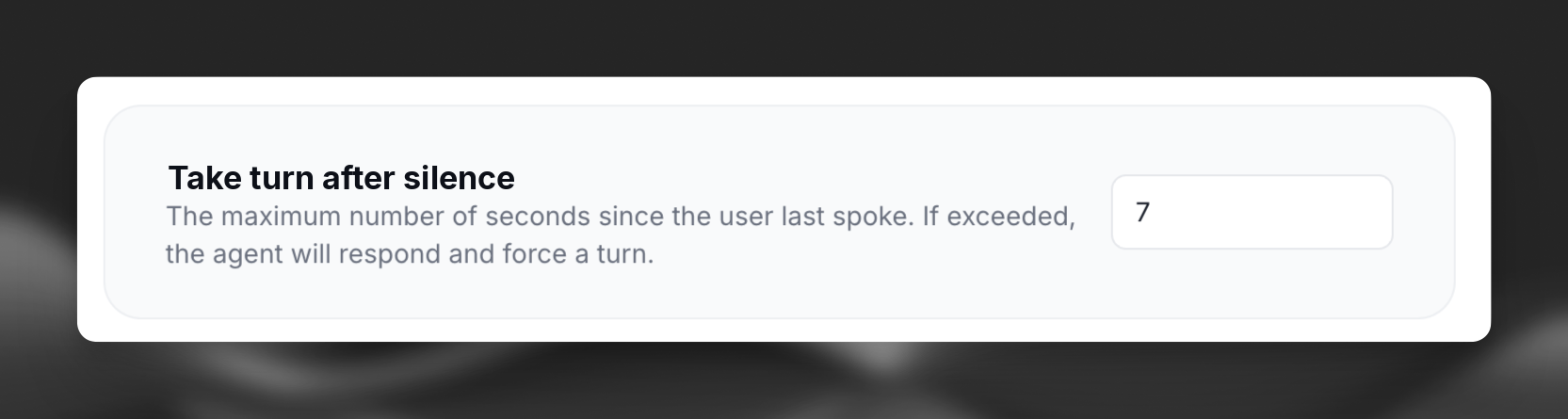
Section titled “Take turn after silence”The Take turn after silence setting determines how long your assistant waits during periods of user silence before taking the next turn and prompting for a response.
Configuration
Section titled “Configuration”The value is specified in seconds and must be between 1 and 30 seconds. In the CLI and API, configure this setting with the conversation_config.turn.turn_timeout field.
Update via the dashboard
Section titled “Update via the dashboard”Open your agent in the dashboard, navigate to the Advanced tab, and adjust the Take turn after silence value. Save your changes.
Update via the CLI
Section titled “Update via the CLI”Pull the agent configuration
Section titled “Pull the agent configuration”elevenlabs agents pull --agent "<agent-name>"Edit `agent_configs/<agent-name>.json`
Section titled “Edit `agent_configs/<agent-name>.json`”Set conversation_config.turn.turn_timeout:
{
  "conversation_config": {
    "turn": {
      "turn_timeout": 7
    }
  }
}
Push your changes
Section titled “Push your changes”elevenlabs agents push --agent "<agent-name>"Update via the API
Section titled “Update via the API”from elevenlabs import ElevenLabs
elevenlabs = ElevenLabs()
elevenlabs.conversational_ai.agents.update(
agent_id="agent_7101k5zvyjhmfg983brhmhkd98n6",
conversation_config={
"turn": {"turn_timeout": 7},
},
)import { ElevenLabsClient } from "@elevenlabs/elevenlabs-js";
const elevenlabs = new ElevenLabsClient();
await elevenlabs.conversationalAi.agents.update("agent_7101k5zvyjhmfg983brhmhkd98n6", {
conversationConfig: {
turn: { turnTimeout: 7 },
},
});Best practices
Section titled “Best practices”- Set shorter timeouts (5-10 seconds) for casual conversations where quick back-and-forth is expected
- Use longer timeouts (10-30 seconds) when users may need more time to think or formulate complex responses
- Consider your user context - customer service may benefit from shorter timeouts while technical support may need longer ones
Soft timeout
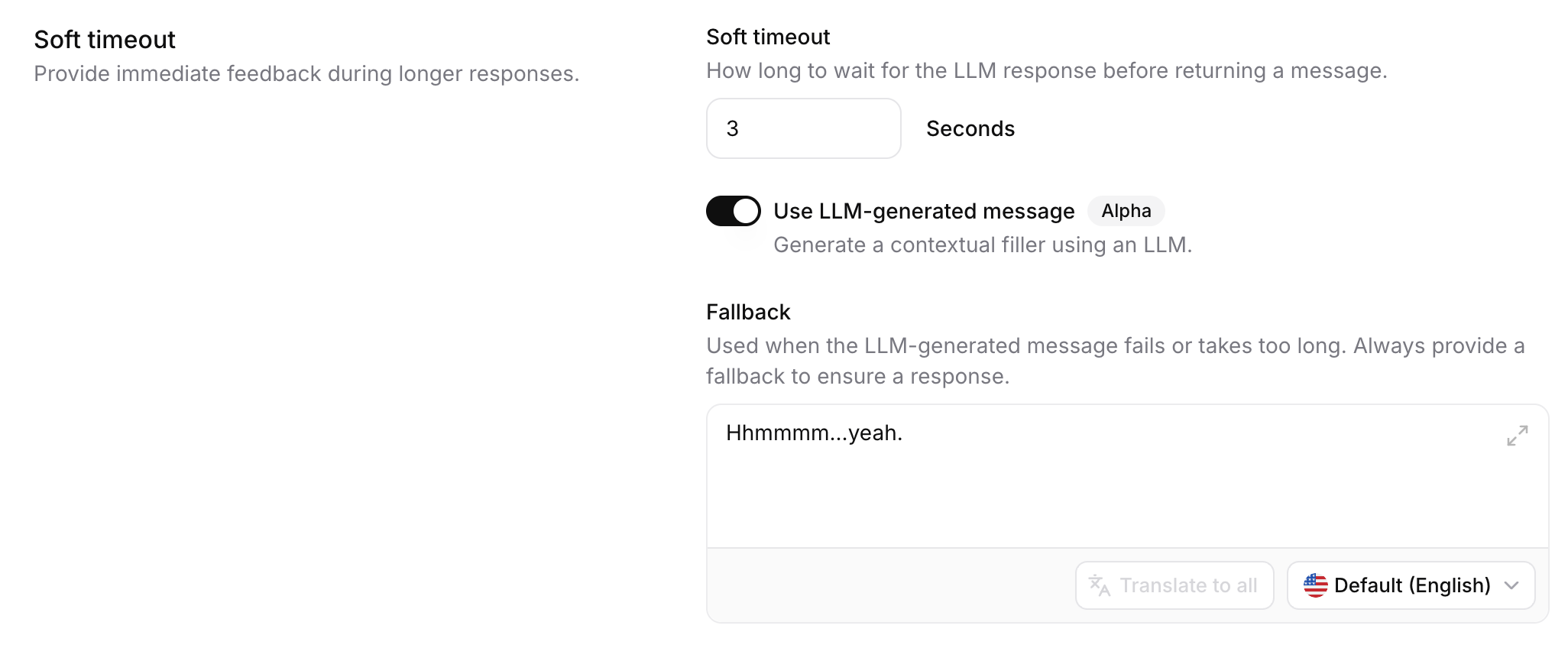
Section titled “Soft timeout”Soft timeout provides immediate audio feedback when the LLM takes longer than expected to generate a response. Instead of awkward silence while waiting, your agent speaks a brief filler phrase like "Hmm..." or "Let me think..." to maintain natural conversational flow.
This feature is useful for:
- Complex queries requiring longer LLM processing
- Handling variable latency from LLM providers
- Creating more human-like conversations with natural thinking pauses
How it works
Section titled “How it works”- When the user finishes speaking, the system starts generating an LLM response
- A timer begins based on the configured timeout duration
- If the LLM response arrives before the timeout, no filler is spoken
- If the timeout is reached before the LLM responds:
- The configured filler message is spoken immediately
- The agent continues waiting for the actual response
- Once ready, the agent speaks the full LLM response
Soft timeout triggers only once per turn to prevent multiple fillers in succession.
Configuration
Section titled “Configuration”Update via the dashboard
Section titled “Update via the dashboard”Open your agent in the dashboard, navigate to the Advanced tab, and adjust the Soft timeout settings. Save your changes.
Update via the CLI
Section titled “Update via the CLI”Pull the agent configuration
Section titled “Pull the agent configuration”elevenlabs agents pull --agent "<agent-name>"Edit `agent_configs/<agent-name>.json`
Section titled “Edit `agent_configs/<agent-name>.json`”Set conversation_config.turn.soft_timeout_config:
{
  "conversation_config": {
    "turn": {
      "soft_timeout_config": {
        "timeout_seconds": 3.0,
        "message": "Hhmmmm...yeah.",
        "use_llm_generated_message": false
      }
    }
  }
}
Push your changes
Section titled “Push your changes”elevenlabs agents push --agent "<agent-name>"Update via the API
Section titled “Update via the API”from elevenlabs import ElevenLabs
elevenlabs = ElevenLabs()
elevenlabs.conversational_ai.agents.update(
agent_id="agent_7101k5zvyjhmfg983brhmhkd98n6",
conversation_config={
"turn": {
"soft_timeout_config": {
"timeout_seconds": 3.0,
"message": "Hhmmmm...yeah.",
"use_llm_generated_message": False,
},
},
},
)import { ElevenLabsClient } from "@elevenlabs/elevenlabs-js";
const elevenlabs = new ElevenLabsClient();
await elevenlabs.conversationalAi.agents.update("agent_7101k5zvyjhmfg983brhmhkd98n6", {
conversationConfig: {
turn: {
softTimeoutConfig: {
timeoutSeconds: 3.0,
message: "Hhmmmm...yeah.",
useLlmGeneratedMessage: false,
},
},
},
});Timeout duration
Section titled “Timeout duration”The time in seconds before the filler message is spoken while waiting for the LLM response.
| Setting | Description |
|---|---|
| Default | -1 (disabled) |
| Range | 0.5 to 8.0 seconds |
| Recommended | 3.0 seconds |
Static message
Section titled “Static message”A predefined filler phrase spoken when soft timeout triggers.
| Setting | Description |
|---|---|
| Default | "Hhmmmm...yeah." |
| Length | 1–200 characters |
This message supports:
- Language overrides: Auto-translates to additional languages configured for your agent
- Client overrides: Can be customized per-call via the SDK
LLM-generated message
Section titled “LLM-generated message”When enabled, generates a contextually-appropriate filler phrase dynamically using a lightweight LLM, instead of the static message.
| Setting | Description |
|---|---|
| Default | false |
| Fallback | Uses static message if generation fails |
The system uses recent conversation context (up to 4 messages, 1000 characters) to generate relevant fillers like "Hmm...", "I see...", "Understood...", "Got it...", or "Alright..."
Best practices
Section titled “Best practices”- Avoid time indicators in filler messages (e.g., "One second...") as actual response times are unpredictable
- Disable soft timeout for quick FAQ bots where responses are consistently fast
Interruptions
Section titled “Interruptions”Interruption handling determines whether users can interrupt your assistant while it's speaking.
Configuration
Section titled “Configuration”Interruption settings can be configured in the agent's Advanced tab under Client Events.
To enable interruptions, make sure interruption is a selected client event.
Interruptions enabled
Section titled “Interruptions enabled”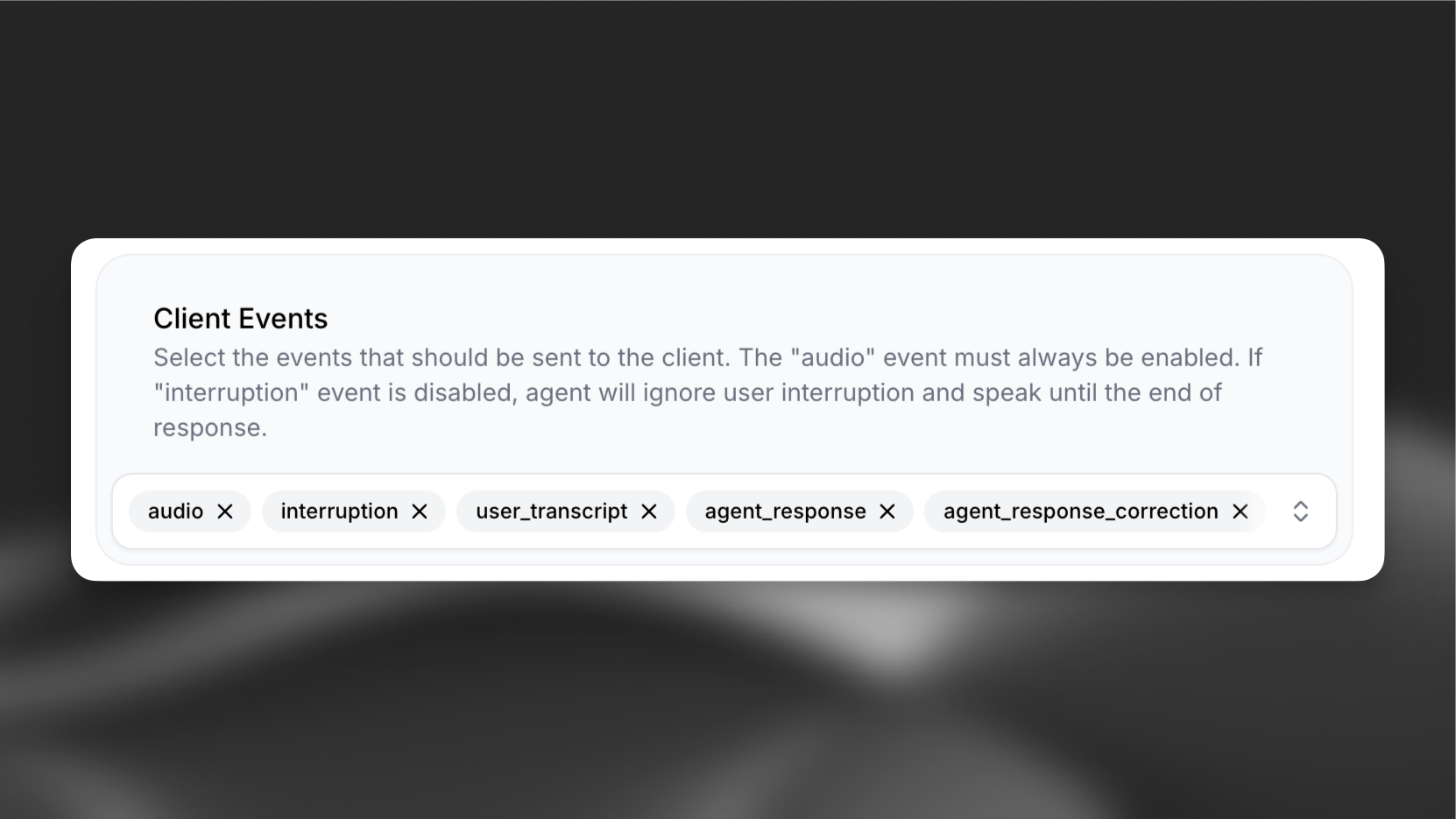
Interruptions disabled
Section titled “Interruptions disabled”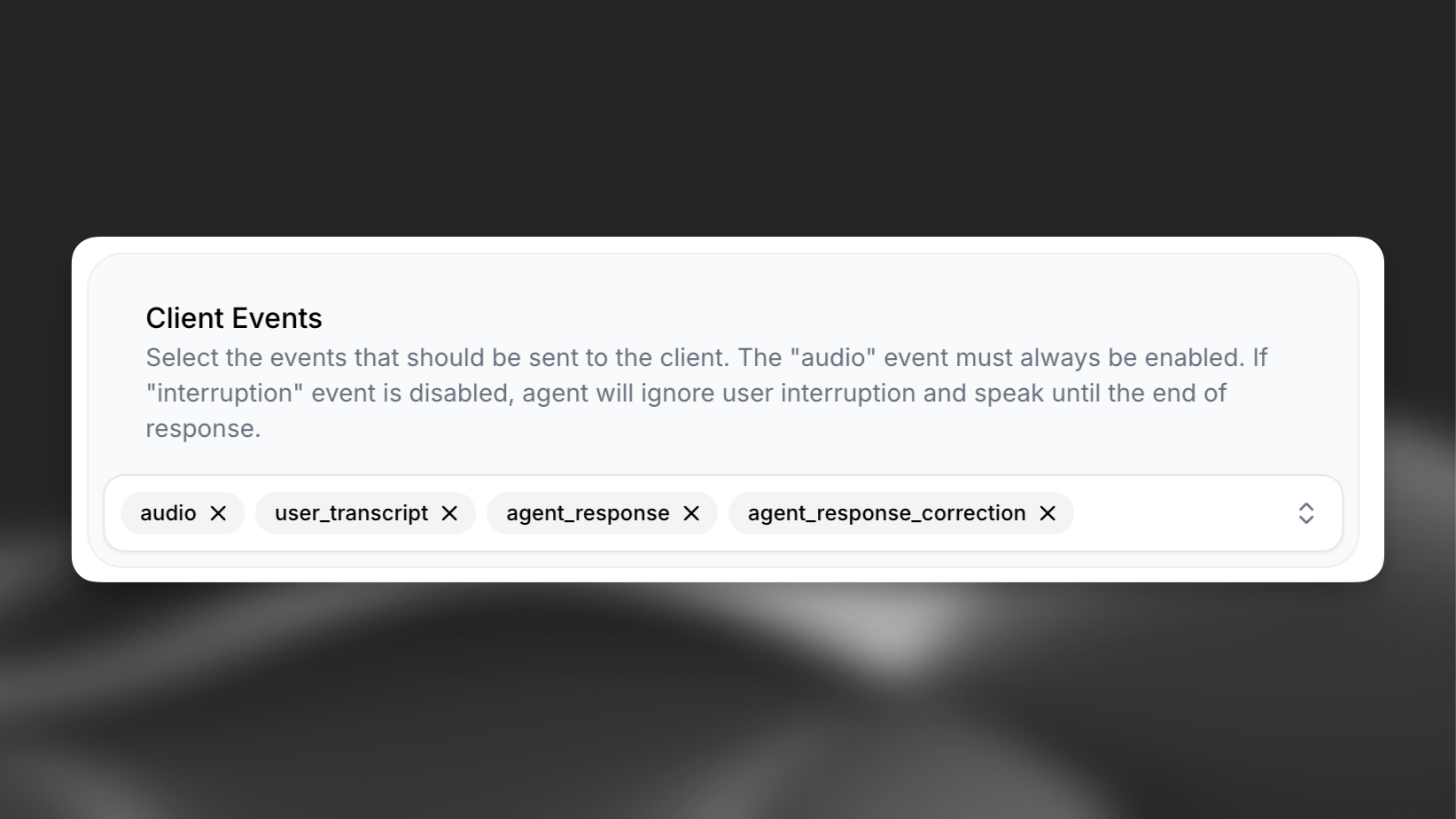
Best practices for interruptions
Section titled “Best practices for interruptions”- Enable interruptions for natural conversational flows where back-and-forth dialogue is expected
- Disable interruptions when message completion is critical (e.g., terms and conditions, safety information)
- Consider your use case context - customer service may benefit from interruptions while information delivery may not
Turn eagerness
Section titled “Turn eagerness”Turn eagerness controls how quickly your assistant responds to user input during conversation. This setting determines how eager the assistant is to take turns and start speaking based on detected speech patterns.
How it works
Section titled “How it works”The assistant now includes two key improvements for more natural turn-taking:
-
Faster response generation - The assistant starts speaking after receiving enough words and a comma from the language model, rather than waiting for complete sentences. This reduces latency and creates more responsive conversations, especially when the assistant has longer responses.
-
Configurable turn eagerness - Control how quickly the assistant interprets pauses or speech patterns as opportunities to respond.
Configuration
Section titled “Configuration”Three modes are available:
- Eager - The assistant responds quickly to user input, jumping in at the earliest opportunity. Best for fast-paced conversations where immediate responses are valued.
- Normal - Balanced turn-taking that works well for most conversational scenarios. The assistant waits for natural conversation breaks before responding.
- Patient - The assistant waits longer before taking its turn, giving users more time to complete their thoughts. Ideal for collecting detailed information or when users need time to formulate responses.
Update via the dashboard
Section titled “Update via the dashboard”Open your agent in the dashboard, navigate to the Agent settings, and select the desired turn eagerness mode. Save your changes.
Update via the CLI
Section titled “Update via the CLI”Pull the agent configuration
Section titled “Pull the agent configuration”elevenlabs agents pull --agent "<agent-name>"Edit `agent_configs/<agent-name>.json`
Section titled “Edit `agent_configs/<agent-name>.json`”Set conversation_config.turn.turn_eagerness to one of "patient", "normal", or "eager":
{
  "conversation_config": {
    "turn": {
      "turn_eagerness": "normal"
    }
  }
}
Push your changes
Section titled “Push your changes”elevenlabs agents push --agent "<agent-name>"Update via the API
Section titled “Update via the API”from elevenlabs import ElevenLabs
elevenlabs = ElevenLabs()
elevenlabs.conversational_ai.agents.update(
agent_id="agent_7101k5zvyjhmfg983brhmhkd98n6",
conversation_config={
"turn": {"turn_eagerness": "normal"},
},
)import { ElevenLabsClient } from "@elevenlabs/elevenlabs-js";
const elevenlabs = new ElevenLabsClient();
await elevenlabs.conversationalAi.agents.update("agent_7101k5zvyjhmfg983brhmhkd98n6", {
conversationConfig: {
turn: { turnEagerness: "normal" },
},
});Best practices for turn eagerness
Section titled “Best practices for turn eagerness”- Use Eager mode for customer service scenarios where quick responses improve user experience
- Use Patient mode when collecting structured information like phone numbers, addresses, or email addresses
- Use Normal mode as a default for general conversational flows
- Combine with workflows to dynamically adjust turn eagerness based on conversation context
- Test different settings with your specific use case to find the optimal balance
Recommended configurations
Section titled “Recommended configurations”Customer service
Section titled “Customer service”- Shorter timeouts (5-10 seconds) for responsive interactions - Enable interruptions to allow customers to interject with questions - Eager turn eagerness for quick, responsive conversations
Information collection
Section titled “Information collection”- Moderate timeouts (10-15 seconds) to allow users time to gather information - Enable interruptions for natural conversation flow - Patient turn eagerness when collecting phone numbers, addresses, or email addresses
Legal disclaimers
Section titled “Legal disclaimers”- Longer timeouts (15-30 seconds) to allow for complex responses - Disable interruptions to ensure full delivery of legal information - Normal turn eagerness to maintain steady pacing
Conversational EdTech
Section titled “Conversational EdTech”- Longer timeouts (10-30 seconds) to allow time to think and formulate responses - Enable interruptions to allow students to interject with questions - Patient turn eagerness to give students adequate time to respond