Multi-voice support
Overview
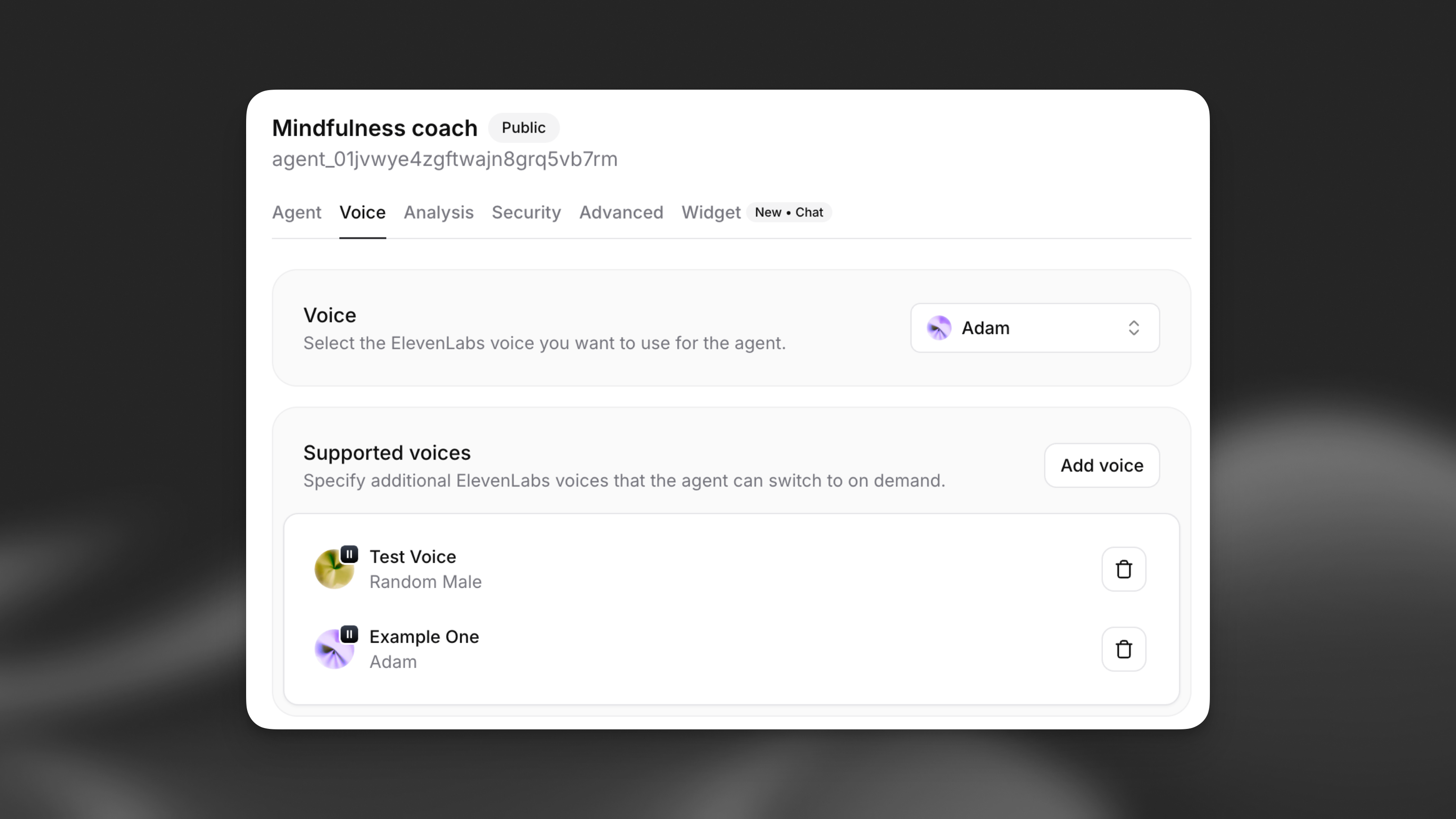
Section titled “Overview”Multi-voice support allows your ElevenLabs agent to dynamically switch between different ElevenLabs voices during a single conversation. This powerful feature enables:
- Multi-character storytelling: Different voices for different characters in narratives
- Language tutoring: Native speaker voices for different languages
- Emotional agents: Voice changes based on emotional context
- Role-playing scenarios: Distinct voices for different personas
How it works
Section titled “How it works”When multi-voice support is enabled, your agent can use XML-style markup to switch between configured voices during text generation. The agent automatically returns to the default voice when no specific voice is specified.
Example voice switching
The teacher said, <spanish>¡Hola estudiantes!</spanish>
Then the student replied, <student>Hello! How are you today?</student>
Multi-character dialogue
<narrator>Once upon a time, in a distant kingdom...</narrator>
<princess>I need to find the magic crystal!</princess>
<wizard>The crystal lies beyond the enchanted forest.</wizard>
Configuration
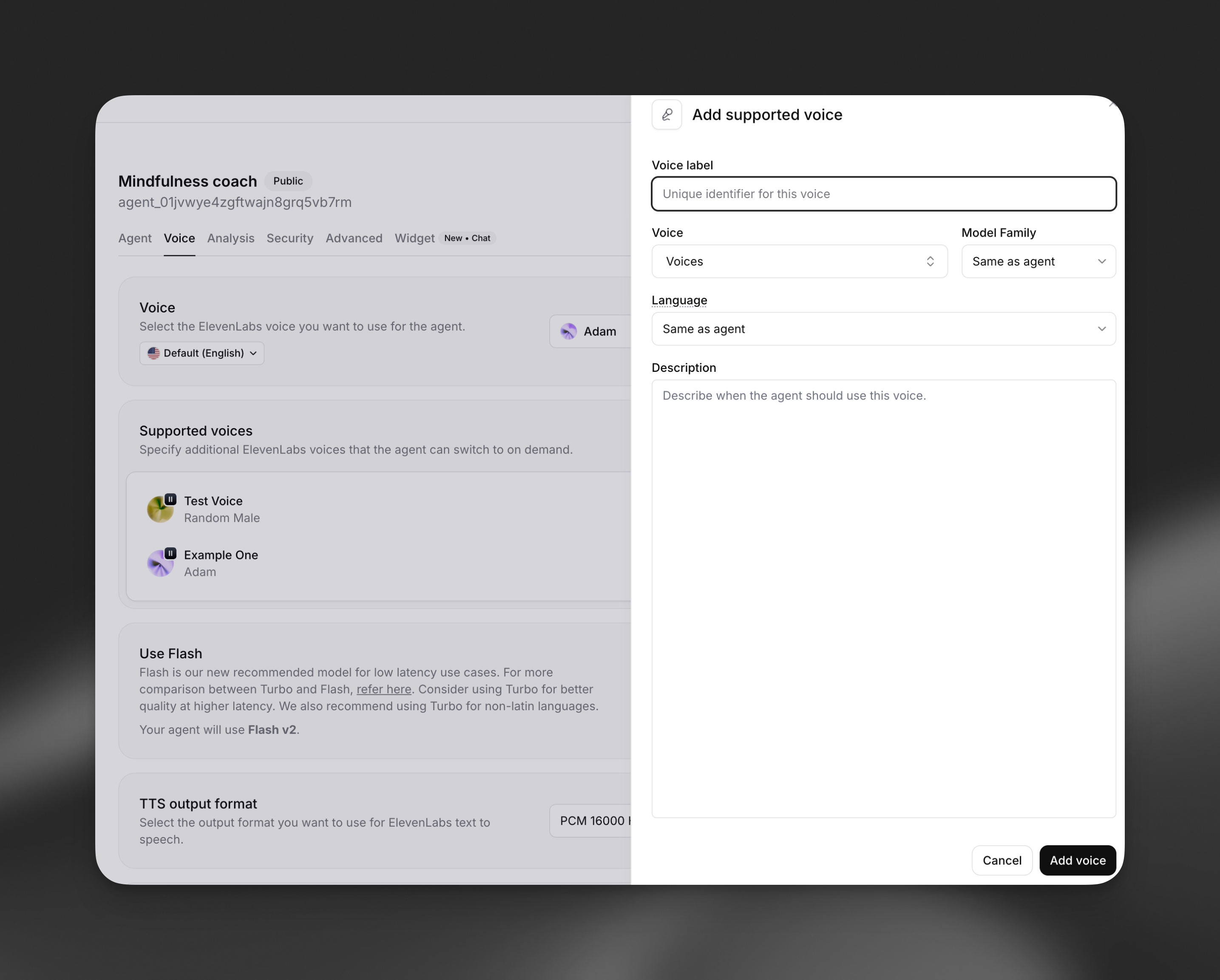
Section titled “Configuration”Adding supported voices
Section titled “Adding supported voices”Each supported voice has the following properties:
- Voice label: Unique identifier (e.g., "Joe", "Spanish", "Happy")
- Voice: Select from your available ElevenLabs voices
- Model family: Choose Turbo, Flash, or Multilingual (optional)
- Language: Override the default language for this voice (optional)
- Description: When the agent should use this voice
Update via the dashboard
Section titled “Update via the dashboard”Open your agent in the dashboard, navigate to the Voice tab, and locate the Multi-voice support section. Click Add voice to configure a new supported voice.
Update via the CLI
Section titled “Update via the CLI”Pull the agent configuration
Section titled “Pull the agent configuration”elevenlabs agents pull --agent "<agent-name>"Edit `agent_configs/<agent-name>.json`
Section titled “Edit `agent_configs/<agent-name>.json`”Set conversation_config.tts.supported_voices:
{
  "conversation_config": {
    "tts": {
      "supported_voices": [
        {
          "label": "Spanish",
          "voice_id": "<voice-id>",
          "language": "es",
          "description": "For any Spanish words or phrases"
        }
      ]
    }
  }
}
Push your changes
Section titled “Push your changes”elevenlabs agents push --agent "<agent-name>"Update via the API
Section titled “Update via the API”from elevenlabs import ElevenLabs
elevenlabs = ElevenLabs()
elevenlabs.conversational_ai.agents.update(
agent_id="agent_7101k5zvyjhmfg983brhmhkd98n6",
conversation_config={
"tts": {
"supported_voices": [
{
"label": "Spanish",
"voice_id": "<voice-id>",
"language": "es",
"description": "For any Spanish words or phrases",
}
]
},
},
)import { ElevenLabsClient } from "@elevenlabs/elevenlabs-js";
const elevenlabs = new ElevenLabsClient();
await elevenlabs.conversationalAi.agents.update("agent_7101k5zvyjhmfg983brhmhkd98n6", {
conversationConfig: {
tts: {
supportedVoices: [
{
label: "Spanish",
voiceId: "<voice-id>",
language: "es",
description: "For any Spanish words or phrases",
},
],
},
},
});Voice properties
Section titled “Voice properties”Voice label
Section titled “Voice label”A unique identifier that the LLM uses to reference this voice. Choose descriptive labels like: - Character names: "Alice", "Bob", "Narrator" - Languages: "Spanish", "French", "German" - Emotions: "Happy", "Sad", "Excited" - Roles: "Teacher", "Student", "Guide"
Model family
Section titled “Model family”Override the agent's default model family for this specific voice: - Flash: Fastest eneration, optimized for real-time use - Turbo: Balanced speed and quality - Multilingual: Highest quality, best for non-English languages - Same as agent: Use agent's default setting
Language override
Section titled “Language override”Specify a different language for this voice, useful for: - Multilingual conversations - Language tutoring applications - Region-specific pronunciations
Description
Section titled “Description”Provide context for when the agent should use this voice. Examples:
- "For any Spanish words or phrases"
- "When the message content is joyful or excited"
- "Whenever the character Joe is speaking"
Implementation
Section titled “Implementation”XML markup syntax
Section titled “XML markup syntax”Your agent uses XML-style tags to switch between voices:
<VOICE_LABEL>text to be spoken</VOICE_LABEL>Key points:
- Replace
VOICE_LABELwith the exact label you configured - Text outside tags uses the default voice
- Tags are case-sensitive
- Nested tags are not supported
System prompt integration
Section titled “System prompt integration”When you configure supported voices, the system automatically adds instructions to your agent's prompt:
When a message should be spoken by a particular person, use markup: "<CHARACTER>message</CHARACTER>" where CHARACTER is the character label.

Available voices are as follows:
- default: any text outside of the CHARACTER tags
- Joe: Whenever Joe is speaking
- Spanish: For any Spanish words or phrases
- Narrator: For narrative descriptions
Example usage
Section titled “Example usage”Language tutoring
Section titled “Language tutoring”Teacher: Let's practice greetings. In Spanish, we say <Spanish>¡Hola! ¿Cómo estás?</Spanish>
Student: How do I respond?
Teacher: You can say <Spanish>¡Hola! Estoy bien, gracias.</Spanish> which means Hello! I'm fine, thank you.Storytelling
Section titled “Storytelling”Once upon a time, a brave princess ventured into a dark cave.
<Princess>I'm not afraid of you, dragon!</Princess> she declared boldly. The dragon rumbled from
the shadows, <Dragon>You should be, little one.</Dragon>
But the princess stood her ground, ready for whatever came next.Best practices
Section titled “Best practices”Voice selection
Section titled “Voice selection”- Choose voices that clearly differentiate between characters or contexts
- Test voice combinations to ensure they work well together
- Consider the emotional tone and personality for each voice
- Ensure voices match the language and accent when switching languages
Label naming
Section titled “Label naming”- Use descriptive, intuitive labels that the LLM can understand
- Keep labels short and memorable
- Avoid special characters or spaces in labels
Performance optimization
Section titled “Performance optimization”- Limit the number of supported voices to what you actually need
- Use the same model family when possible to reduce switching overhead
- Test with your expected conversation patterns
- Monitor response times with multiple voice switches
Content guidelines
Section titled “Content guidelines”- Provide clear descriptions for when each voice should be used
- Test edge cases where voice switching might be unclear
- Consider fallback behavior when voice labels are ambiguous
- Ensure voice switches enhance rather than distract from the conversation
Limitations
Section titled “Limitations”What happens if I use an undefined voice label?
Section titled “What happens if I use an undefined voice label?”If the agent uses a voice label that hasn't been configured, the text will be spoken using the default voice. The XML tags will be ignored.
Can I change voices mid-sentence?
Section titled “Can I change voices mid-sentence?”Yes, you can switch voices within a single response. Each tagged section will use the specified voice, while untagged text uses the default voice.
Do voice switches affect conversation latency?
Section titled “Do voice switches affect conversation latency?”Voice switching adds minimal overhead. The first use of each voice in a conversation may have slightly higher latency as the voice is initialized.
Can I use the same voice with different labels?
Section titled “Can I use the same voice with different labels?”Yes, you can configure multiple labels that use the same ElevenLabs voice but with different model families, languages, or contexts.
How do I train my agent to use voice switching effectively?
Section titled “How do I train my agent to use voice switching effectively?”Provide clear examples in your system prompt and test thoroughly. You can include specific scenarios where voice switching should occur and examples of the XML markup format.