Experiments
Run controlled A/B tests on production traffic to optimize agent performance with data, not intuition
Experiments let you run controlled A/B tests across any aspect of agent configuration — prompt structure, workflow logic, voice, personality, tools, knowledge base — by routing a defined slice of traffic to a variant, measuring the impact on key outcomes, and promoting winners to production.
Why experiment
Section titled “Why experiment”Without structured experimentation, optimization relies on intuition. A prompt tweak “feels” better. A workflow adjustment “should” improve containment. A new escalation path “seems” more efficient.
Experiments replace guesswork with evidence. You test changes against live traffic, measure real outcomes, and promote what works.
How it works
Section titled “How it works”Experiments follow a four-step workflow:
Create a variant
Start from your current agent configuration and create a new branch. Modify anything — system prompt, workflow, voice, tools, knowledge base, guardrails, or evaluation criteria. Each change is tracked as a versioned configuration.
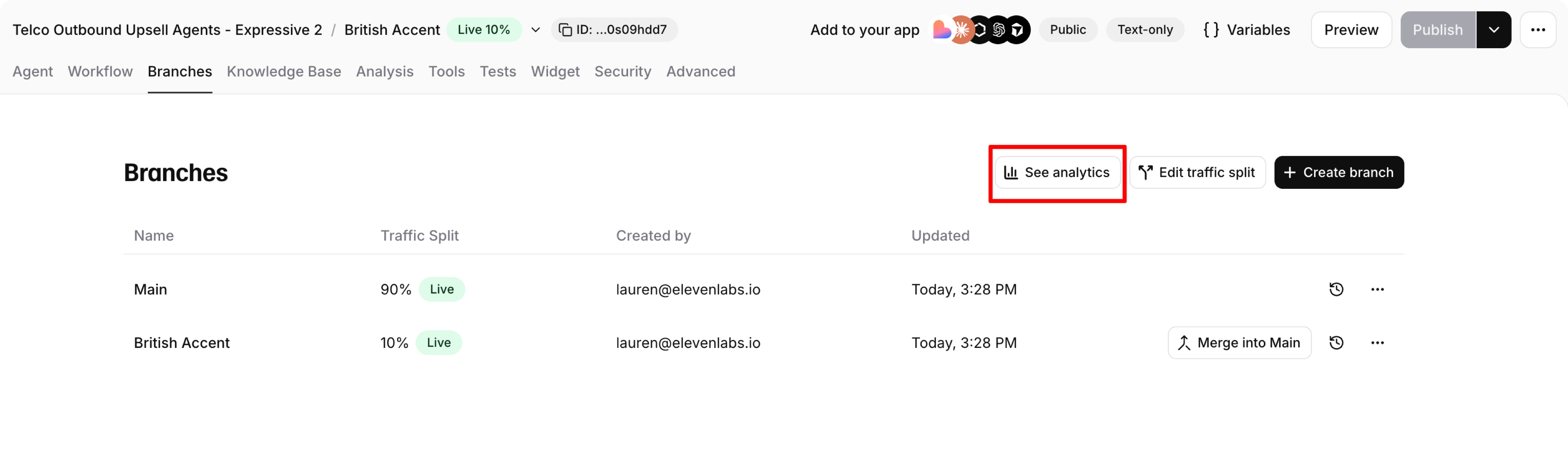
Navigate to the Branches tab in your agent settings and click Create branch.
Route traffic
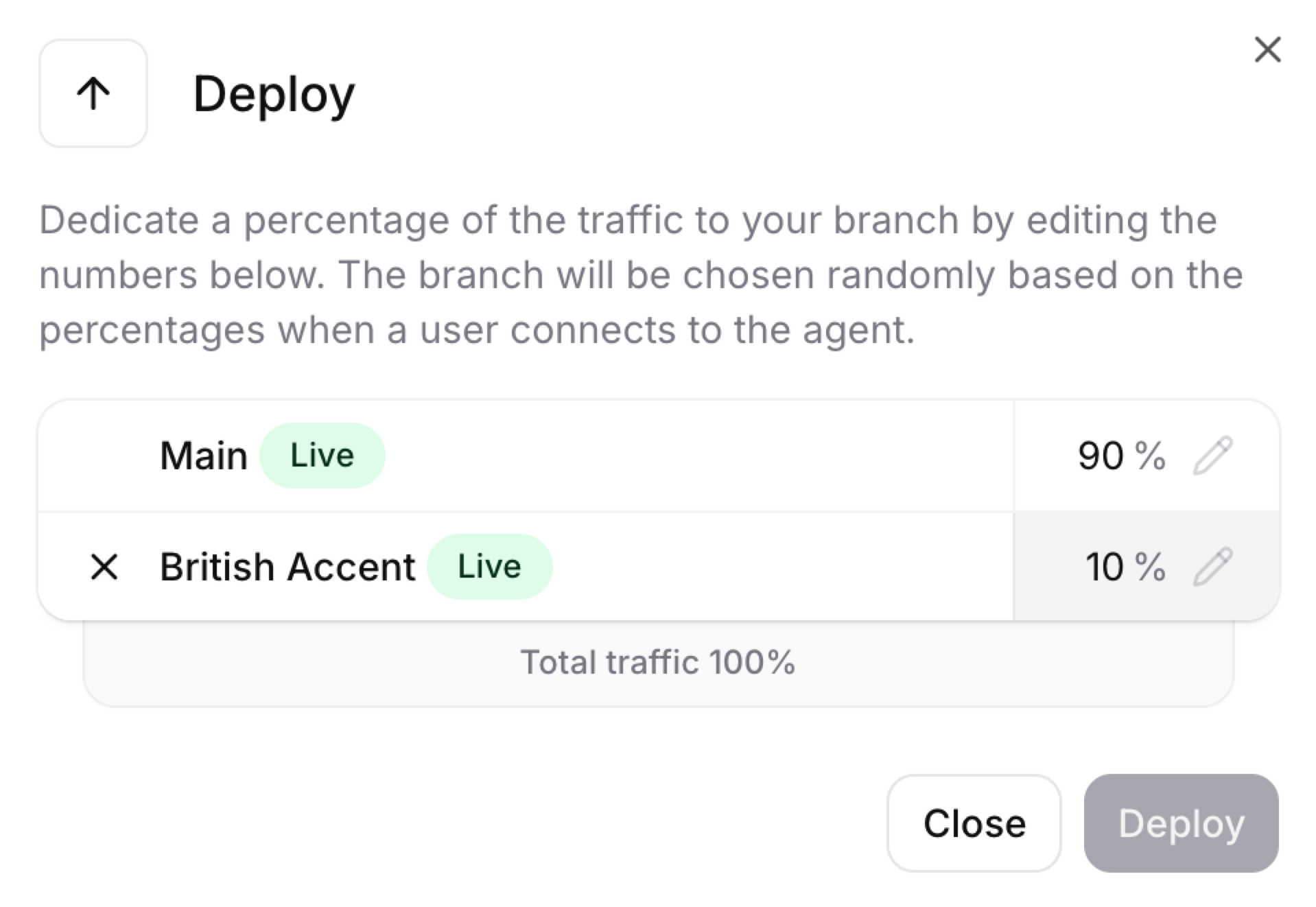
Define what percentage of live conversations should go to your variant. Start small (5–10%) to limit risk, then increase as confidence grows.
Click Edit traffic split and set the percentages for each branch. Percentages must total exactly 100%.
Measure impact
Compare variant performance against your baseline using the analytics dashboard. Click See analytics from the branches panel to jump directly to a branch-filtered view.
Teams can measure outcomes such as:
- CSAT
- Containment rate
- Conversion
- Average handling time
- Median agent response latency
- Cost per agent resolution
Promote the winner
Once a variant demonstrates measurable improvement, either increase its traffic share or merge it into the main branch to make it the new default. Full version history is preserved, enabling rollbacks if needed.
Traffic routing
Section titled “Traffic routing”Traffic is split between branches by percentage. Routing is deterministic based on the conversation ID, so the same user consistently reaches the same branch across sessions.
By default, traffic is randomized across the user base. If you use the API to initiate conversations, you can route specific cohorts to specific branches by controlling which conversations are initiated with which branch configuration.
Use cases
Section titled “Use cases”Experiments support continuous optimization across customer-facing and operational workflows.
Customer experience
Test whether a revised escalation flow improves CSAT without increasing handling time. Compare different greeting styles, empathy levels, or resolution strategies.
Revenue
Test whether a more direct tone or different qualification logic increases conversion. Experiment with objection handling, pricing presentation, or follow-up timing.
Operations
Measure whether tool logic changes reduce average handling time or infrastructure cost. Test different knowledge base configurations or workflow structures.
Each experiment is tied to a specific agent version, so every performance shift is attributable to a defined configuration change.
What you can test
Section titled “What you can test”Any aspect of agent configuration can be varied between branches:
| Category | Examples |
|---|---|
| System prompt | Tone, instructions, personality, guardrails |
| Workflow | Node structure, branching logic, escalation paths |
| Voice | Voice selection, TTS model, speed settings |
| Tools | Tool configuration, webhook tool logic, MCP servers |
| Knowledge base | Different documents, RAG settings |
| LLM | Model selection, temperature, max tokens |
| Evaluation criteria | Different success metrics per branch |
| Language | Language settings, multi-language configurations |
Best practices
Section titled “Best practices”Start with a hypothesis
Define what you expect to improve and how you’ll measure it before creating a variant. For example: “Changing the escalation prompt to include a summary of the issue will improve our resolution-rate evaluation criterion by 10%.”
Change one thing at a time
Isolating a single variable makes it clear what caused any performance difference. If you change the prompt, voice, and workflow simultaneously, you won’t know which change drove the result.
Set up evaluation criteria first
Configure success evaluation criteria before running experiments. These provide the structured metrics you need to compare variants objectively.
Start with small traffic percentages
Begin with 5–10% of traffic on the variant. This limits exposure if something goes wrong while still generating meaningful data.
Give experiments enough time
Allow enough conversations to accumulate before drawing conclusions. Small sample sizes lead to unreliable results. Monitor the analytics dashboard and wait for trends to stabilize.
Keep experiments short-lived
Merge or discard experiments promptly. Long-running branches become harder to merge and may drift from the main configuration.
Next steps
Section titled “Next steps”Versioning
Learn the underlying versioning system — branches, versions, and API reference
Analytics
Monitor experiment performance with the analytics dashboard
Success evaluation
Define custom success criteria to measure experiment outcomes
Testing
Set up automated tests before branching to establish a baseline