Post-call webhooks
Overview
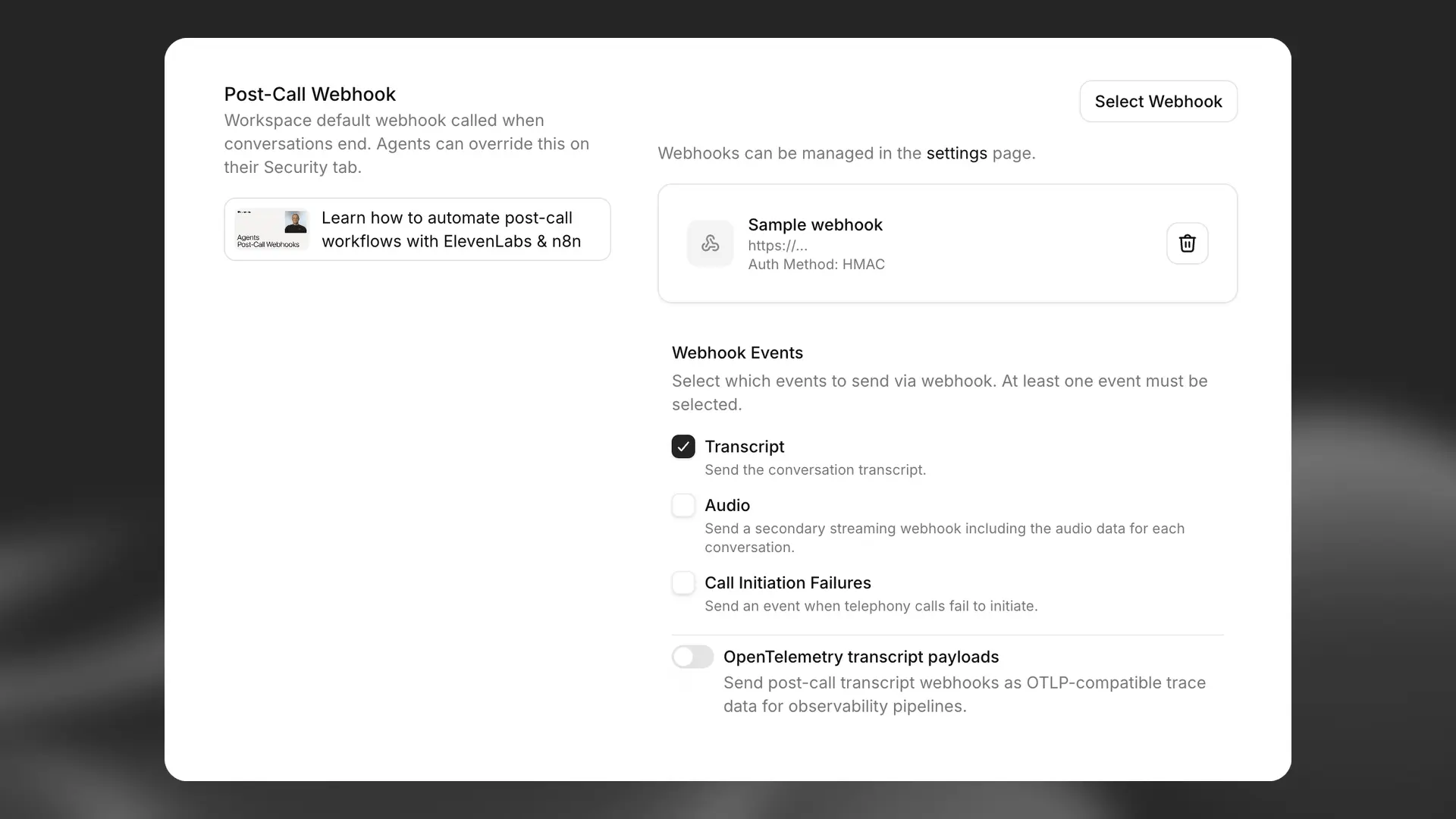
Section titled “Overview”Post-call Webhooks allow you to receive detailed information about a call after analysis is complete. When enabled, ElevenLabs will send a POST request to your specified endpoint with comprehensive call data.
ElevenLabs supports three types of post-call webhooks:
- Transcription webhooks (
post_call_transcription): Contains full conversation data including transcripts, analysis results, and metadata - Audio webhooks (
post_call_audio): Contains minimal data with base64-encoded audio of the full conversation - Call initiation failure webhooks (
call_initiation_failure): Contains information about failed call initiation attempts including failure reasons and metadata
Enabling post-call webhooks
Section titled “Enabling post-call webhooks”Post-call webhooks can be enabled for all agents in your workspace through the ElevenAgents settings page.
Authentication
Section titled “Authentication”It is important for the listener to validate all incoming webhooks. Webhooks currently support authentication via HMAC signatures. Set up HMAC authentication by:
- Securely storing the shared secret generated upon creation of the webhook
- Verifying the ElevenLabs-Signature header in your endpoint using the SDK
The JavaScript SDK exposes constructEvent; the Python SDK exposes construct_event with rawBody, sig_header, and secret (these are not named payload / signature in Python). Both verify the signature, validate the timestamp, and parse the JSON payload.
Python
Section titled “Python”Example webhook handler using FastAPI:
from dotenv import load_dotenv
from fastapi import FastAPI, Request
from fastapi.responses import JSONResponse
from elevenlabs.client import ElevenLabs
from elevenlabs.errors import BadRequestError
import os

load_dotenv()

app = FastAPI()
elevenlabs = ElevenLabs(
    api_key=os.getenv("ELEVENLABS_API_KEY"),
)

WEBHOOK_SECRET = os.getenv("WEBHOOK_SECRET")

@app.post("/webhook")
async def receive_message(request: Request):
    payload = await request.body()
    signature = request.headers.get("elevenlabs-signature")

    try:
        event = elevenlabs.webhooks.construct_event(
            rawBody=payload.decode("utf-8"),
            sig_header=signature,
            secret=WEBHOOK_SECRET,
        )
    except BadRequestError as e:
        return JSONResponse(content={"error": "Invalid signature"}, status_code=401)

    # construct_event returns a dict (parsed JSON), not an object with attributes
    if event.get("type") == "post_call_transcription":
        print(f"Received transcription: {event.get('data')}")

    return {"status": "received"}
JavaScript
Section titled “JavaScript”Express
Section titled “Express”Example webhook handler using Express:
import { ElevenLabsClient } from '@elevenlabs/elevenlabs-js';
import express from 'express';

const app = express();

const elevenlabs = new ElevenLabsClient();
const WEBHOOK_SECRET = process.env.WEBHOOK_SECRET;

// Use express.text() to preserve raw body for signature verification
app.post('/webhook', express.text({ type: 'application/json' }), async (req, res) => {
  const signature = req.headers['elevenlabs-signature'];
  const payload = req.body; // Raw string body

  let event;
  try {
    event = await elevenlabs.webhooks.constructEvent(payload, signature, WEBHOOK_SECRET);
  } catch (error) {
    return res.status(401).json({ error: 'Invalid signature' });
  }

  // Process the webhook event
  if (event.type === 'post_call_transcription') {
    console.log('Received transcription:', event.data);
  }

  res.status(200).json({ received: true });
});
Next.js
Section titled “Next.js”Example webhook handler using Next.js API route:
app/api/webhook/route.ts
import { NextResponse } from 'next/server';
import type { NextRequest } from 'next/server';
import { ElevenLabsClient } from '@elevenlabs/elevenlabs-js';

const elevenlabs = new ElevenLabsClient();
const WEBHOOK_SECRET = process.env.WEBHOOK_SECRET;

export async function POST(req: NextRequest) {
  const body = await req.text();
  const signature = req.headers.get('elevenlabs-signature');

  let event;
  try {
    event = await elevenlabs.webhooks.constructEvent(body, signature, WEBHOOK_SECRET);
  } catch (error) {
    return NextResponse.json({ error: 'Invalid signature' }, { status: 401 });
  }

  // Process the webhook event
  if (event.type === 'post_call_transcription') {
    console.log('Received transcription:', event.data);
  }

  return NextResponse.json({ received: true }, { status: 200 });
}
IP allowlisting
Section titled “IP allowlisting”For additional security, you can add ElevenLabs' static egress IPs to your allowlist. See IP allowlisting for the complete list of IP addresses.
Webhook response structure
Section titled “Webhook response structure”ElevenLabs sends three distinct types of post-call webhooks, each with different data structures:
Transcription webhooks (post_call_transcription)
Section titled “Transcription webhooks (post_call_transcription)”Contains comprehensive conversation data including full transcripts, analysis results, and metadata.
Top-level fields
Section titled “Top-level fields”| Field | Type | Description |
|---|---|---|
type |
string | Type of event (always post_call_transcription) |
data |
object | Conversation data using the ConversationHistoryCommonModel structure |
event_timestamp |
number | When this event occurred in unix time UTC |
Data object structure
Section titled “Data object structure”The data object contains:
| Field | Type | Description |
|---|---|---|
agent_id |
string | The ID of the agent that handled the call |
agent_name |
string | The name of the agent at the time of the conversation |
conversation_id |
string | Unique identifier for the conversation |
status |
string | Status of the conversation (e.g., "done") |
user_id |
string | User identifier if available |
branch_id |
string | The agent branch used for the conversation, if applicable |
version_id |
string | The ID of the agent version (snapshot) that was active during the call |
environment |
string | The environment used for resolving environment variables |
transcript |
array | Complete conversation transcript with turns |
metadata |
object | Call timing, costs, and phone details |
analysis |
object | Evaluation results and conversation summary |
conversation_initiation_client_data |
object | Configuration overrides and dynamic variables |
has_audio |
boolean | Whether the conversation has any audio available |
has_user_audio |
boolean | Whether user audio is available for the conversation |
has_response_audio |
boolean | Whether agent response audio is available for the conversation |
Audio webhooks (post_call_audio)
Section titled “Audio webhooks (post_call_audio)”Contains minimal data with the full conversation audio as base64-encoded MP3.
Top-level fields
Section titled “Top-level fields”| Field | Type | Description |
|---|---|---|
type |
string | Type of event (always post_call_audio) |
data |
object | Minimal audio data |
event_timestamp |
number | When this event occurred in unix time UTC |
Data object structure
Section titled “Data object structure”The data object contains only:
| Field | Type | Description |
|---|---|---|
agent_id |
string | The ID of the agent that handled the call |
conversation_id |
string | Unique identifier for the conversation |
full_audio |
string | Base64-encoded string containing the complete conversation audio in MP3 format |
Call initiation failure webhooks (call_initiation_failure)
Section titled “Call initiation failure webhooks (call_initiation_failure)”Contains information about telephony call initiation attempts, including failure reasons and telephony-provider metadata.
Top-level fields
Section titled “Top-level fields”| Field | Type | Description |
|---|---|---|
type |
string | Type of event (always call_initiation_failure) |
data |
object | Call initiation failure data |
event_timestamp |
number | When this event occurred in unix time UTC |
Data object structure
Section titled “Data object structure”The data object contains:
| Field | Type | Description |
|---|---|---|
agent_id |
string | The ID of the agent that was assigned to handle the call |
conversation_id |
string | Unique identifier for the conversation |
failure_reason |
string | The failure reason ("busy", "no-answer", "unknown") |
metadata |
object | Additional data provided by the telephony provider. |
Metadata object structure
Section titled “Metadata object structure”The metadata object structure varies depending on whether the outbound call was made via Twilio or via SIP trunking. The object includes a type field that distinguishes between the two, and a body field containing provider-specific details.
SIP metadata (type: "sip"):
| Field | Type | Required | Description |
|---|---|---|---|
type |
string | Yes | Provider type (always sip) |
body |
object | Yes | SIP-specific call failure information |
The body object for SIP metadata contains:
| Field | Type | Required | Description |
|---|---|---|---|
from_number |
number | Yes | The phone number of the party that initiated the call. |
to_number |
number | Yes | The phone number of the called party. |
sip_status_code |
number | Yes | SIP response status code (e.g., 486 for busy) |
error_reason |
string | Yes | Human-readable error description |
call_sid |
string | Yes | SIP call session identifier |
twirp_code |
string | No | Twirp error code if applicable |
sip_status |
string | No | SIP status text corresponding to the status code |
Twilio metadata (type: "twilio"):
| Field | Type | Required | Description |
|---|---|---|---|
type |
string | Yes | Provider type (always twilio) |
body |
object | Yes | Twilio StatusCallback body containing call details, documented here |
Example webhook payloads
Section titled “Example webhook payloads”Transcription webhook example
Section titled “Transcription webhook example”{
"type": "post_call_transcription",
"event_timestamp": 1739537297,
"data": {
"agent_id": "xyz",
"conversation_id": "abc",
"status": "done",
"user_id": "user123",
"transcript": [
{
"role": "agent",
"message": "Hey there angelo. How are you?",
"tool_calls": null,
"tool_results": null,
"feedback": null,
"time_in_call_secs": 0,
"conversation_turn_metrics": null
},
{
"role": "user",
"message": "Hey, can you tell me, like, a fun fact about 11 Labs?",
"tool_calls": null,
"tool_results": null,
"feedback": null,
"time_in_call_secs": 2,
"conversation_turn_metrics": null
},
{
"role": "agent",
"message": "I do not have access to fun facts about Eleven Labs. However, I can share some general information about the company. Eleven Labs is an AI voice technology platform that specializes in voice cloning and text-to-speech...",
"tool_calls": null,
"tool_results": null,
"feedback": null,
"time_in_call_secs": 9,
"conversation_turn_metrics": {
"convai_llm_service_ttfb": {
"elapsed_time": 0.3704247010173276
},
"convai_llm_service_ttf_sentence": {
"elapsed_time": 0.5551181449554861
}
}
}
],
"metadata": {
"start_time_unix_secs": 1739537297,
"call_duration_secs": 22,
"cost": 296,
"deletion_settings": {
"deletion_time_unix_secs": 1802609320,
"deleted_logs_at_time_unix_secs": null,
"deleted_audio_at_time_unix_secs": null,
"deleted_transcript_at_time_unix_secs": null,
"delete_transcript_and_pii": true,
"delete_audio": true
},
"feedback": {
"overall_score": null,
"likes": 0,
"dislikes": 0
},
"authorization_method": "authorization_header",
"charging": {
"dev_discount": true
},
"termination_reason": ""
},
"analysis": {
"evaluation_criteria_results": {},
"data_collection_results": {},
"call_successful": "success",
"transcript_summary": "The conversation begins with the agent asking how Angelo is, but Angelo redirects the conversation by requesting a fun fact about 11 Labs. The agent acknowledges they don't have specific fun facts about Eleven Labs but offers to provide general information about the company. They briefly describe Eleven Labs as an AI voice technology platform specializing in voice cloning and text-to-speech technology. The conversation is brief and informational, with the agent adapting to the user's request despite not having the exact information asked for."
},
"conversation_initiation_client_data": {
"conversation_config_override": {
"agent": {
"prompt": null,
"first_message": null,
"language": "en"
},
"tts": {
"voice_id": null
}
},
"custom_llm_extra_body": {},
"dynamic_variables": {
"user_name": "angelo"
},
"branch_id": null,
"environment": null
}
}
}Audio webhook example
Section titled “Audio webhook example”{
"type": "post_call_audio",
"event_timestamp": 1739537319,
"data": {
"agent_id": "xyz",
"conversation_id": "abc",
"full_audio": "SUQzBAAAAAAA...base64_encoded_mp3_data...AAAAAAAAAA=="
}
}Call initiation failure webhook examples
Section titled “Call initiation failure webhook examples”Twilio metadata example
Section titled “Twilio metadata example”{
"type": "call_initiation_failure",
"event_timestamp": 1759931652,
"data": {
"agent_id": "xyz",
"conversation_id": "abc",
"failure_reason": "busy",
"metadata": {
"type": "twilio",
"body": {
"Called": "+441111111111",
"ToState": "",
"CallerCountry": "US",
"Direction": "outbound-api",
"Timestamp": "Wed, 08 Oct 2025 13:54:12 +0000",
"CallbackSource": "call-progress-events",
"SipResponseCode": "487",
"CallerState": "WA",
"ToZip": "",
"SequenceNumber": "2",
"CallSid": "CA8367245817625617832576245724",
"To": "+441111111111",
"CallerZip": "98631",
"ToCountry": "GB",
"CalledZip": "",
"ApiVersion": "2010-04-01",
"CalledCity": "",
"CallStatus": "busy",
"Duration": "0",
"From": "+11111111111",
"CallDuration": "0",
"AccountSid": "AC37682153267845716245762454a",
"CalledCountry": "GB",
"CallerCity": "RAYMOND",
"ToCity": "",
"FromCountry": "US",
"Caller": "+11111111111",
"FromCity": "RAYMOND",
"CalledState": "",
"FromZip": "12345",
"FromState": "WA"
}
}
}
}SIP metadata example
Section titled “SIP metadata example”{
"type": "call_initiation_failure",
"event_timestamp": 1759931652,
"data": {
"agent_id": "xyz",
"conversation_id": "abc",
"failure_reason": "busy",
"metadata": {
"type": "sip",
"body": {
"from_number": "+441111111111",
"to_number": "+11111111111",
"sip_status_code": 486,
"error_reason": "INVITE failed: sip status: 486: Busy here (SIP 486)",
"call_sid": "d8e7f6a5-b4c3-4d5e-8f9a-0b1c2d3e4f5a",
"sip_status": "Busy here",
"twirp_code": "unavailable"
}
}
}
}Audio webhook delivery
Section titled “Audio webhook delivery”Audio webhooks are delivered separately from transcription webhooks and contain only the essential fields needed to identify the conversation along with the base64-encoded audio data.
Streaming delivery
Section titled “Streaming delivery”Audio webhooks are delivered as streaming HTTP requests with the transfer-encoding: chunked header to handle large audio files efficiently.
Processing audio webhooks
Section titled “Processing audio webhooks”Since audio webhooks are delivered via chunked transfer encoding, you'll need to handle streaming data properly:
import base64
import json
from aiohttp import web

async def handle_webhook(request):

    # Check if this is a chunked/streaming request
    if request.headers.get("transfer-encoding", "").lower() == "chunked":
        # Read streaming data in chunks
        chunked_body = bytearray()
        while True:
            chunk = await request.content.read(8192)  # 8KB chunks
            if not chunk:
                break
            chunked_body.extend(chunk)

        # Parse the complete payload
        request_body = json.loads(chunked_body.decode("utf-8"))
    else:
        # Handle regular requests
        body_bytes = await request.read()
        request_body = json.loads(body_bytes.decode('utf-8'))

    # Process different webhook types
    if request_body["type"] == "post_call_transcription":
        # Handle transcription webhook with full conversation data
        handle_transcription_webhook(request_body["data"])
    elif request_body["type"] == "post_call_audio":
        # Handle audio webhook with minimal data
        handle_audio_webhook(request_body["data"])
    elif request_body["type"] == "call_initiation_failure":
        # Handle call initiation failure webhook
        handle_call_initiation_failure_webhook(request_body["data"])

    return web.json_response({"status": "ok"})

def handle_audio_webhook(data):
    # Decode base64 audio data
    audio_bytes = base64.b64decode(data["full_audio"])

    # Save or process the audio file
    conversation_id = data["conversation_id"]
    with open(f"conversation_{conversation_id}.mp3", "wb") as f:
        f.write(audio_bytes)

def handle_call_initiation_failure_webhook(data):
    # Handle call initiation failure events
    agent_id = data["agent_id"]
    conversation_id = data["conversation_id"]
    failure_reason = data.get("failure_reason")
    metadata = data.get("metadata", {})

    # Log the failure for monitoring
    print(f"Call failed for agent {agent_id}, conversation {conversation_id}")
    print(f"Failure reason: {failure_reason}")

    # Access provider-specific metadata
    provider_type = metadata.get("type")
    body = metadata.get("body", {})
    if provider_type == "sip":
        print(f"SIP status code: {body.get('sip_status_code')}")
        print(f"Error reason: {body.get('error_reason')}")
    elif provider_type == "twilio":
        print(f"Twilio CallSid: {body.get('CallSid')}")
        print(f"Call status: {body.get('CallStatus')}")

    # Update your system with the failure information
    # e.g., mark lead as "call_failed" in CRM
import fs from "fs";

app.post("/webhook/elevenlabs", (req, res) => {
  let body = "";

  // Handle chunked/streaming requests
  req.on("data", (chunk) => {
    body += chunk;
  });

  req.on("end", () => {
    try {
      const requestBody = JSON.parse(body);

      // Process different webhook types
      if (requestBody.type === "post_call_transcription") {
        // Handle transcription webhook with full conversation data
        handleTranscriptionWebhook(requestBody.data);
      } else if (requestBody.type === "post_call_audio") {
        // Handle audio webhook with minimal data
        handleAudioWebhook(requestBody.data);
      } else if (requestBody.type === "call_initiation_failure") {
        // Handle call initiation failure webhook
        handleCallFailureWebhook(requestBody.data);
      }

      res.status(200).json({ status: "ok" });
    } catch (error) {
      console.error("Error processing webhook:", error);
      res.status(400).json({ error: "Invalid JSON" });
    }
  });
});

function handleAudioWebhook(data) {
  // Decode base64 audio data
  const audioBytes = Buffer.from(data.full_audio, "base64");

  // Save or process the audio file
  const conversationId = data.conversation_id;
  fs.writeFileSync(`conversation_${conversationId}.mp3`, audioBytes);
}

function handleCallFailureWebhook(data) {
  // Handle call initiation failure events
  const { agent_id, conversation_id, failure_reason, metadata } = data;

  // Log the failure for monitoring
  console.log(`Call failed for agent ${agent_id}, conversation ${conversation_id}`);
  console.log(`Failure reason: ${failure_reason}`);

  // Access provider-specific metadata
  const body = metadata.body || {};
  if (metadata?.type === "sip") {
    console.log(`SIP status code: ${body.sip_status_code}`);
    console.log(`Error reason: ${body.error_reason}`);
  } else if (metadata?.type === "twilio") {
    console.log(`Twilio CallSid: ${body.CallSid}`);
    console.log(`Call status: ${body.CallStatus}`);
  }

  // Update your system with the failure information
  // e.g., mark lead as "call_failed" in CRM
}Use cases
Section titled “Use cases”Automated call follow-ups
Section titled “Automated call follow-ups”Post-call webhooks enable you to build automated workflows that trigger immediately after a call ends. Here are some practical applications:
CRM integration
Section titled “CRM integration”Update your customer relationship management system with conversation data as soon as a call completes:
// Example webhook handler
app.post("/webhook/elevenlabs", async (req, res) => {
  // HMAC validation code

  const { data } = req.body;

  // Extract key information
  const userId = data.metadata.user_id;
  const transcriptSummary = data.analysis.transcript_summary;
  const callSuccessful = data.analysis.call_successful;

  // Update CRM record
  await updateCustomerRecord(userId, {
    lastInteraction: new Date(),
    conversationSummary: transcriptSummary,
    callOutcome: callSuccessful,
    fullTranscript: data.transcript,
  });

  res.status(200).send("Webhook received");
});
Stateful conversations
Section titled “Stateful conversations”Maintain conversation context across multiple interactions by storing and retrieving state:
- When a call starts, pass in your user id as a dynamic variable.
- When a call ends, set up your webhook endpoint to store conversation data in your database, based on the extracted user id from the dynamic_variables.
- When the user calls again, you can retrieve this context and pass it to the new conversation into a {{previous_topics}} dynamic variable.
- This creates a seamless experience where the agent "remembers" previous interactions
// Store conversation state when call ends
app.post("/webhook/elevenlabs", async (req, res) => {
  // HMAC validation code

  const { data } = req.body;
  const userId = data.metadata.user_id;

  // Store conversation state
  await db.userStates.upsert({
    userId,
    lastConversationId: data.conversation_id,
    lastInteractionTimestamp: data.metadata.start_time_unix_secs,
    conversationHistory: data.transcript,
    previousTopics: extractTopics(data.analysis.transcript_summary),
  });

  res.status(200).send("Webhook received");
});

// When initiating a new call, retrieve and use the state
async function initiateCall(userId) {
  // Get user's conversation state
  const userState = await db.userStates.findOne({ userId });

  // Start new conversation with context from previous calls
  return await elevenlabs.startConversation({
    agent_id: "xyz",
    conversation_id: generateNewId(),
    dynamic_variables: {
      user_name: userState.name,
      previous_conversation_id: userState.lastConversationId,
      previous_topics: userState.previousTopics.join(", "),
    },
  });
}