Topic discovery
Understand recurring conversation topics, sentiment, and success trends.
Topic discovery groups completed agent conversations into recurring topics.
Use it to understand what users discuss with your agents, how those topics change over time, and which conversations contributed to each topic.
Overview
Section titled “Overview”Topic discovery helps you answer questions such as:
- Which topics are users discussing most often?
- Which topics have positive or negative sentiment?
- Which topics are succeeding or failing against your configured evaluation criteria?
- Which conversations contributed to a topic?
Discovered topics
Automatically groups similar conversations into recurring topics.
Topic metrics
Shows volume, sentiment, and success trends for each discovered topic.
Conversation drill-down
Opens the conversations behind a topic so you can review specific examples.
Time windows
Compares topics across the selected reporting period, such as 1, 7, or 30 days.
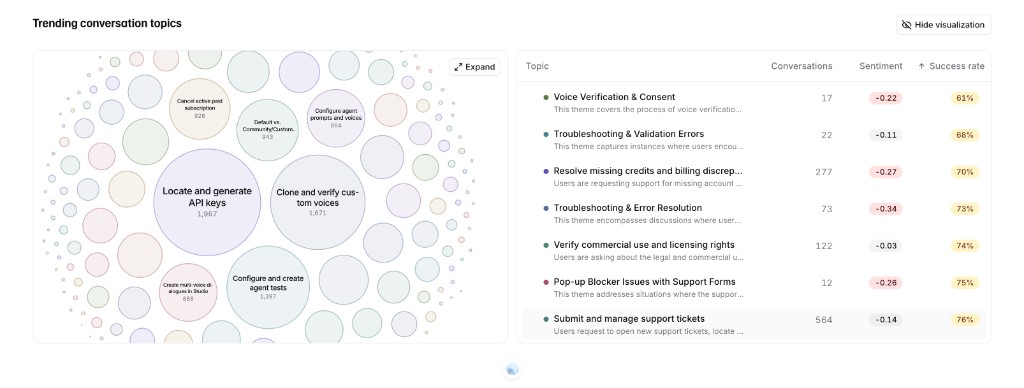
Topic discovery showing a topic visualization and table
Enable topic discovery
Section titled “Enable topic discovery”To enable topic discovery, open your agent’s Analysis settings and turn on Topic discovery.
The same settings page also includes Sentiment analysis, which adds sentiment metrics to conversations and discovered topics.
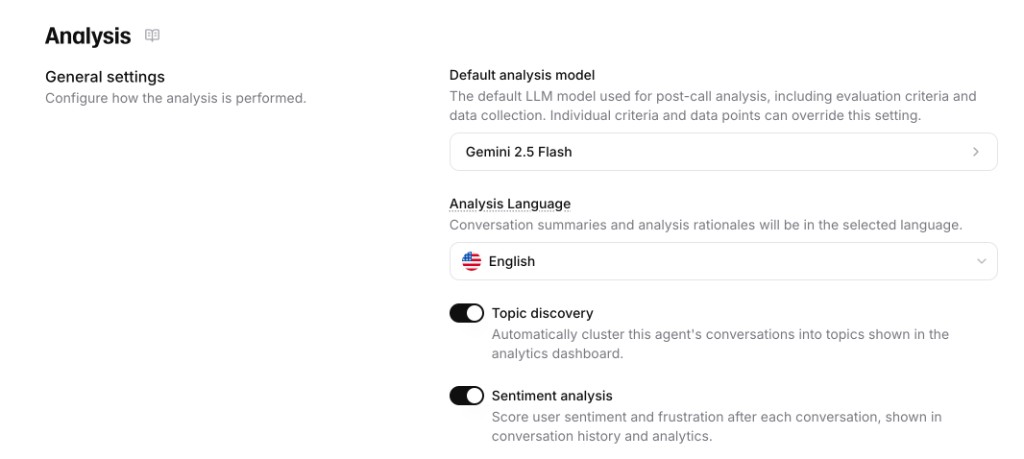
Analysis settings with topic discovery and sentiment analysis enabled
How topic discovery works
Section titled “How topic discovery works”Topic discovery runs after conversations are analyzed. It reviews conversation transcripts for an agent and groups conversations with similar meaning into topics.
Each topic represents a recurring user intent or issue, such as billing questions, booking changes, product availability, or short non-engaged calls.
Conversation analysis runs
After a conversation ends, the platform analyzes the transcript and stores the conversation-level results.
Topics are discovered
The platform identifies groups of conversations that discuss similar subjects.
Topics are matched over time
New topic groups are matched to existing topics when they describe the same recurring subject. This keeps the same topic stable across reporting windows.
Metrics are added
Spotlight aggregates conversation volume, sentiment, and success evaluation results for each topic.
Topic metrics
Section titled “Topic metrics”Topic metrics are calculated from the conversations assigned to each topic.
- Conversations: Number of conversations assigned to the topic in the selected time window.
- Sentiment: Aggregate user sentiment for the conversations in the topic.
- Success rate: Percentage of evaluated conversations that passed your configured success criteria.
Sentiment
Section titled “Sentiment”Sentiment is aggregated from conversation-level sentiment analysis. It helps you identify topics where users are usually positive, neutral, or negative.
Use sentiment to prioritize topics that combine high volume with negative user experience.
Success rate
Section titled “Success rate”Success rate is calculated from Success evaluation results.
The rate uses conversations with a success or failure result. Conversations with an unknown result are not counted in the success rate because the platform could not determine whether the criterion passed.
Time windows
Section titled “Time windows”Spotlight aggregates topics over the selected time window.
Short windows help you inspect recent changes. Longer windows help you identify recurring patterns and higher-confidence trends.
When you change the time window, the same topic can show different volume, sentiment, and success rate because the underlying conversation set changes.
Conversation drill-down
Section titled “Conversation drill-down”Select a topic to open the conversations assigned to it.
Use drill-down to:
- Review real examples behind a metric.
- Understand why a topic has negative sentiment.
- Find conversations that failed an evaluation criterion.
- Identify missing knowledge base content or prompt instructions.
Historical data
Section titled “Historical data”Topic discovery updates automatically for new conversations after it is enabled.
Historical conversations only show complete topic metrics if the required analysis results already exist for those conversations. For example:
- Sentiment requires conversation-level sentiment analysis.
- Success rate requires success evaluation results.
- Topic drill-down requires conversations to be linked to the discovered topic.
If older conversations show topics without sentiment or success rate, the underlying historical analysis may not have been generated for that period.
Best practices
Section titled “Best practices”Start with clear evaluation criteria
Configure success criteria that match the actual goal of the conversation. Vague criteria make topic success rates harder to interpret.
Use topic volume and sentiment together
High-volume topics with negative sentiment usually deserve review before low-volume topics with similar sentiment.
Compare time windows
Use short windows for recent regressions and longer windows for stable product or support trends.
Use drill-down before changing prompts
A topic can contain several user situations. Review example conversations before changing the system prompt, tools, or knowledge base.