SMS OTP verification
Overview
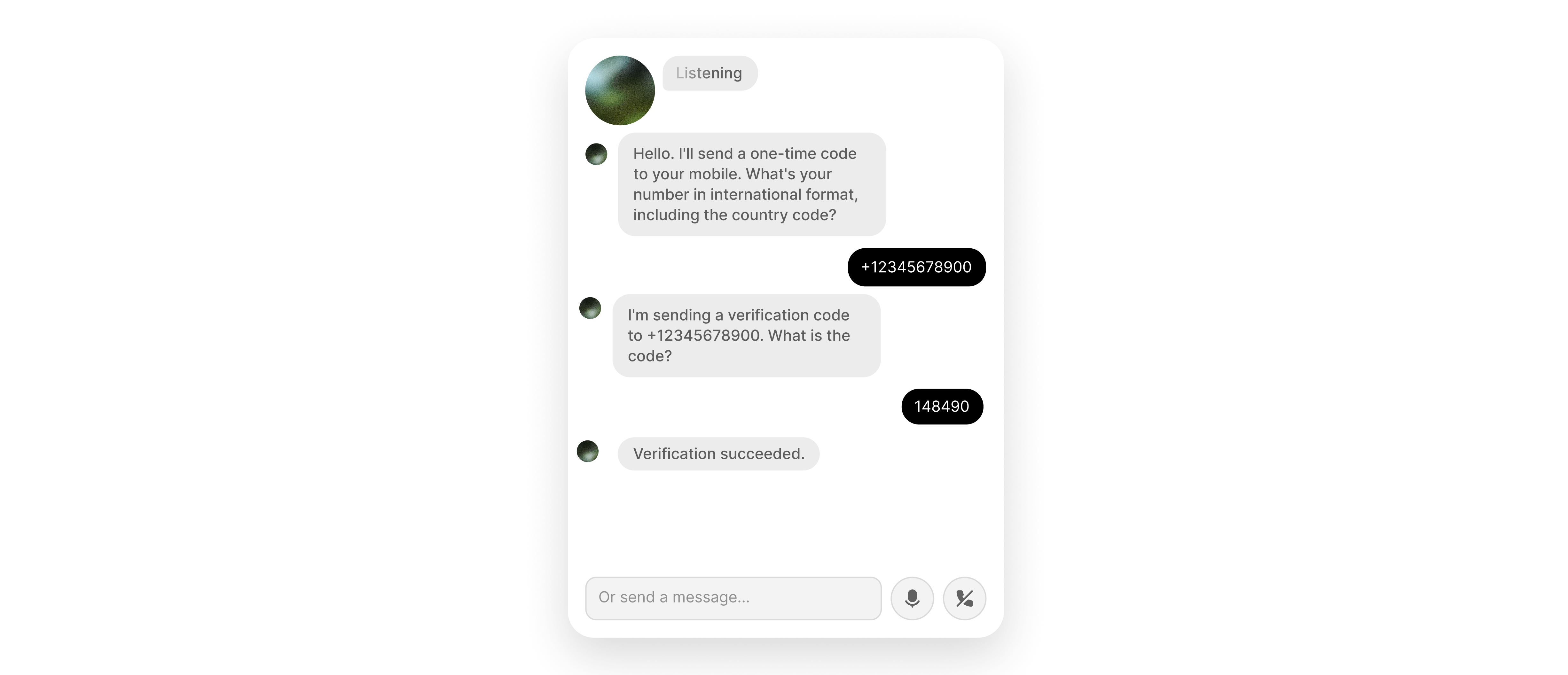
Section titled “Overview”This guide shows you how to integrate Twilio Verify with your ElevenLabs agent so you can send an OTP to a caller's phone number and verify the code they read back during a live voice conversation.
You will learn how to:
- Create a Twilio Verify service and Base64-encode your credentials for authentication.
- Configure two webhook tools (
send_SMS_verificationandcheck_SMS_verification) in the dashboard, with the Agents CLI, or using the ElevenLabs API. - Authenticate both webhook calls using an
Authorizationheader with a secret value. - Enable the
skip_turnsystem tool so the agent waits when the caller has not received the code yet.
Prerequisites
Section titled “Prerequisites”- A Twilio account with Twilio Verify enabled. If Verify is not available in your Twilio Console, request access through Twilio support or your Twilio account team.
- If your Twilio account is in trial mode, the destination phone number must be a verified caller ID in Twilio.
Log in to the Twilio Console
Section titled “Log in to the Twilio Console”Open the Twilio Console.
Create an Authenticate (Verify) service
Section titled “Create an Authenticate (Verify) service”In the left sidebar, choose Add + and create an Authenticate (Verify) service.
Name the service
Section titled “Name the service”Give it a descriptive name (for example, ElevenLabs OTP).
Copy the Verify Service SID
Section titled “Copy the Verify Service SID”Open the service Settings page and copy the Verify Service SID. It starts with VA and is different from your Account SID.
You can use the Twilio API Explorer in the console to test requests before you attach them to your agent.
Encode credentials and configure webhook tools
Section titled “Encode credentials and configure webhook tools”Encode your Twilio credentials for Basic authentication
Section titled “Encode your Twilio credentials for Basic authentication”Twilio Verify uses HTTP Basic authentication with your Account SID as the username and Auth Token as the password. Find both under Account Info on the Twilio Console home page.
In your shell, Base64-encode ACCOUNT_SID:AUTH_TOKEN (colon-separated, no spaces):
printf '%s' 'YOUR_ACCOUNT_SID:YOUR_AUTH_TOKEN' | base64Copy the output. The full Authorization header value is the word Basic, a single space, and that Base64 string. Store it as a tool secret in the next steps.
Basic dkFDxxxxxxxxxxxxxxxxxxxxxxxxxxxxxxxx==Configure the `send_SMS_verification` and `check_SMS_verification` tools
Section titled “Configure the `send_SMS_verification` and `check_SMS_verification` tools”send_SMS_verification calls Twilio Verify to send an SMS OTP. check_SMS_verification submits the digits the caller speaks. Both require the same Verify Service SID and the same Authorization secret.
Add via the dashboard
Section titled “Add via the dashboard”send_SMS_verification
Section titled “send_SMS_verification”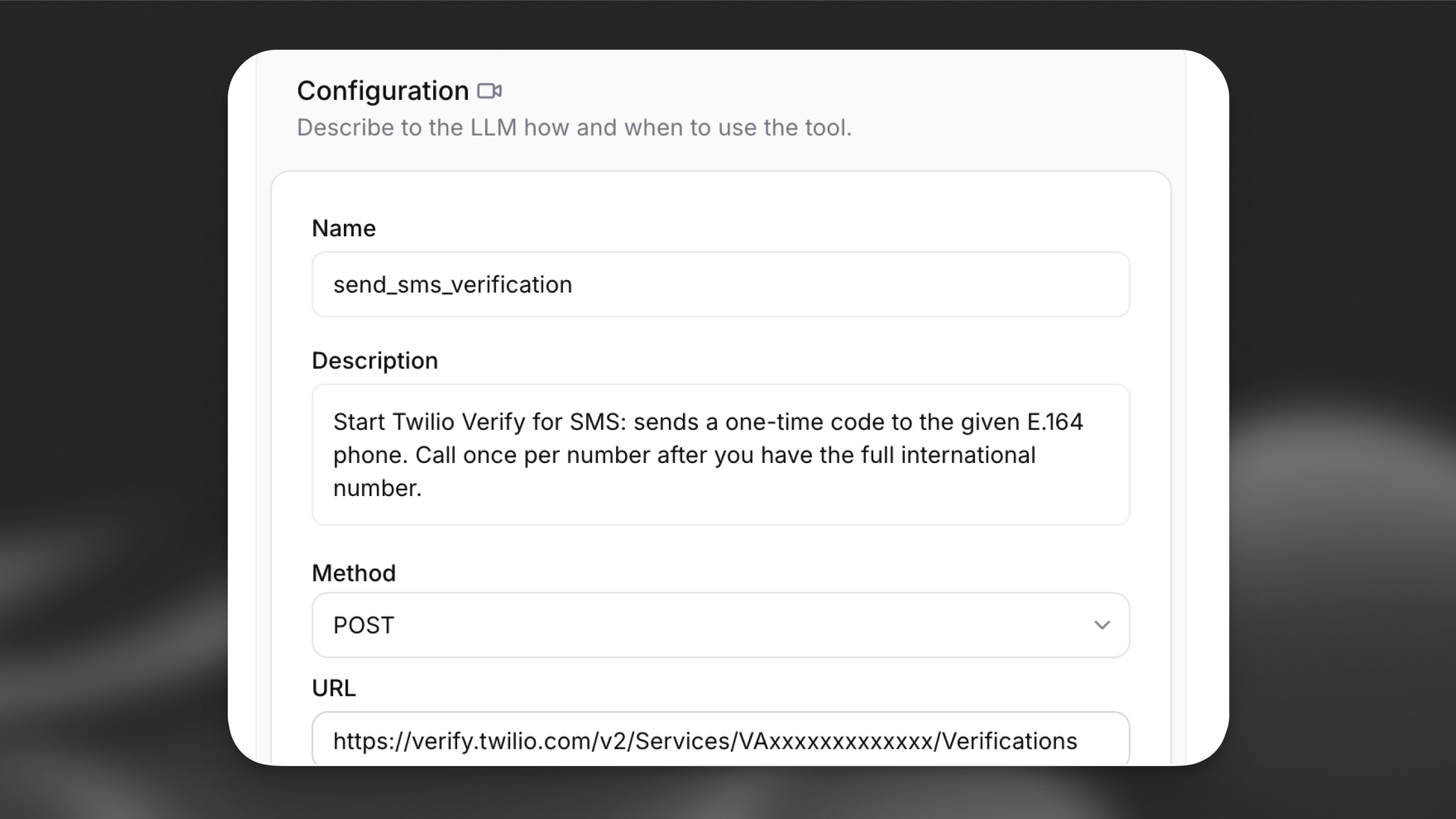
In the Agent section of your agent settings, choose Add Tool and select Webhook.
| Field | Value |
|---|---|
| Name | send_SMS_verification |
| Description | Sends an OTP verification code via SMS to the provided phone number |
| Method | POST |
| URL | https://verify.twilio.com/v2/Services/YOUR_VERIFY_SERVICE_SID/Verifications |
Replace YOUR_VERIFY_SERVICE_SID with the VA... SID from the first step.
Authentication header: Under Headers, add Authorization as type Secret and paste the full value (Basic plus Base64). See Webhook tools.
Body parameters: Set Content type to URL-encoded (application/x-www-form-urlencoded). Add parameters with LLM Prompt as the value type:
| Data type | Identifier | Description |
|---|---|---|
string |
To |
Caller phone number in E.164 format (for example +14155552671) |
string |
Channel |
Delivery channel; use sms |
check_SMS_verification
Section titled “check_SMS_verification”Add a second webhook tool:
| Field | Value |
|---|---|
| Name | check_SMS_verification |
| Description | Checks whether the OTP code provided by the caller is valid |
| Method | POST |
| URL | https://verify.twilio.com/v2/Services/YOUR_VERIFY_SERVICE_SID/VerificationCheck |
Use the same Verify Service SID and the same Authorization secret as for send_SMS_verification.
Body parameters: URL-encoded. Add To (E.164) and Code (OTP digits) with LLM Prompt.
Add via the CLI
Section titled “Add via the CLI”Add tool config files
Section titled “Add tool config files”Save the send tool as tool_configs/send_SMS_verification.json (replace YOUR_VERIFY_SERVICE_SID with your VA... SID):
{
  "type": "webhook",
  "name": "send_SMS_verification",
  "description": "Sends an OTP verification code via SMS to the provided phone number",
  "api_schema": {
    "url": "https://verify.twilio.com/v2/Services/YOUR_VERIFY_SERVICE_SID/Verifications",
    "method": "POST",
    "content_type": "application/x-www-form-urlencoded",
    "request_headers": {
      "Authorization": { "secret_id": "YOUR_SECRET_ID" }
    },
    "request_body_schema": {
      "type": "object",
      "description": "Twilio Verify start verification parameters",
      "required": ["To", "Channel"],
      "properties": {
        "To": {
          "type": "string",
          "description": "Caller phone number in E.164 format (for example +14155552671)"
        },
        "Channel": {
          "type": "string",
          "constant_value": "sms"
        }
      }
    }
  }
}
Save the check tool as tool_configs/check_SMS_verification.json:
{
  "type": "webhook",
  "name": "check_SMS_verification",
  "description": "Checks whether the OTP code provided by the caller is valid",
  "api_schema": {
    "url": "https://verify.twilio.com/v2/Services/YOUR_VERIFY_SERVICE_SID/VerificationCheck",
    "method": "POST",
    "content_type": "application/x-www-form-urlencoded",
    "request_headers": {
      "Authorization": { "secret_id": "YOUR_SECRET_ID" }
    },
    "request_body_schema": {
      "type": "object",
      "description": "Twilio Verify verification check parameters",
      "required": ["To", "Code"],
      "properties": {
        "To": {
          "type": "string",
          "description": "Same caller number in E.164 format"
        },
        "Code": {
          "type": "string",
          "description": "The OTP digits the caller provided"
        }
      }
    }
  }
}
Register the tools
Section titled “Register the tools”elevenlabs tools add "send_SMS_verification" --type "webhook" --config-path ./tool_configs/send_SMS_verification.json
elevenlabs tools add "check_SMS_verification" --type "webhook" --config-path ./tool_configs/check_SMS_verification.jsonAttach the tools to your agent
Section titled “Attach the tools to your agent”Edit agent_configs/<agent-name>.json. Under conversation_config.agent.prompt, set tool_ids to include both tools (use the IDs from tools.json or from elevenlabs agents tools list). Then push:
elevenlabs agents push --agent "<agent-name>"Add via the API
Section titled “Add via the API”from elevenlabs import ElevenLabs, ToolRequestModel
elevenlabs = ElevenLabs()
send_sms = elevenlabs.conversational_ai.tools.create(
request=ToolRequestModel(
tool_config={
"type": "webhook",
"name": "send_SMS_verification",
"description": "Sends an OTP verification code via SMS to the provided phone number",
"api_schema": {
"url": "https://verify.twilio.com/v2/Services/YOUR_VERIFY_SERVICE_SID/Verifications",
"method": "POST",
"content_type": "application/x-www-form-urlencoded",
"request_headers": {
"Authorization": {"secret_id": "YOUR_SECRET_ID"},
},
"request_body_schema": {
"type": "object",
"description": "Twilio Verify start verification parameters",
"required": ["To", "Channel"],
"properties": {
"To": {
"type": "string",
"description": "Caller phone number in E.164 format (for example +14155552671)",
},
"Channel": {
"type": "string",
"constant_value": "sms",
},
},
},
},
}
)
)
check_sms = elevenlabs.conversational_ai.tools.create(
request=ToolRequestModel(
tool_config={
"type": "webhook",
"name": "check_SMS_verification",
"description": "Checks whether the OTP code provided by the caller is valid",
"api_schema": {
"url": "https://verify.twilio.com/v2/Services/YOUR_VERIFY_SERVICE_SID/VerificationCheck",
"method": "POST",
"content_type": "application/x-www-form-urlencoded",
"request_headers": {
"Authorization": {"secret_id": "YOUR_SECRET_ID"},
},
"request_body_schema": {
"type": "object",
"description": "Twilio Verify verification check parameters",
"required": ["To", "Code"],
"properties": {
"To": {
"type": "string",
"description": "Same caller number in E.164 format",
},
"Code": {
"type": "string",
"description": "The OTP digits the caller provided",
},
},
},
},
}
)
)
elevenlabs.conversational_ai.agents.update(
agent_id="agent_7101k5zvyjhmfg983brhmhkd98n6",
conversation_config={
"agent": {
"prompt": {
"tool_ids": [send_sms.id, check_sms.id],
},
},
},
)import { ElevenLabsClient } from "@elevenlabs/elevenlabs-js";
const elevenlabs = new ElevenLabsClient();
const sendSms = await elevenlabs.conversationalAi.tools.create({
toolConfig: {
type: "webhook",
name: "send_SMS_verification",
description: "Sends an OTP verification code via SMS to the provided phone number",
apiSchema: {
url: "https://verify.twilio.com/v2/Services/YOUR_VERIFY_SERVICE_SID/Verifications",
method: "POST",
contentType: "application/x-www-form-urlencoded",
requestHeaders: {
Authorization: { secretId: "YOUR_SECRET_ID" },
},
requestBodySchema: {
type: "object",
description: "Twilio Verify start verification parameters",
required: ["To", "Channel"],
properties: {
To: {
type: "string",
description: "Caller phone number in E.164 format (for example +14155552671)",
},
Channel: {
type: "string",
constantValue: "sms",
},
},
},
},
},
});
const checkSms = await elevenlabs.conversationalAi.tools.create({
toolConfig: {
type: "webhook",
name: "check_SMS_verification",
description: "Checks whether the OTP code provided by the caller is valid",
apiSchema: {
url: "https://verify.twilio.com/v2/Services/YOUR_VERIFY_SERVICE_SID/VerificationCheck",
method: "POST",
contentType: "application/x-www-form-urlencoded",
requestHeaders: {
Authorization: { secretId: "YOUR_SECRET_ID" },
},
requestBodySchema: {
type: "object",
description: "Twilio Verify verification check parameters",
required: ["To", "Code"],
properties: {
To: {
type: "string",
description: "Same caller number in E.164 format",
},
Code: {
type: "string",
description: "The OTP digits the caller provided",
},
},
},
},
},
});
await elevenlabs.conversationalAi.agents.update("agent_7101k5zvyjhmfg983brhmhkd98n6", {
conversationConfig: {
agent: {
prompt: {
toolIds: [sendSms.id, checkSms.id],
},
},
},
});Enable the `skip_turn` system tool
Section titled “Enable the `skip_turn` system tool”Callers often need a moment to receive the SMS before they can read the code. Without skip_turn, the agent may talk over the pause or repeat prompts.
Add via the dashboard
Section titled “Add via the dashboard”In Tools, choose Add Tool, select System tool, and enable Skip turn. No further configuration is required.
Add via the CLI
Section titled “Add via the CLI”In agent_configs/<agent-name>.json, under conversation_config.agent.prompt, set built_in_tools.skip_turn to null (defaults) so Skip turn is enabled, then run:
elevenlabs agents push --agent "<agent-name>"Add via the API
Section titled “Add via the API”from elevenlabs import ElevenLabs
elevenlabs = ElevenLabs()
elevenlabs.conversational_ai.agents.update(
agent_id="agent_7101k5zvyjhmfg983brhmhkd98n6",
conversation_config={
"agent": {
"prompt": {
"built_in_tools": {
"skip_turn": None,
},
},
},
},
)import { ElevenLabsClient } from "@elevenlabs/elevenlabs-js";
const elevenlabs = new ElevenLabsClient();
await elevenlabs.conversationalAi.agents.update("agent_7101k5zvyjhmfg983brhmhkd98n6", {
conversationConfig: {
agent: {
prompt: {
builtInTools: {
skipTurn: null,
},
},
},
},
});If you already set tool_ids when creating the webhook tools, merge built_in_tools into the same prompt object instead of replacing it.
Add guidance to the system prompt so the model knows when to call it, for example:
When the caller indicates they are still waiting to receive the OTP code — for example,
"hold on", "I haven't received it yet", or "give me a second" — use the skip_turn tool
to wait silently rather than speaking. Do not repeat the prompt or ask for the code again
until the caller indicates they are ready.
See Skip turn for details.
Orchestrate the flow in the system prompt
Section titled “Orchestrate the flow in the system prompt”Use a system prompt that sequences the tools clearly, for example:
You are a secure verification agent. When you need to verify a caller's identity:

1. Ask for their phone number if you do not already have it.
2. Standardize the number to E.164 for tool calls: a leading plus, country code, then digits only, no spaces (for example +14155552671).
3. Call send_SMS_verification with their number and Channel set to "sms".
4. Tell the caller: "I've sent a verification code to your phone. Please read it out when you're ready."
5. If the caller says they haven't received the code yet or asks for a moment, use skip_turn to wait silently.
6. Once the caller provides the code, call check_SMS_verification with their number and the code.
7. If the response status is "approved", proceed with the verified flow.
8. If the code is invalid, let the caller know and offer to resend.
Troubleshooting
Section titled “Troubleshooting”Twilio 60200 — Invalid parameter (HTTP 400)
Section titled “Twilio 60200 — Invalid parameter (HTTP 400)”Twilio may return a body like this when the request URL or body does not match what the Verify API expects:
{
  "code": 60200,
  "message": "Invalid parameter",
  "more_info": "https://www.twilio.com/docs/errors/60200",
  "status": 400
}
What to check: The path must use your Verify Service SID (VA...) from the Authenticate (Verify) service settings. Putting your Account SID (AC...) in .../Services/{Sid}/... is a frequent cause of 60200. See Twilio’s 60200 documentation for other invalid-parameter cases.
Twilio 20003 — Authentication Error — No credentials provided (HTTP 401)
Section titled “Twilio 20003 — Authentication Error — No credentials provided (HTTP 401)”When the Authorization header is missing, malformed, or not sent, Twilio can respond with:
{
  "code": 20003,
  "message": "Authentication Error - No credentials provided",
  "more_info": "https://www.twilio.com/docs/errors/20003",
  "status": 401
}
What to check: The tool must send an Authorization header whose value is the full Basic <base64> string (including the word Basic and a single space before the Base64 output). The Base64 input must be exactly ACCOUNT_SID:AUTH_TOKEN with no extra spaces or newlines. Confirm the secret is attached to this header on both webhook tools. See 20003.
Other issues
Section titled “Other issues”- Number rejected in trial mode: In the Twilio Console, open Verified phone numbers and ensure the destination number is listed before you test.
- Agent talks over the caller: Confirm Skip turn is enabled and the system prompt tells the model to use
skip_turnwhen the caller needs time.