Register Twilio calls
Advanced
This guide covers an advanced integration pattern for developers who need full control over their Twilio infrastructure. For a simpler setup, consider using the native Twilio integration which handles configuration automatically.
When to use each approach
Section titled “When to use each approach”Before diving in, understand the trade-offs between the native integration and the register call approach:
| Feature | Native integration | Register call |
|---|---|---|
| Ease of setup | Easier | More complex |
| Call transfers | Supported | Not supported |
| Custom Twilio logic | Limited | Full control |
| Phone number management | Through ElevenLabs | Through Twilio |
Overview
Section titled “Overview”The register call endpoint allows you to use your own Twilio infrastructure while leveraging ElevenLabs agents for the conversation. Instead of importing your Twilio number into ElevenLabs, you maintain full control of your Twilio setup and use the ElevenLabs API to register calls and receive TwiML for connecting them to your agents.
This approach is ideal when you:
- Need to maintain your existing Twilio infrastructure and workflows
- Want programmatic control over call routing and handling
- Have complex call flows that require custom Twilio logic before connecting to an agent
- Need to integrate ElevenLabs agents into an existing telephony system
How it works
Section titled “How it works”- Your server receives an inbound call or initiates an outbound call via Twilio
- Your server calls the ElevenLabs register call endpoint with agent and call details
- ElevenLabs returns TwiML that connects the call to your agent via WebSocket
- You return this TwiML to Twilio to establish the connection
Prerequisites
Section titled “Prerequisites”- An ElevenLabs account
- A configured ElevenLabs Conversational Agent (create one here)
- A Twilio account with an active phone number
- Your agent configured with μ-law 8000 Hz audio format (see agent configuration)
Agent configuration
Section titled “Agent configuration”Before using the register call endpoint, configure your agent to use the correct audio format supported by Twilio.
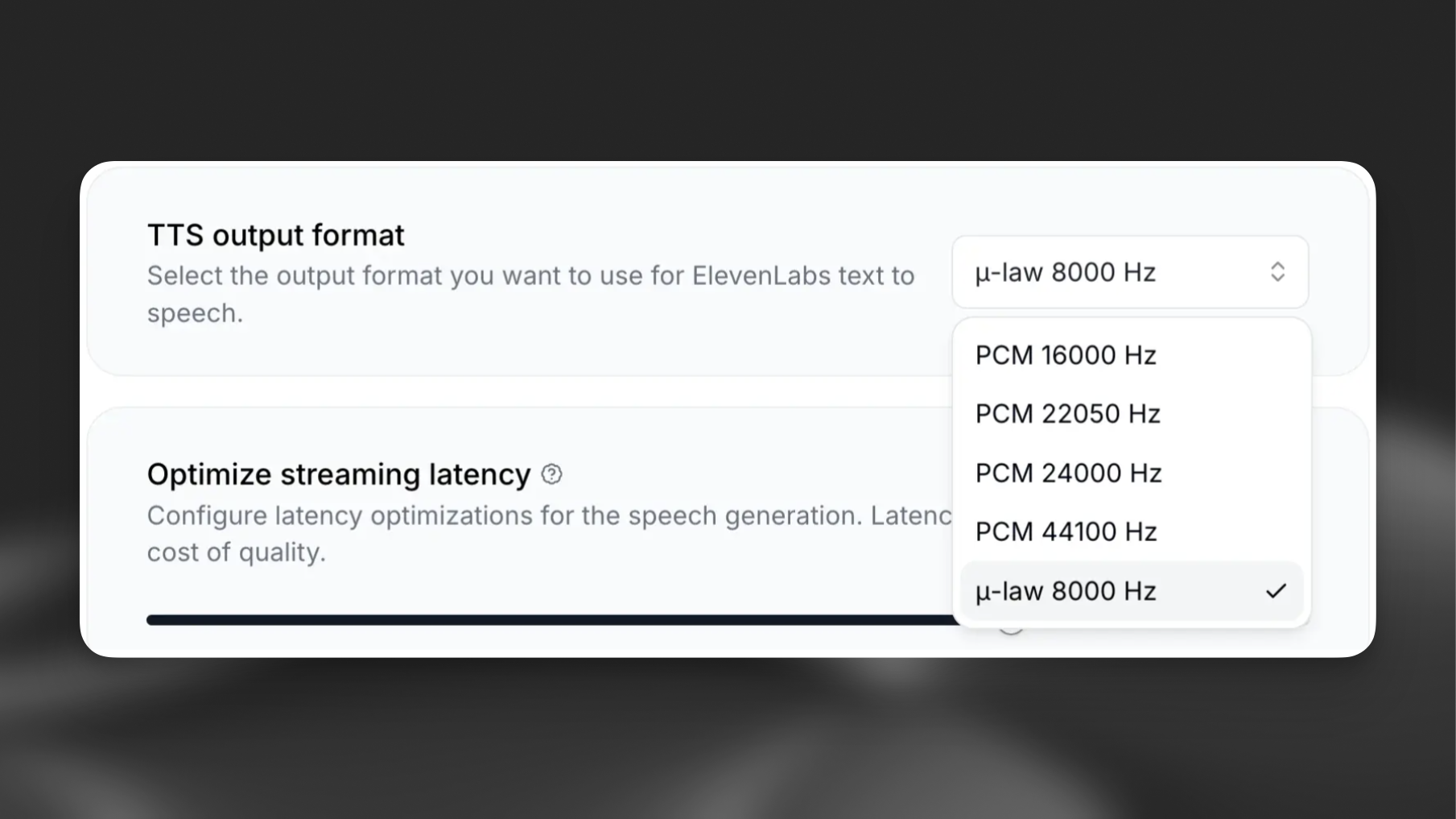
Configure TTS Output
Section titled “Configure TTS Output”- Navigate to your agent settings
- Go to the Voice section
- Select "μ-law 8000 Hz" from the dropdown
Set Input Format
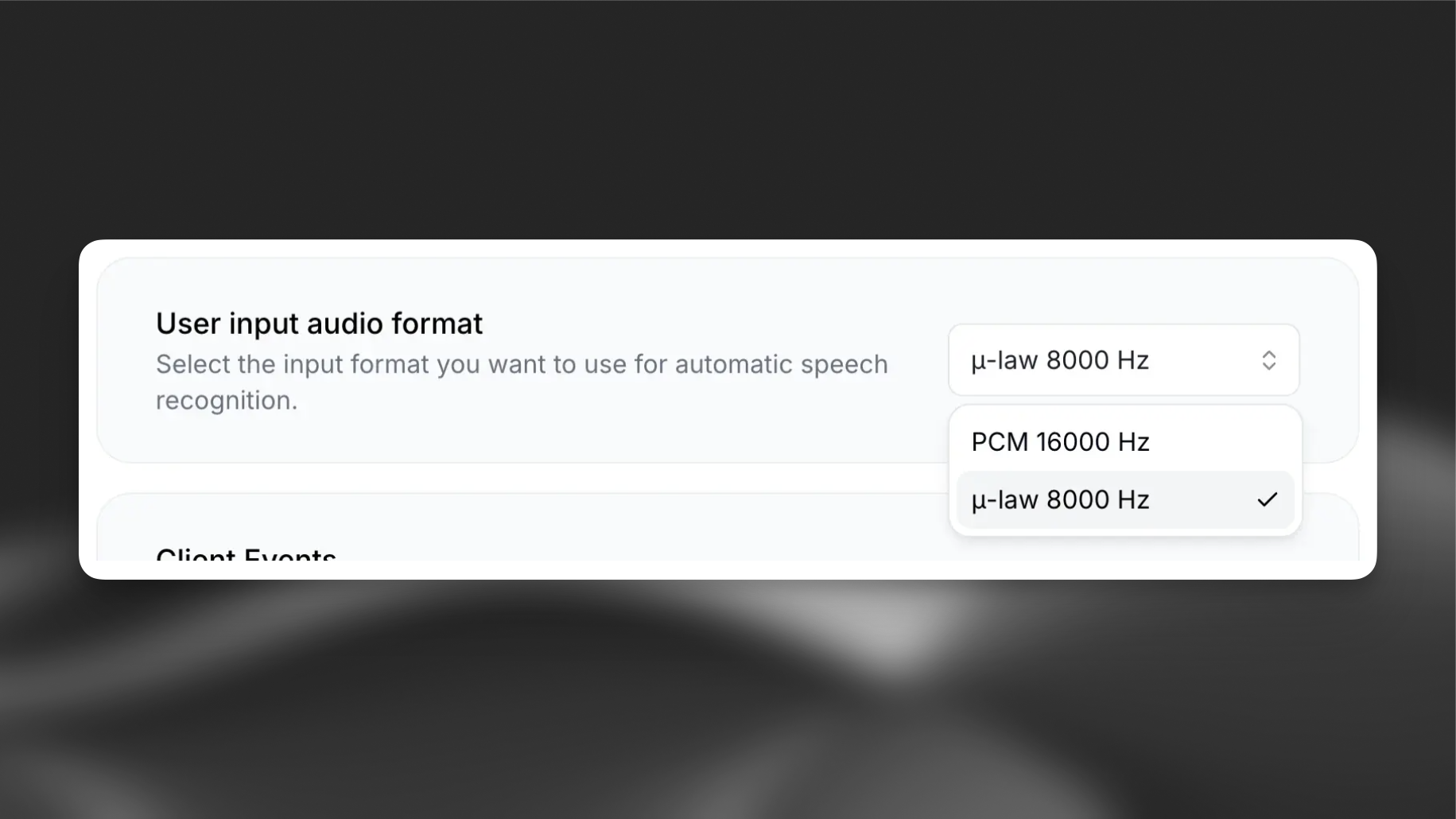
Section titled “Set Input Format”- Navigate to your agent settings
- Go to the Advanced section
- Select "μ-law 8000 Hz" for the input format
API reference
Section titled “API reference”The register call endpoint accepts the following parameters:
| Parameter | Type | Required | Description |
|---|---|---|---|
agent_id |
string | Yes | The ID of the agent to handle the call |
from_number |
string | Yes | The caller's phone number |
to_number |
string | Yes | The destination phone number |
direction |
string | No | Call direction: inbound (default) or outbound |
conversation_initiation_client_data |
object | No | Dynamic variables and configuration overrides |
The endpoint returns TwiML that you should pass directly to Twilio.
Implementation
Section titled “Implementation”import os
from fastapi import FastAPI, Request
from fastapi.responses import Response
from elevenlabs import ElevenLabs
app = FastAPI()
elevenlabs = ElevenLabs()
AGENT_ID = os.getenv("ELEVENLABS_AGENT_ID")
@app.post("/twilio/inbound")
async def handle_inbound_call(request: Request):
form_data = await request.form()
from_number = form_data.get("From")
to_number = form_data.get("To")
# Register the call with ElevenLabs
twiml = elevenlabs.conversational_ai.twilio.register_call(
agent_id=AGENT_ID,
from_number=from_number,
to_number=to_number,
direction="inbound",
conversation_initiation_client_data={
"dynamic_variables": {
"caller_number": from_number,
}
}
)
# Return the TwiML directly to Twilio
return Response(content=twiml, media_type="application/xml")
if __name__ == "__main__":
import uvicorn
uvicorn.run(app, host="0.0.0.0", port=8000)import { ElevenLabsClient } from "@elevenlabs/elevenlabs-js";
import express from "express";
const app = express();
app.use(express.urlencoded({ extended: true }));
const elevenlabs = new ElevenLabsClient();
const AGENT_ID = process.env.ELEVENLABS_AGENT_ID;
// Handle incoming Twilio calls
app.post("/twilio/inbound", async (req, res) => {
const { From: fromNumber, To: toNumber } = req.body;
// Register the call with ElevenLabs
const twiml = await elevenlabs.conversationalAi.twilio.registerCall({
agentId: AGENT_ID,
fromNumber,
toNumber,
direction: "inbound",
conversationInitiationClientData: {
dynamicVariables: {
caller_number: fromNumber,
},
},
});
// Return the TwiML directly to Twilio
res.type("application/xml").send(twiml);
});
app.listen(8000, () => {
console.log("Server running on port 8000");
});Outbound calls
Section titled “Outbound calls”For outbound calls, initiate the call through Twilio and point the webhook URL to your server, which then registers with ElevenLabs:
from twilio.rest import Client
import os
from fastapi import Request
from fastapi.responses import Response
from elevenlabs import ElevenLabs

# Initialize clients
twilio_client = Client(
    os.getenv("TWILIO_ACCOUNT_SID"),
    os.getenv("TWILIO_AUTH_TOKEN")
)
elevenlabs = ElevenLabs()
AGENT_ID = os.getenv("ELEVENLABS_AGENT_ID")

def initiate_outbound_call(to_number: str):
    call = twilio_client.calls.create(
        from_=os.getenv("TWILIO_PHONE_NUMBER"),
        to=to_number,
        url="https://your-server.com/twilio/outbound"
    )
    return call.sid

@app.post("/twilio/outbound")
async def handle_outbound_webhook(request: Request):
    form_data = await request.form()
    from_number = form_data.get("From")
    to_number = form_data.get("To")

    twiml = elevenlabs.conversational_ai.twilio.register_call(
        agent_id=AGENT_ID,
        from_number=from_number,
        to_number=to_number,
        direction="outbound",
    )

return Response(content=twiml, media_type="application/xml")import { ElevenLabsClient } from "@elevenlabs/elevenlabs-js";
import Twilio from "twilio";
// Initialize clients
const twilioClient = new Twilio(process.env.TWILIO_ACCOUNT_SID, process.env.TWILIO_AUTH_TOKEN);
const elevenlabs = new ElevenLabsClient();
const AGENT_ID = process.env.ELEVENLABS_AGENT_ID;
// Initiate an outbound call
async function initiateOutboundCall(toNumber: string) {
const call = await twilioClient.calls.create({
from: process.env.TWILIO_PHONE_NUMBER,
to: toNumber,
url: "https://your-server.com/twilio/outbound",
});
return call.sid;
}
// Handle the Twilio webhook for outbound calls
app.post("/twilio/outbound", async (req, res) => {
const { From: fromNumber, To: toNumber } = req.body;
const twiml = await elevenlabs.conversationalAi.twilio.registerCall({
agentId: AGENT_ID,
fromNumber,
toNumber,
direction: "outbound",
});
res.type("application/xml").send(twiml);
});Personalizing conversations
Section titled “Personalizing conversations”Use the conversation_initiation_client_data parameter to pass dynamic variables and override agent configuration:
{
  "agent_id": "your-agent-id",
  "from_number": "+1234567890",
  "to_number": "+0987654321",
  "direction": "inbound",
  "conversation_initiation_client_data": {
    "dynamic_variables": {
      "customer_name": "John Doe",
      "account_type": "premium",
      "order_id": "ORD-12345"
    }
  }
}Twilio configuration
Section titled “Twilio configuration”Configure your Twilio phone number to point to your server:
Create a public URL
Section titled “Create a public URL”For local development, use ngrok to expose your server:
ngrok http 8000Configure your Twilio number
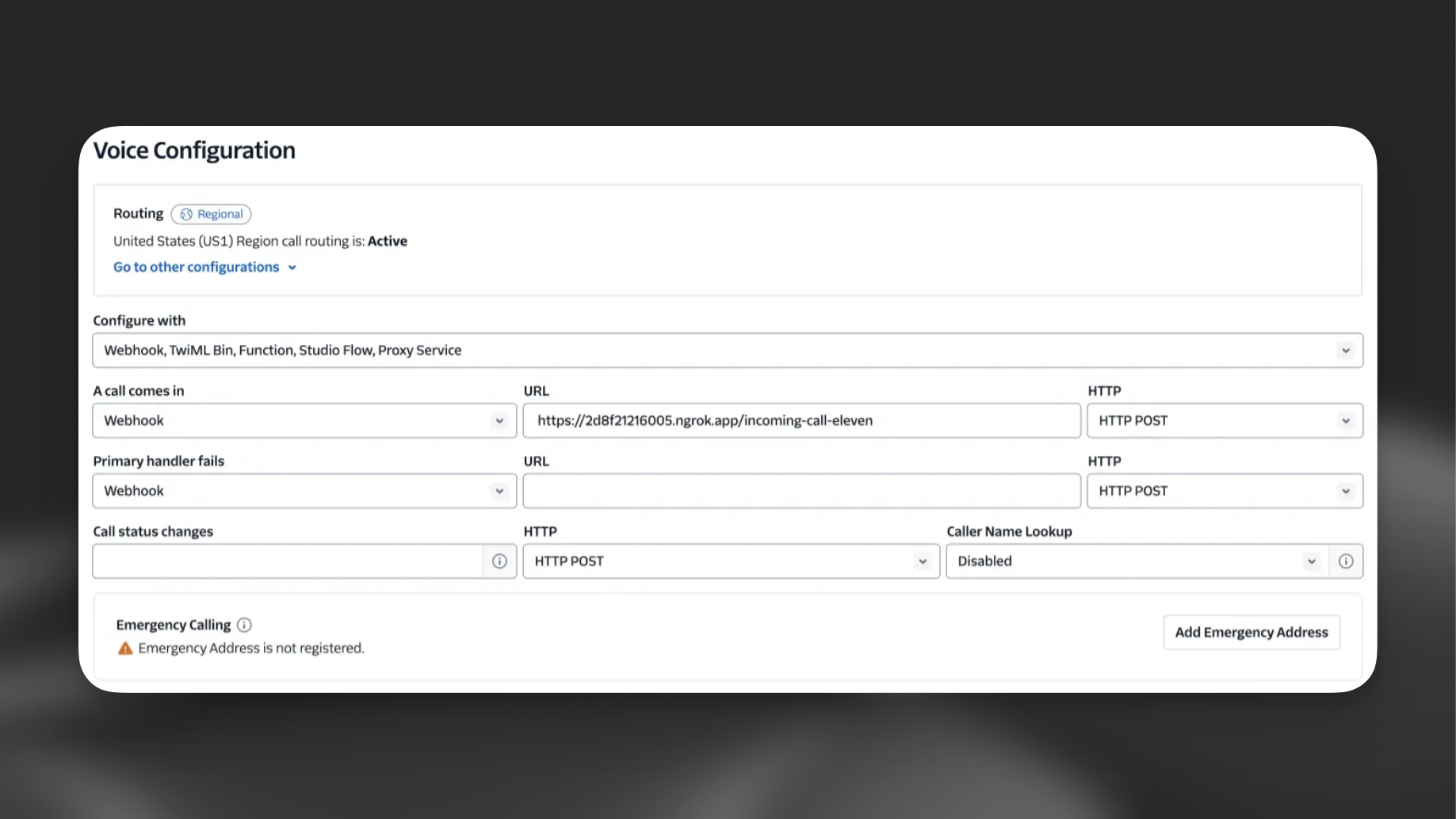
Section titled “Configure your Twilio number”- Go to the Twilio Console
- Navigate to Phone Numbers > Manage > Active numbers
- Select your phone number
- Under "Voice Configuration", set the webhook URL to your server endpoint (e.g.,
https://your-ngrok-url.ngrok.app/twilio/inbound) - Set the HTTP method to POST
Limitations
Section titled “Limitations”When using the register call endpoint instead of the native integration:
- No call transfers: Transfer functionality is not available as ElevenLabs does not have access to your Twilio credentials
- Manual configuration: You must configure audio formats and handle TwiML routing yourself
- No dashboard import: Phone numbers registered this way do not appear in the ElevenLabs phone numbers dashboard