Outbound messages & templates
Overview
Section titled “Overview”An agent can only send free-form WhatsApp messages inside an active conversation. To reach a user first — for notifications, re-engagement, or scheduled calls — you send a Meta-approved message template. This page covers creating templates, sending outbound messages and calls, and running them at scale.
Creating templates in WhatsApp Manager
Section titled “Creating templates in WhatsApp Manager”Templates are created and approved in WhatsApp Manager, not in ElevenLabs.
When creating a template:
- Choose a category: Utility for transactional messages, Marketing for promotional messages, or Authentication for verification codes. Meta prices and rate-limits each category differently — see WhatsApp pricing.
- Choose a parameter format: positional (
{{1}},{{2}}) or named ({{customer_name}}). Named parameters require aparameter_nameon each value you send. - Submit for approval. Approval usually takes minutes to hours. A template that is pending or rejected cannot be sent — the API accepts the request but Meta never delivers the message.
Sending an outbound message
Section titled “Sending an outbound message”Sending a template message starts a new conversation. The agent stays silent until the user replies — the template itself is the first message, and no conversation timers start until the user responds.
Dashboard
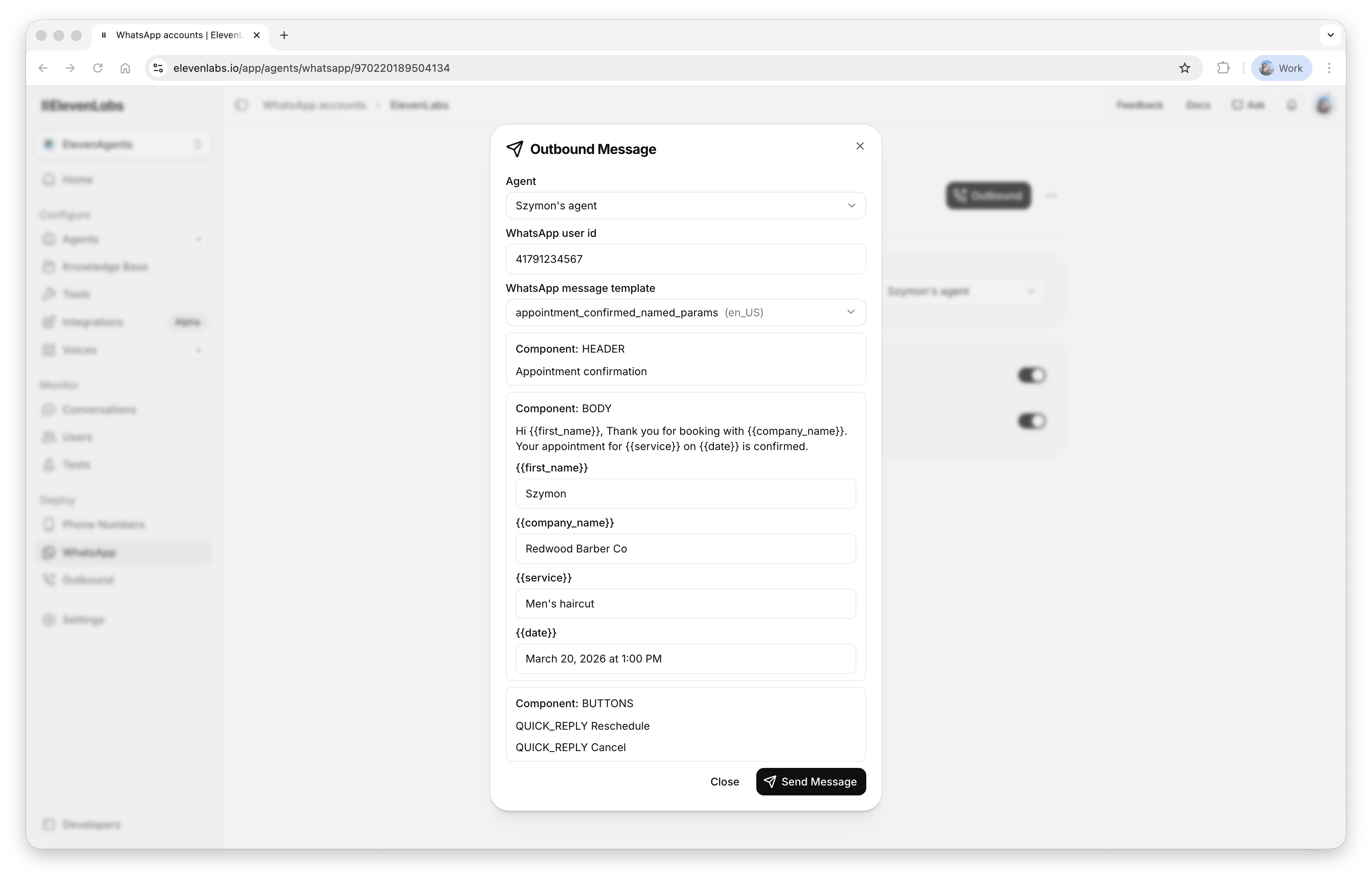
Section titled “Dashboard”Go to the WhatsApp page, select your account, and click the Outbound -> Message button. Select an agent, provide a WhatsApp user ID, and choose the message template and its parameters:
Python
Section titled “Python”from elevenlabs import ElevenLabs
elevenlabs = ElevenLabs()
elevenlabs.conversational_ai.whatsapp.outbound_message(
whatsapp_phone_number_id="524029457612345",
whatsapp_user_id="12213231492",
template_name="welcome",
template_language_code="en",
template_params=[
{
"type": "body",
"parameters": [
{
"type": "text",
"parameter_name": "name",
"text": "Daniele",
}
],
}
],
agent_id="agent_9201kwcrbq9qfxaa2t8nnnkqf2w9",
conversation_initiation_client_data={
"dynamic_variables": {"customer_name": "Daniele"},
},
)TypeScript
Section titled “TypeScript”import { ElevenLabsClient } from "@elevenlabs/elevenlabs-js";
const elevenlabs = new ElevenLabsClient();
await elevenlabs.conversationalAi.whatsapp.outboundMessage({
whatsappPhoneNumberId: "524029457612345",
whatsappUserId: "12213231492",
templateName: "welcome",
templateLanguageCode: "en",
templateParams: [
{
type: "body",
parameters: [
{
type: "text",
parameterName: "name",
text: "Daniele",
},
],
},
],
agentId: "agent_9201kwcrbq9qfxaa2t8nnnkqf2w9",
conversationInitiationClientData: {
dynamicVariables: { customer_name: "Daniele" },
},
});curl -X POST https://api.elevenlabs.io/v1/convai/whatsapp/outbound-message \
-H "xi-api-key: $ELEVENLABS_API_KEY" \
-H "Content-Type: application/json" \
-d '{
"whatsapp_phone_number_id": "524029457612345",
"whatsapp_user_id": "12213231492",
"template_name": "welcome",
"template_language_code": "en",
"template_params": [
{
"type": "body",
"parameters": [
{"type": "text", "parameter_name": "name", "text": "Daniele"}
]
}
],
"agent_id": "agent_9201kwcrbq9qfxaa2t8nnnkqf2w9",
"conversation_initiation_client_data": {
"dynamic_variables": {"customer_name": "Daniele"}
}
}'See the API reference for the full request schema.
Template parameters
Section titled “Template parameters”template_params is a list of component objects, one per template component that has parameters:
{"type": "body", "parameters": [...]}for body placeholders{"type": "header", "parameters": [...]}for a parameterized header (text, image, document, or location){"type": "button", "sub_type": ..., "index": ..., "parameters": [...]}for button parameters
Each entry in parameters is a value object such as {"type": "text", "text": "Daniele"}. For templates with named parameters, include parameter_name on each value. Omitting the component wrapper — for example, passing {"type": "text", ...} directly in template_params — is rejected.
Recipient number format
Section titled “Recipient number format”whatsapp_user_id must contain digits only: the country code followed by the number, with no +, spaces, or dashes. For example, 14155552671, not +1 (415) 555-2671.
Dynamic variables, branches, and environments
Section titled “Dynamic variables, branches, and environments”The conversation_initiation_client_data field lets you set dynamic variables for the conversation and pin it to a specific agent branch and environment:
{
  "dynamic_variables": { "customer_name": "Daniele" },
  "branch_id": "agtbrch_8721kwarbs83e233mg1fzkaf9pg0",
  "environment": "staging"
}
These settings persist for the conversation: when the user replies, the agent resumes on the requested branch and environment. The branch and environment are validated first — if either does not exist, the request fails with an error and no message is sent.
This request field is how outbound conversations receive dynamic variables; inbound conversations receive them from a conversation initiation webhook instead — see initialization context.
After you send
Section titled “After you send”A successful request returns a conversation_id and the conversation appears in your history with the rendered template as the first message. The agent does not run until the user replies. Sending the template starts neither the maximum-duration timer nor the inactivity timer; both begin once the conversation resumes. A 200 response means ElevenLabs accepted the request — Meta can still decline delivery afterwards. If the message never arrives, see Troubleshooting.
Scheduling an outbound call
Section titled “Scheduling an outbound call”Outbound WhatsApp calls require the user's permission — see user call permissions. Create a message template with a call permission request component in WhatsApp Manager. When you schedule a call, ElevenLabs checks the permission state:
- Permission already granted: the call is placed immediately.
- Permission not yet requested: the permission-request template is sent, and the call is placed as soon as the user approves.
- Permission declined: the conversation is recorded as failed with the reason
User declined the call permission request.
Dashboard
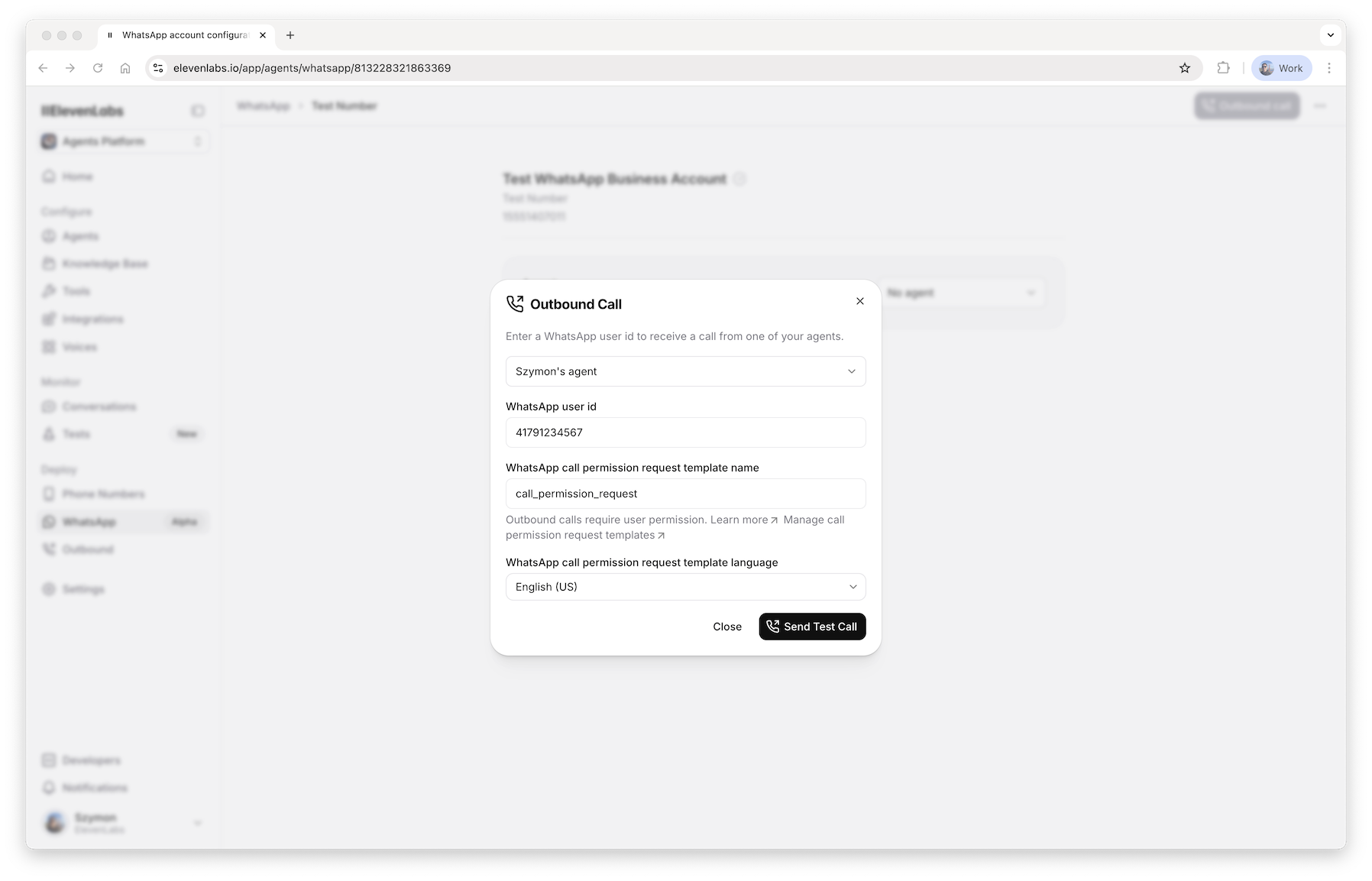
Section titled “Dashboard”Go to the WhatsApp page, select your account, and click the Outbound -> Call button. Select an agent, provide a WhatsApp user ID, and choose the call permission request template:
Python
Section titled “Python”from elevenlabs import ElevenLabs
elevenlabs = ElevenLabs()
elevenlabs.conversational_ai.whatsapp.outbound_call(
whatsapp_phone_number_id="524029457612345",
whatsapp_user_id="12213231492",
whatsapp_call_permission_request_template_name="call_permission",
whatsapp_call_permission_request_template_language_code="en",
agent_id="agent_9201kwcrbq9qfxaa2t8nnnkqf2w9",
conversation_initiation_client_data={
"dynamic_variables": {"customer_name": "Daniele"},
},
)TypeScript
Section titled “TypeScript”import { ElevenLabsClient } from "@elevenlabs/elevenlabs-js";
const elevenlabs = new ElevenLabsClient();
await elevenlabs.conversationalAi.whatsapp.outboundCall({
whatsappPhoneNumberId: "524029457612345",
whatsappUserId: "12213231492",
whatsappCallPermissionRequestTemplateName: "call_permission",
whatsappCallPermissionRequestTemplateLanguageCode: "en",
agentId: "agent_9201kwcrbq9qfxaa2t8nnnkqf2w9",
conversationInitiationClientData: {
dynamicVariables: { customer_name: "Daniele" },
},
});curl -X POST https://api.elevenlabs.io/v1/convai/whatsapp/outbound-call \
-H "xi-api-key: $ELEVENLABS_API_KEY" \
-H "Content-Type: application/json" \
-d '{
"whatsapp_phone_number_id": "524029457612345",
"whatsapp_user_id": "12213231492",
"whatsapp_call_permission_request_template_name": "call_permission",
"whatsapp_call_permission_request_template_language_code": "en",
"agent_id": "agent_9201kwcrbq9qfxaa2t8nnnkqf2w9",
"conversation_initiation_client_data": {
"dynamic_variables": {"customer_name": "Daniele"}
}
}'See the API reference for the full request schema. As with outbound messages, conversation_initiation_client_data sets dynamic variables and pins the conversation to a branch and environment, and an unknown branch or environment is rejected before the call is scheduled.
Campaigns and batching
Section titled “Campaigns and batching”To call many users, use batch calling with whatsapp_params: provide the phone number ID and the call permission request template once, and a whatsapp_user_id per recipient.
There is no native batch endpoint for outbound messages yet. For template campaigns, call the outbound message endpoint once per recipient, and stay within Meta's messaging limits for your number — see messaging limits.