Dynamic variables
Dynamic variables allow you to inject runtime values into your agent's messages, system prompts, and tools. This enables you to personalize each conversation with user-specific data without creating multiple agents.
Overview
Section titled “Overview”Dynamic variables can be integrated into multiple aspects of your agent:
- System prompts to customize behavior and context
- First messages to personalize greetings
- Tool parameters and headers to pass user-specific data
Here are a few examples where dynamic variables are useful:
- Personalizing greetings with user names
- Including account details in responses
- Passing data to tool calls
- Customizing behavior based on subscription tiers
- Accessing system information like conversation ID or call duration
System dynamic variables
Section titled “System dynamic variables”Your agent has access to these automatically available system variables:
system__agent_id- Unique identifier of the agent that initiated the conversation (stays stable throughout the conversation)system__current_agent_id- Unique identifier of the currently active agent (changes after agent transfers)system__caller_id- Caller's phone number (voice calls only)system__called_number- Destination phone number (voice calls only)system__call_duration_secs- Call duration in secondssystem__time_utc- Current UTC time (ISO format)system__time- Current time in the specified timezone (human-readable format, e.g., "Friday, 12:33 12 December 2025")system__timezone- User-provided timezone (must be valid for tzinfo)system__conversation_id- ElevenLabs' unique conversation identifiersystem__call_sid- Call SID (twilio calls only)system__call_id- Unique identifier for the SIP trunk call (SIP trunk calls only)system__agent_turns- The total number of conversation turns the agent has taken during this conversation.system__current_agent_turns- The number of conversation turns the current agent has taken. Resets whenever the conversation transfers to a different agent.system__current_subagent_turns- The number of conversation turns the current subagent has taken. Resets whenever the workflow transitions to a different node.system__is_text_only- True if the conversation operates in text-only mode, false otherwise.system__conversation_history- JSON-serialized representation of the current conversation history. Lazily evaluated at the moment it is referenced. See format details below.
System variables:
- Are available without runtime configuration
- Are prefixed with
system__(reserved prefix) - Are updated automatically throughout the conversation
Conversation history format
Section titled “Conversation history format”The system__conversation_history variable contains a JSON object with the following structure:
{
  "x-elevenlabs-history": true,
  "entries": [
    { "role": "user", "message": "Hello" },
    { "role": "agent", "message": "Hi, how can I help?" },
    {
      "role": "agent",
      "tool_requests": [{ "tool_name": "lookup_order", "params_as_json": { "order_id": "123" } }]
    },
    {
      "role": "tool",
      "tool_results": [{ "tool_name": "lookup_order", "result_value": "{\"status\": \"shipped\"}" }]
    }
  ]
}
Each entry includes a role ("user", "agent", or "tool") and one of:
message— the text content of the turntool_requests— an array of tool calls made by the agent, with resolved parameter valuestool_results— an array of tool responses
If a tool result or parameter contains a nested conversation history, it is redacted to a placeholder (e.g. [conversation_history (5 turns)]) to avoid unbounded recursive expansion.
This variable is useful for passing conversation context to tools (e.g. webhooks, custom LLMs) or for including conversation history in sub-agent prompts during handoffs.
Secret dynamic variables
Section titled “Secret dynamic variables”Secret dynamic variables are populated in the same way as normal dynamic variables but indicate to our ElevenAgents that these should only be used in dynamic variable headers and never sent to an LLM provider as part of an agent's system prompt or first message.
We recommend using these for auth tokens or private IDs that should not be sent to an LLM. To create a secret dynamic variable, simply prefix the dynamic variable with secret__.
Updating dynamic variables from tools
Section titled “Updating dynamic variables from tools”Tool calls can create or update dynamic variables if they return a valid JSON object. To specify what should be extracted, set the object path(s) using dot notation. If the field or path doesn't exist, nothing is updated.
Example of a response object and dot notation:
- Status corresponds to the path:
response.status - The first user's email in the users array corresponds to the path:
response.users.0.email
JSON
{
  "response": {
    "status": 200,
    "message": "Successfully found 5 users",
    "users": [
      "user_1": {
        "user_name": "test_user_1",
        "email": "test_user_1@email.com"
      }
    ]
  }
}
To update a dynamic variable to be the first user's email, set the assignment like so.
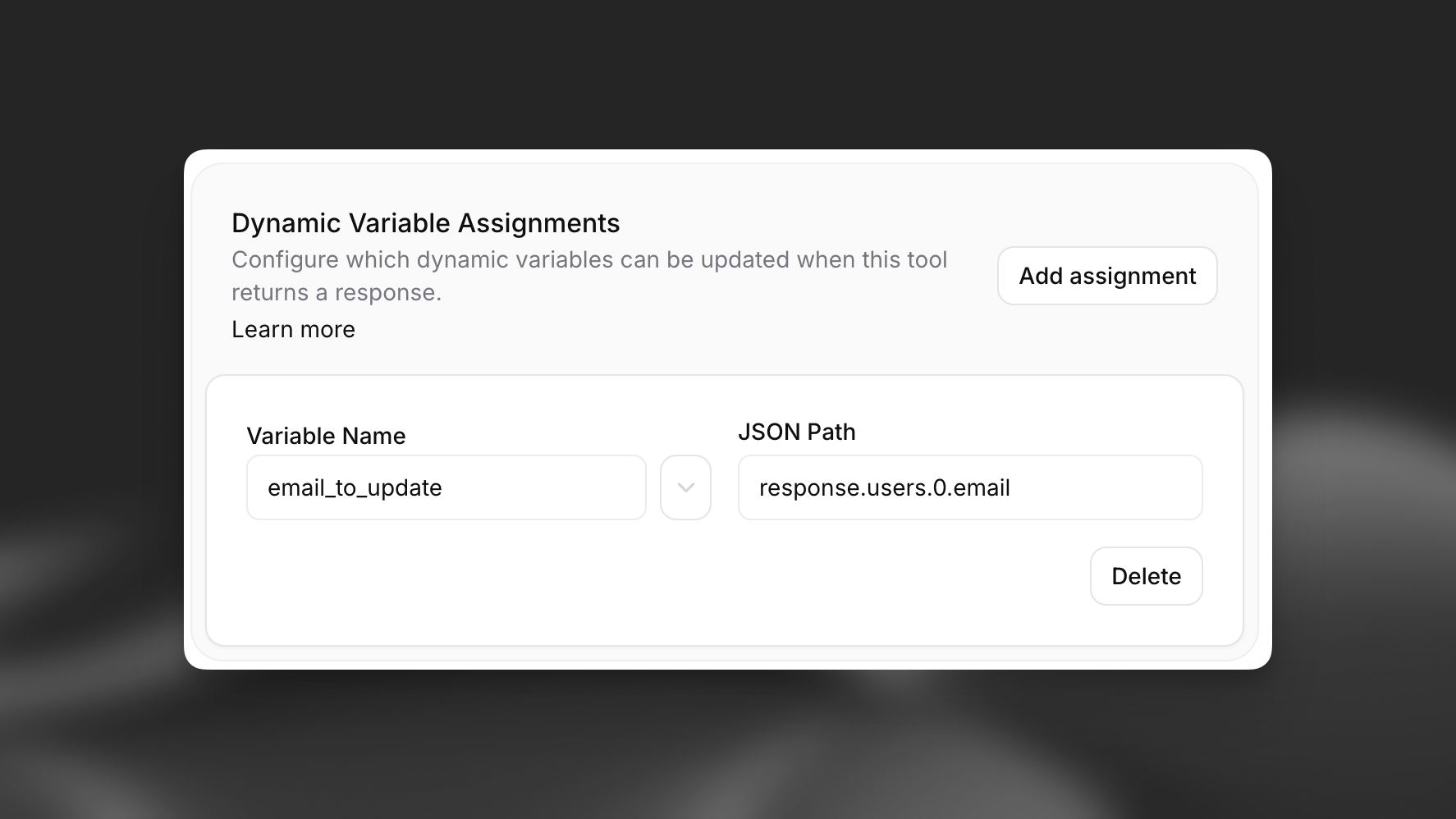
Assignments are a field of each webhook tool, documented here.
Prerequisites
Section titled “Prerequisites”- An ElevenLabs account
- A configured ElevenLabs Conversational Agent (create one here)
Define dynamic variables in prompts
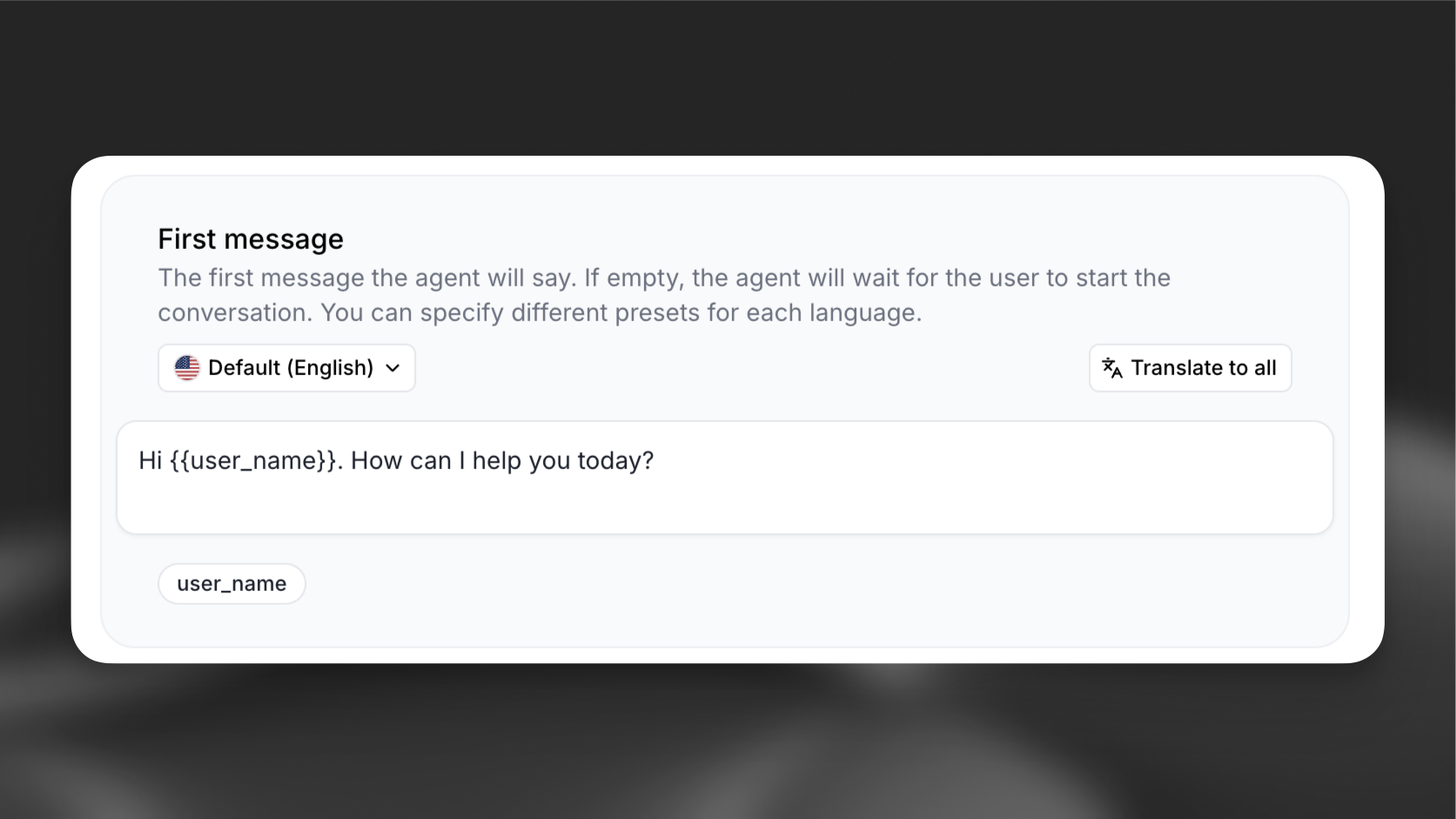
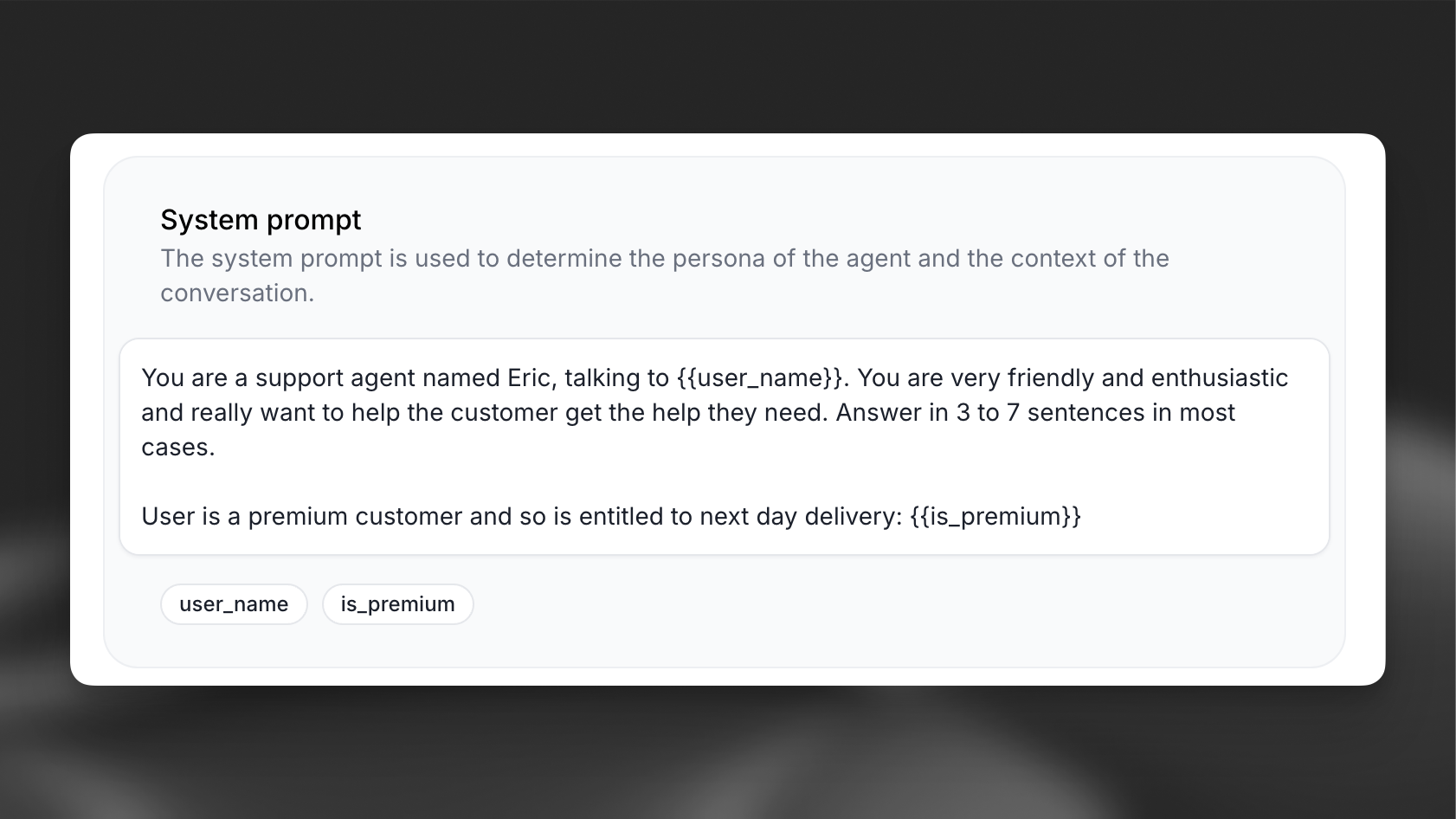
Section titled “Define dynamic variables in prompts”Add variables using double curly braces {{variable_name}} in your:
- System prompts
- First messages
- Tool parameters
Define dynamic variables in tools
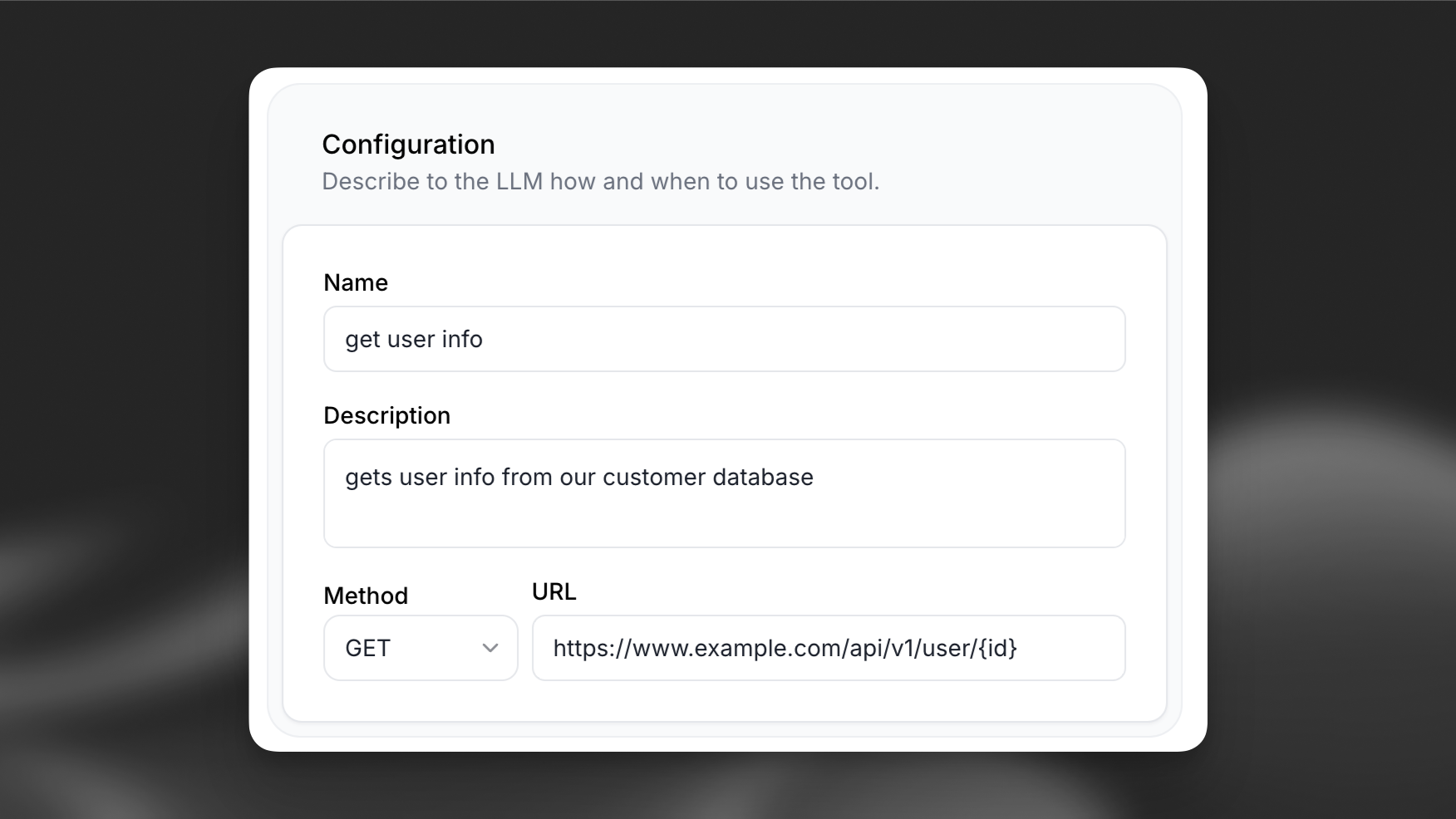
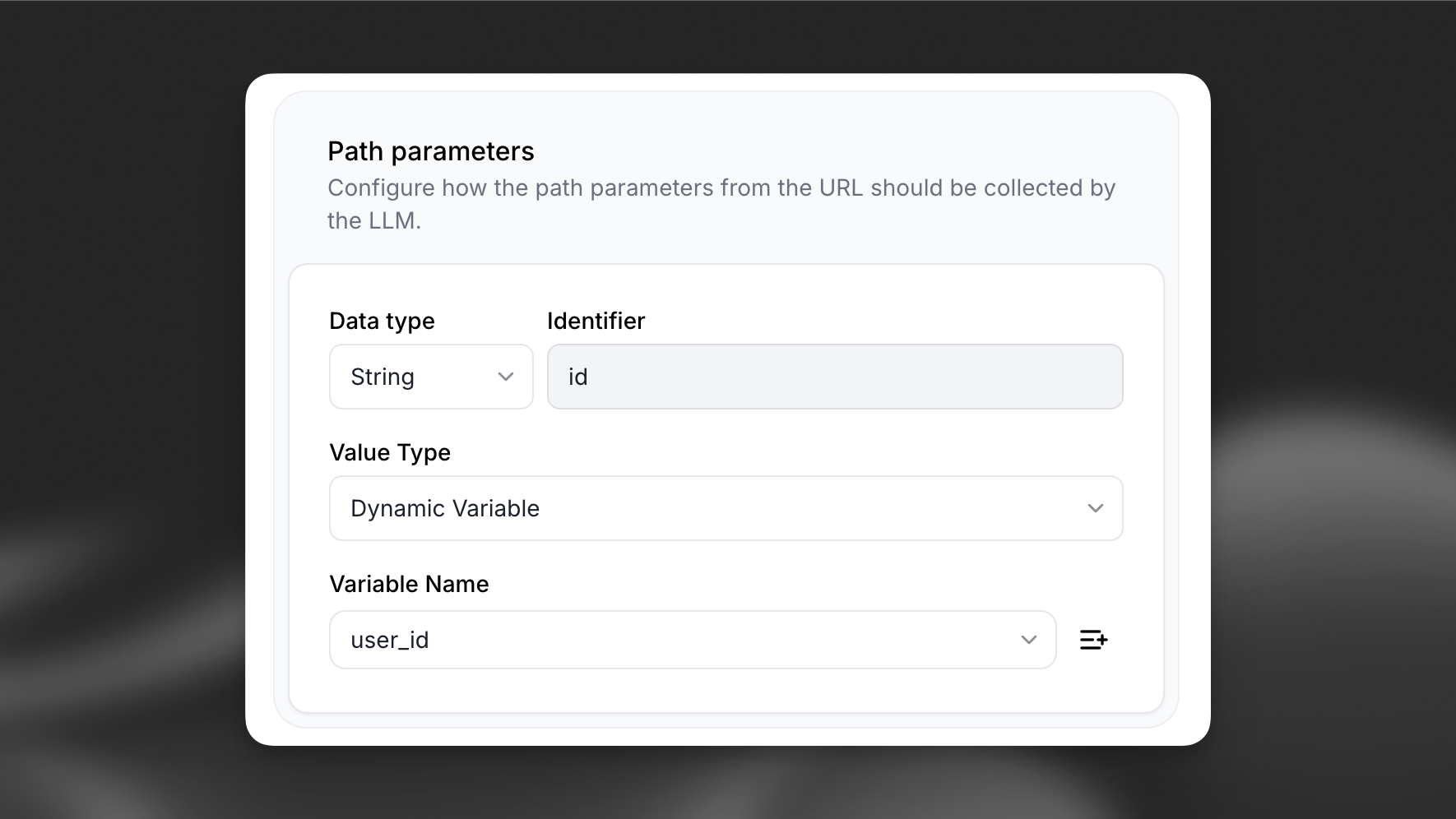
Section titled “Define dynamic variables in tools”You can also define dynamic variables in the tool configuration.
To create a new dynamic variable, set the value type to Dynamic variable and click the + button.
Set placeholders
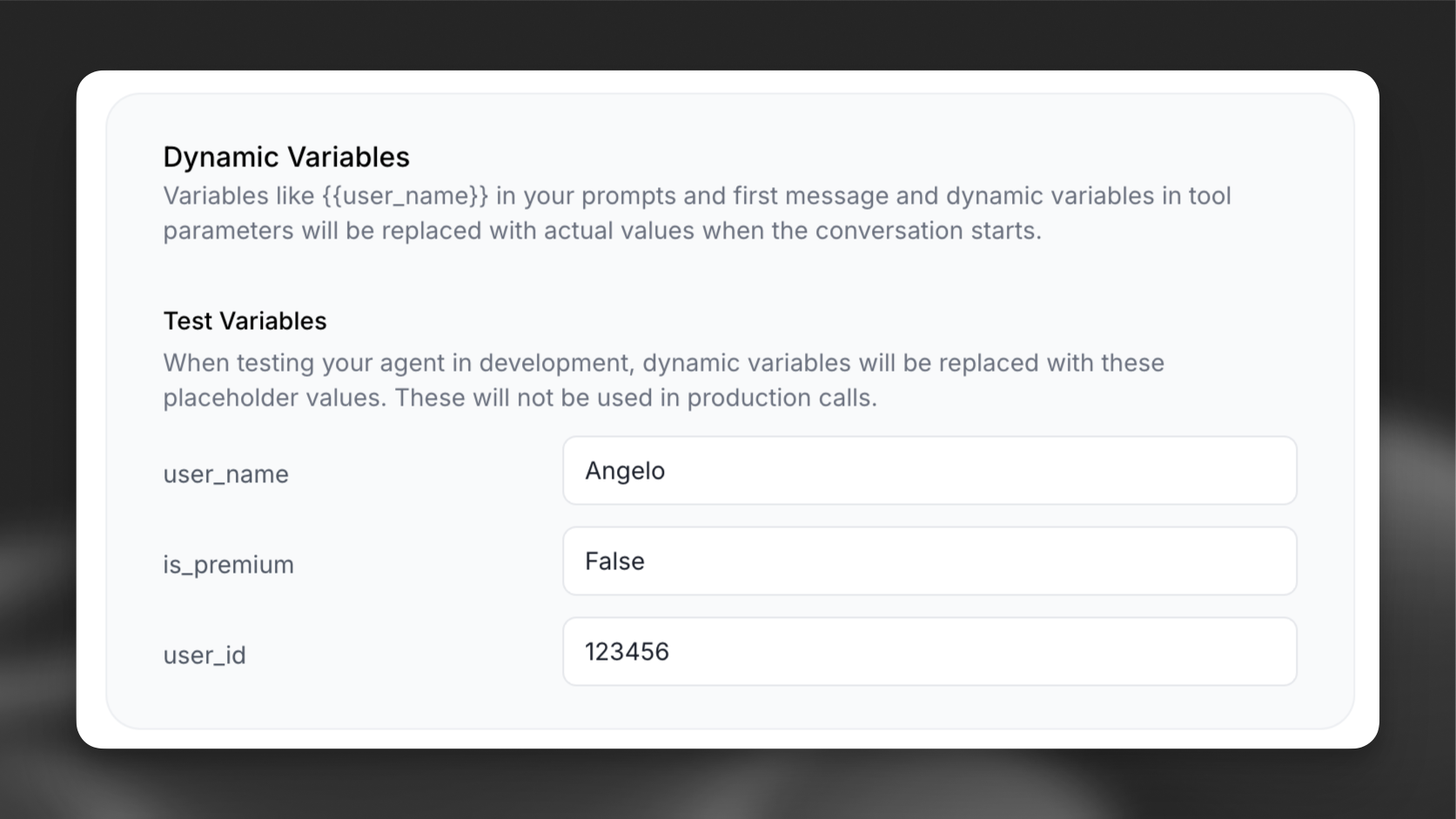
Section titled “Set placeholders”Configure default values for testing without passing variables at runtime.
Update via the dashboard
Section titled “Update via the dashboard”Set default values for each dynamic variable in the agent's dashboard.
Update via the CLI
Section titled “Update via the CLI”Pull the agent configuration
Section titled “Pull the agent configuration”elevenlabs agents pull --agent "<agent-name>"Edit `agent_configs/<agent-name>.json`
Section titled “Edit `agent_configs/<agent-name>.json`”Set conversation_config.agent.dynamic_variables.dynamic_variable_placeholders. Each key is the variable name; the value is the placeholder used during testing:
{
  "conversation_config": {
    "agent": {
      "dynamic_variables": {
        "dynamic_variable_placeholders": {
          "user_name": "Angelo",
          "account_type": "premium"
        }
      }
    }
  }
}
Push your changes
Section titled “Push your changes”elevenlabs agents push --agent "<agent-name>"Update via the API
Section titled “Update via the API”from elevenlabs import ElevenLabs
elevenlabs = ElevenLabs()
elevenlabs.conversational_ai.agents.update(
agent_id="agent_7101k5zvyjhmfg983brhmhkd98n6",
conversation_config={
"agent": {
"dynamic_variables": {
"dynamic_variable_placeholders": {
"user_name": "Angelo",
"account_type": "premium",
}
}
},
},
)import { ElevenLabsClient } from "@elevenlabs/elevenlabs-js";
const elevenlabs = new ElevenLabsClient();
await elevenlabs.conversationalAi.agents.update("agent_7101k5zvyjhmfg983brhmhkd98n6", {
conversationConfig: {
agent: {
dynamicVariables: {
dynamicVariablePlaceholders: {
user_name: "Angelo",
account_type: "premium",
},
},
},
},
});Pass variables at runtime
Section titled “Pass variables at runtime”When starting a conversation, provide the dynamic variables in your code:
Python
import osimport signalfrom elevenlabs.client import ElevenLabsfrom elevenlabs.conversational_ai.conversation import Conversation, ConversationInitiationDatafrom elevenlabs.conversational_ai.default_audio_interface import DefaultAudioInterfaceagent_id = os.getenv("AGENT_ID")api_key = os.getenv("ELEVENLABS_API_KEY")elevenlabs = ElevenLabs(api_key=api_key)dynamic_vars = { "user_name": "Angelo",}config = ConversationInitiationData( dynamic_variables=dynamic_vars)conversation = Conversation( elevenlabs, agent_id, config=config, # Assume auth is required when API_KEY is set. requires_auth=bool(api_key), # Use the default audio interface. audio_interface=DefaultAudioInterface(), # Simple callbacks that print the conversation to the console. callback_agent_response=lambda response: print(f"Agent: {response}"), callback_agent_response_correction=lambda original, corrected: print(f"Agent: {original} -> {corrected}"), callback_user_transcript=lambda transcript: print(f"User: {transcript}"), # Uncomment the below if you want to see latency measurements. # callback_latency_measurement=lambda latency: print(f"Latency: {latency}ms"),)conversation.start_session()signal.signal(signal.SIGINT, lambda sig, frame: conversation.end_session())JavaScript
import { Conversation } from '@elevenlabs/client';class VoiceAgent { ... async startConversation() { try { // Request microphone access await navigator.mediaDevices.getUserMedia({ audio: true }); this.conversation = await Conversation.startSession({ agentId: 'agent_id_goes_here', // Replace with your actual agent ID dynamicVariables: { user_name: 'Angelo' }, ... add some callbacks here }); } catch (error) { console.error('Failed to start conversation:', error); alert('Failed to start conversation. Please ensure microphone access is granted.'); } }}Swift
let dynamicVars: [String: DynamicVariableValue] = [
  "customer_name": .string("John Doe"),
  "account_balance": .number(5000.50),
  "user_id": .int(12345),
  "is_premium": .boolean(true)
]

// Create session config with dynamic variables
let config = SessionConfig(
    agentId: "agent_7101k5zvyjhmfg983brhmhkd98n6",
    dynamicVariables: dynamicVars
)

// Start the conversation
let conversation = try await Conversation.startSession(
    config: config
)
Widget
<elevenlabs-convai
  agent-id="agent_7101k5zvyjhmfg983brhmhkd98n6"
  dynamic-variables='{"user_name": "John", "account_type": "premium"}'
></elevenlabs-convai>
Public Talk-to Page Integration
Section titled “Public Talk-to Page Integration”The public talk-to page supports dynamic variables through URL parameters, enabling you to personalize conversations when sharing agent links. This is particularly useful for embedding personalized agents in websites, emails, or marketing campaigns.
URL Parameter Methods
Section titled “URL Parameter Methods”There are two methods to pass dynamic variables to the public talk-to page:
Method 1: Base64-Encoded JSON
Section titled “Method 1: Base64-Encoded JSON”Pass variables as a base64-encoded JSON object using the vars parameter:
https://elevenlabs.io/app/talk-to?agent_id=agent_7101k5zvyjhmfg983brhmhkd98n6&vars=eyJ1c2VyX25hbWUiOiJKb2huIiwiYWNjb3VudF90eXBlIjoicHJlbWl1bSJ9The vars parameter contains base64-encoded JSON:
{ "user_name": "John", "account_type": "premium" }Method 2: Individual Query Parameters
Section titled “Method 2: Individual Query Parameters”Pass variables using var_ prefixed query parameters:
https://elevenlabs.io/app/talk-to?agent_id=agent_7101k5zvyjhmfg983brhmhkd98n6&var_user_name=John&var_account_type=premiumParameter Precedence
Section titled “Parameter Precedence”When both methods are used simultaneously, individual var_ parameters take precedence over the base64-encoded variables to prevent conflicts:
https://elevenlabs.io/app/talk-to?agent_id=agent_7101k5zvyjhmfg983brhmhkd98n6&vars=eyJ1c2VyX25hbWUiOiJKYW5lIn0=&var_user_name=JohnIn this example, user_name will be "John" (from var_user_name) instead of "Jane" (from the base64-encoded vars).
Implementation Examples
Section titled “Implementation Examples”JavaScript URL Generation
Section titled “JavaScript URL Generation”// Method 1: Base64-encoded JSON
function generateTalkToURL(agentId, variables) {
const baseURL = 'https://elevenlabs.io/app/talk-to';
const encodedVars = btoa(JSON.stringify(variables));
return `${baseURL}?agent_id=${agentId}&vars=${encodedVars}`;
}
// Method 2: Individual parameters
function generateTalkToURLWithParams(agentId, variables) {
const baseURL = 'https://elevenlabs.io/app/talk-to';
const params = new URLSearchParams({ agent_id: agentId });
Object.entries(variables).forEach(([key, value]) => {
params.append(`var_${key}`, encodeURIComponent(value));
});
return `${baseURL}?${params.toString()}`;
}
// Usage
const variables = {
user_name: "John Doe",
account_type: "premium",
session_id: "sess_123"
};
const urlMethod1 = generateTalkToURL("agent_7101k5zvyjhmfg983brhmhkd98n6", variables);
const urlMethod2 = generateTalkToURLWithParams("agent_7101k5zvyjhmfg983brhmhkd98n6", variables);Python URL Generation
Section titled “Python URL Generation”import base64
import json
from urllib.parse import urlencode, quote
def generate_talk_to_url(agent_id, variables):
"""Generate URL with base64-encoded variables"""
base_url = "https://elevenlabs.io/app/talk-to"
encoded_vars = base64.b64encode(json.dumps(variables).encode()).decode()
return f"{base_url}?agent_id={agent_id}&vars={encoded_vars}"
def generate_talk_to_url_with_params(agent_id, variables):
"""Generate URL with individual var_ parameters"""
base_url = "https://elevenlabs.io/app/talk-to"
params = {"agent_id": agent_id}
for key, value in variables.items():
params[f"var_{key}"] = value
return f"{base_url}?{urlencode(params)}"
# Usage
variables = {
"user_name": "John Doe",
"account_type": "premium",
"session_id": "sess_123"
}
url_method1 = generate_talk_to_url("agent_7101k5zvyjhmfg983brhmhkd98n6", variables)
url_method2 = generate_talk_to_url_with_params("agent_7101k5zvyjhmfg983brhmhkd98n6", variables)Manual URL Construction
Section titled “Manual URL Construction”# Base64-encoded method
1. Create JSON: {"user_name": "John", "account_type": "premium"}
2. Encode to base64: eyJ1c2VyX25hbWUiOiJKb2huIiwiYWNjb3VudF90eXBlIjoicHJlbWl1bSJ9
3. Add to URL: https://elevenlabs.io/app/talk-to?agent_id=agent_7101k5zvyjhmfg983brhmhkd98n6&vars=eyJ1c2VyX25hbWUiOiJKb2huIiwiYWNjb3VudF90eXBlIjoicHJlbWl1bSJ9
# Individual parameters method
1. Add each variable with var_ prefix
2. URL encode values if needed
3. Final URL: https://elevenlabs.io/app/talk-to?agent_id=agent_7101k5zvyjhmfg983brhmhkd98n6&var_user_name=John&var_account_type=premiumSupported Types
Section titled “Supported Types”Dynamic variables support these value types:
String
Section titled “String”Text values
Number
Section titled “Number”Numeric values
Boolean
Section titled “Boolean”True/false values
Troubleshooting
Section titled “Troubleshooting”Variables not replacing
Section titled “Variables not replacing”Verify that:
- Variable names match exactly (case-sensitive)
- Variables use double curly braces:
{{ variable_name }} - Variables are included in your dynamic_variables object
Type errors
Section titled “Type errors”Ensure that:
- Variable values match the expected type
- Values are strings, numbers, or booleans only